


Models
Hindsight uses several machine learning models for different tasks.
Overview
- LLM — Fact extraction, reasoning, and generation. Provider-specific, fully configurable.
- Embedding — Vector representations for semantic search. Default:
BAAI/bge-small-en-v1.5. - Cross-Encoder — Reranking search results. Default:
cross-encoder/ms-marco-MiniLM-L-6-v2.
Embedding and cross-encoder models are downloaded automatically from HuggingFace on first run.
LLM
Used for fact extraction, entity resolution, mental model consolidation, and answer synthesis.
Supported providers:
Also supports any OpenAI-compatible API (e.g., Azure OpenAI, Together AI, Fireworks) and 100+ providers via LiteLLM (e.g., AWS Bedrock, Azure OpenAI, Together AI).
Hindsight works with any provider that exposes an OpenAI-compatible API. Set HINDSIGHT_API_LLM_PROVIDER=openai and point HINDSIGHT_API_LLM_BASE_URL at the endpoint that serves /chat/completions — for most providers that is the URL ending in /v1, not the account or resource root.
Azure OpenAI does not serve the API at the resource root, so https://<resource>.openai.azure.com on its own returns 404 Resource not found. See Azure OpenAI Setup for the two URL shapes that work.
The openai provider talks to the Chat Completions API (/v1/chat/completions). For the newer Responses API (/v1/responses), use HINDSIGHT_API_LLM_PROVIDER=openai-responses — see the tip below. Both accept a custom HINDSIGHT_API_LLM_BASE_URL, so an OpenAI-compatible endpoint that exposes /v1/responses works the same way as a Chat Completions one.
See Configuration for setup examples.
Set HINDSIGHT_API_LLM_PROVIDER=openai-responses to call OpenAI's Responses API (/v1/responses) instead of Chat Completions.
Why it exists: some reasoning models — e.g. gpt-5.6-terra — reject reasoning_effort when function tools are present on Chat Completions (HTTP 400 unless reasoning_effort="none"). Reflect is a tool-calling loop, so on the openai (Completions) provider that forces the whole operation — including the final synthesis — to run with reasoning disabled. (Hindsight retries that 400 once with reasoning_effort="none" so the call still succeeds — but it succeeds without reasoning.) The Responses API keeps the model's chain-of-thought as a first-class reasoning item, so reasoning and tools coexist: reflect's search loop runs with a real HINDSIGHT_API_LLM_REASONING_EFFORT (e.g. high).
Recommended for reasoning models (gpt-5.x, o-series) that use tools. It also honors a custom HINDSIGHT_API_LLM_BASE_URL, so any OpenAI-compatible endpoint exposing /v1/responses (gateways, Azure-style deployments) can be used just like the Chat Completions path.
See Configuration for setup examples.
max_tokensOn a thinking model (Gemini 2.5+/3.x, GPT-5/o-series, Grok reasoning, Claude extended thinking) the provider's output budget covers reasoning tokens plus visible output — the reasoning is billed against the same max_output_tokens/max_completion_tokens cap. A small cap can therefore be fully consumed by reasoning, leaving the visible answer truncated mid-word.
Hindsight keeps the reflect/mental-model max_tokens meaning visible page length: it is applied as a prompt-level target plus a post-hoc rewrite, not as a hard cap on the provider call. Reflect's synthesis call is uncapped by default so reasoning never starves the answer. If you want a hard cost ceiling on that call, set HINDSIGHT_API_REFLECT_MAX_COMPLETION_TOKENS — but leave enough headroom above your page length for reasoning, or thinking models will truncate again.
When a Gemini call does hit its cap, Hindsight logs a truncated at max_output_tokens warning instead of returning the half-written text as a silent success.
Set HINDSIGHT_API_LLM_PROVIDER=bedrock to use AWS Bedrock models directly. Model names use Bedrock model IDs (e.g., us.amazon.nova-2-lite-v1:0). No API key is required — authentication uses AWS credentials (AWS_ACCESS_KEY_ID, AWS_SECRET_ACCESS_KEY, AWS_REGION_NAME) or IAM roles. For 50% cost savings on throughput, set HINDSIGHT_API_LLM_BEDROCK_SERVICE_TIER=flex (see Configuration).
See Configuration for setup examples.
Set HINDSIGHT_API_LLM_PROVIDER=llamacpp to run a built-in llama.cpp server with no external dependencies. A Gemma 4 E2B GGUF model (~3.5 GB) is auto-downloaded on first run. Requires the local-llm extra: pip install 'hindsight-api-slim[local-llm]'.
The published Docker image does not bundle llama-cpp-python (to keep the image small). For a runnable Docker setup that adds it on top, see docker/docker-compose/local-llm/.
See Configuration for all options.
Set HINDSIGHT_API_LLM_PROVIDER=litellm to use any model supported by LiteLLM, including Azure OpenAI, Together AI, Fireworks AI, and many more. Model names use LiteLLM's provider prefix format (e.g., azure/gpt-4o).
See Configuration for setup examples.
Set HINDSIGHT_API_LLM_PROVIDER=litellmrouter to run the default LLM through LiteLLM's Router — ordered fallback across deployments, load-balanced same-tier routing, weighted picks, per-deployment rpm/tpm limits, and cooldowns are all available via the Router config. Hindsight passes the JSON config through verbatim.
See Configuration for setup.
Provider Capabilities
Beyond basic generation, some providers support optional features that lower cost or latency. Hindsight uses each feature automatically when the configured provider supports it.
| Provider | Batch API | Explicit prompt caching |
|---|---|---|
OpenAI (openai) | ✅ | — |
OpenAI Responses (openai-responses) | — | — |
Anthropic (anthropic) | — | — |
Google Gemini (gemini) | ✅ | ✅ |
Vertex AI (vertexai) | — | ✅ |
Groq (groq) | ✅ | — |
Ollama (ollama) | — | — |
Ollama Cloud (ollama-cloud) | — | — |
LM Studio (lmstudio) | — | — |
llama.cpp (llamacpp) | — | — |
MiniMax (minimax) | — | — |
DeepSeek (deepseek) | — | — |
z.ai (zai) | — | — |
opencode-go (opencode-go) | — | — |
Atlas Cloud (atlas) | — | — |
Meta Model API (meta) | — | — |
Volcano Engine (volcano) | — | — |
OpenRouter (openrouter) | — | — |
Requesty (requesty) | — | — |
OpenAI Codex (openai-codex) | — | — |
ChatGPT (chatgpt) | — | — |
Claude Code (claude-code) | — | — |
Cursor (cursor) | — | — |
GitHub Copilot (github-copilot) | — | — |
AWS Bedrock (bedrock) | — | — |
Fireworks AI (fireworks) | ✅ | — |
Nous Portal (nous) | — | — |
SuperGrok (OAuth) (xai-oauth) | — | — |
LiteLLM (100+) (litellm) | — | — |
- Batch API — submits bulk retain extraction through the provider's asynchronous batch endpoint, typically at ~50% lower cost. Used automatically when available; otherwise calls run synchronously.
- Explicit prompt caching — reuses the large, fixed system prefix that retain (fact extraction), consolidation, and the reflect tool-loop send on every call, billing it at the provider's cached-input rate. On Gemini/Vertex this uses the
CachedContentAPI. On by default; disable withHINDSIGHT_API_LLM_PROMPT_CACHE_ENABLED=false. Hindsight structures these prompts so the cached prefix is bank-agnostic — one cache is shared across all banks rather than one per bank/mission, and creation soft-fails to an uncached call, so it never breaks a request.
A blank "Explicit prompt caching" cell does not mean a provider has no caching. OpenAI, for example, caches a stable leading prompt prefix automatically server-side, so it benefits with no configuration; Anthropic supports caching via cache_control breakpoints which can be wired up through the same provider hook. The column tracks only Hindsight's explicit get_or_create_cached_prefix hook, which Gemini/Vertex implement today.
Benchmarks
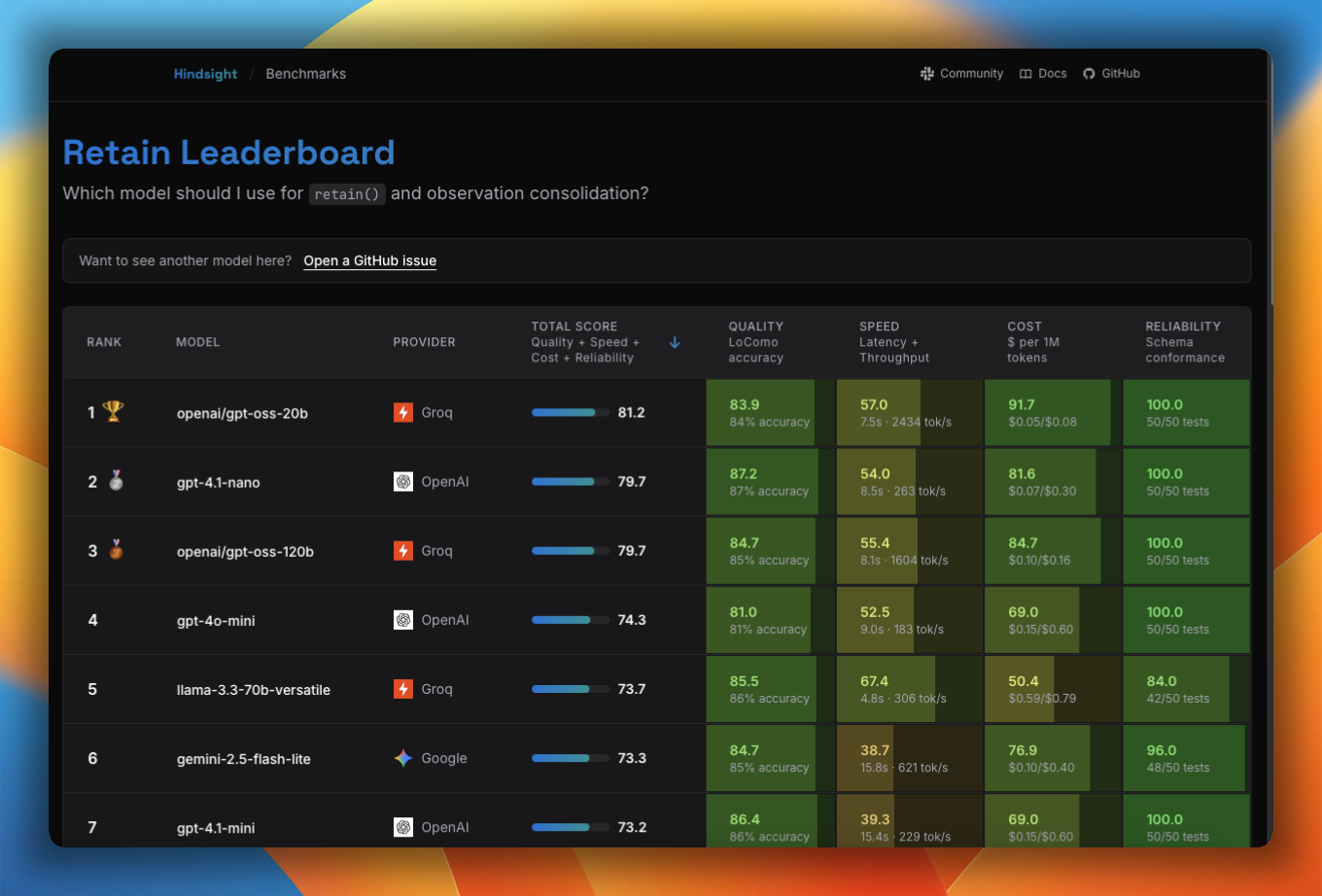
Not sure which model to use? The Model Leaderboard benchmarks models across accuracy, speed, cost, and reliability for retain, reflect, and observation consolidation so you can pick the right trade-off for your use case.
Tested Models
The following models have been tested and verified to work correctly with Hindsight:
| Provider | Model |
|---|---|
| OpenAI | gpt-5.2 |
| OpenAI | gpt-5 |
| OpenAI | gpt-5-mini |
| OpenAI | gpt-5-nano |
| OpenAI | gpt-4.1-mini |
| OpenAI | gpt-4.1-nano |
| OpenAI | gpt-4o-mini |
| Anthropic | claude-sonnet-4-20250514 |
| Anthropic | claude-3-5-sonnet-20241022 |
| Gemini | gemini-3.5-flash |
| Gemini | gemini-3.1-pro-preview |
| Gemini | gemini-3.1-flash-lite |
| Groq | openai/gpt-oss-120b |
| Groq | openai/gpt-oss-20b |
| Meta | muse-spark-1.3 |
Provider Default Models
Each provider has a recommended default model that's used when HINDSIGHT_API_LLM_MODEL is not explicitly set. This makes configuration simpler - just specify the provider and get a sensible default:
| Provider | Default Model |
|---|---|
openai | gpt-4o-mini |
openai-responses | gpt-5.6 |
anthropic | claude-haiku-4-5 |
gemini | gemini-3.5-flash |
vertexai | google/gemini-3.1-flash-lite |
groq | openai/gpt-oss-120b |
ollama | gemma3:12b |
ollama-cloud | gemma3:12b |
lmstudio | local-model |
llamacpp | gemma-4-e2b-it (auto-downloaded GGUF) |
minimax | MiniMax-M3 |
deepseek | deepseek-v4-flash |
zai | glm-4.5-flash |
opencode-go | deepseek-v4-flash |
atlas | deepseek-ai/deepseek-v4-pro |
meta | muse-spark-1.3 |
volcano | doubao-pro-32k |
openrouter | qwen/qwen3.5-9b |
requesty | openai/gpt-4o-mini |
openai-codex | gpt-5.6-luna |
chatgpt | gpt-6-luna |
claude-code | claude-sonnet-4-5-20250929 |
cursor | auto |
github-copilot | gpt-5.6-terra |
bedrock | us.amazon.nova-2-lite-v1:0 |
fireworks | accounts/fireworks/models/llama-v3p1-8b-instruct |
nous | deepseek/deepseek-v4-flash |
xai-oauth | grok-4.5 |
litellm | gpt-4o-mini |
Example: Setting just the provider uses its default model:
# Uses claude-haiku-4-5 automatically
export HINDSIGHT_API_LLM_PROVIDER=anthropic
export HINDSIGHT_API_LLM_API_KEY=sk-ant-xxxxxxxxxxxx
You can override the default by explicitly setting HINDSIGHT_API_LLM_MODEL:
# Override to use Sonnet instead
export HINDSIGHT_API_LLM_PROVIDER=anthropic
export HINDSIGHT_API_LLM_API_KEY=sk-ant-xxxxxxxxxxxx
export HINDSIGHT_API_LLM_MODEL=claude-sonnet-4-5-20250929
This also applies to per-operation overrides:
# Global: OpenAI gpt-4o-mini (default)
export HINDSIGHT_API_LLM_PROVIDER=openai

# Retain: Anthropic claude-haiku-4-5 (default)
export HINDSIGHT_API_RETAIN_LLM_PROVIDER=anthropic
Using Other Models
Other LLM models not listed above may work with Hindsight, but they must support at least 65,000 output tokens to ensure reliable fact extraction. If you need support for a specific model that doesn't meet this requirement, please open an issue to request an exception.
If your model only supports 32k or fewer output tokens (e.g., some older models), you can reduce the retain completion token limit:
# For models that support 32k output tokens
export HINDSIGHT_API_RETAIN_MAX_COMPLETION_TOKENS=32000

# For models that support 16k output tokens
export HINDSIGHT_API_RETAIN_MAX_COMPLETION_TOKENS=16000
Important: HINDSIGHT_API_RETAIN_MAX_COMPLETION_TOKENS must be greater than HINDSIGHT_API_RETAIN_CHUNK_SIZE (default: 3000). The system will validate this on startup and provide an error message if the configuration is invalid.
Groq's free tier only allows 8,000 tokens per minute — far below what Hindsight needs for a single retain call (~64k). Free-tier Groq models therefore can't be used with Hindsight; use a paid Groq tier or a different provider.
Configuration
# Groq (recommended)
export HINDSIGHT_API_LLM_PROVIDER=groq
export HINDSIGHT_API_LLM_API_KEY=gsk_xxxxxxxxxxxx
export HINDSIGHT_API_LLM_MODEL=openai/gpt-oss-20b

# OpenAI (Chat Completions API, /v1/chat/completions)
export HINDSIGHT_API_LLM_PROVIDER=openai
export HINDSIGHT_API_LLM_API_KEY=sk-xxxxxxxxxxxx
export HINDSIGHT_API_LLM_MODEL=gpt-4o

# OpenAI Responses API (/v1/responses) — reasoning + tools together
export HINDSIGHT_API_LLM_PROVIDER=openai-responses
export HINDSIGHT_API_LLM_API_KEY=sk-xxxxxxxxxxxx
export HINDSIGHT_API_LLM_MODEL=gpt-5.6           # reasoning model; e.g. gpt-5.6-terra
export HINDSIGHT_API_LLM_REASONING_EFFORT=high   # sent alongside tools, unlike Completions
# Optional: point at any OpenAI-compatible endpoint exposing /v1/responses
# export HINDSIGHT_API_LLM_BASE_URL=https://your-gateway.example.com/v1

# Gemini
export HINDSIGHT_API_LLM_PROVIDER=gemini
export HINDSIGHT_API_LLM_API_KEY=xxxxxxxxxxxx
export HINDSIGHT_API_LLM_MODEL=gemini-3.5-flash

# Anthropic
export HINDSIGHT_API_LLM_PROVIDER=anthropic
export HINDSIGHT_API_LLM_API_KEY=sk-ant-xxxxxxxxxxxx
export HINDSIGHT_API_LLM_MODEL=claude-sonnet-4-20250514

# Ollama (local)
export HINDSIGHT_API_LLM_PROVIDER=ollama
export HINDSIGHT_API_LLM_BASE_URL=http://localhost:11434/v1
export HINDSIGHT_API_LLM_MODEL=llama3

# Ollama Cloud (hosted Ollama endpoint, requires API key)
export HINDSIGHT_API_LLM_PROVIDER=ollama-cloud
export HINDSIGHT_API_LLM_API_KEY=your-ollama-cloud-api-key
export HINDSIGHT_API_LLM_MODEL=gemma3:12b

# LM Studio (local)
export HINDSIGHT_API_LLM_PROVIDER=lmstudio
export HINDSIGHT_API_LLM_BASE_URL=http://localhost:1234/v1
export HINDSIGHT_API_LLM_MODEL=your-local-model

# MiniMax (1M context window)
export HINDSIGHT_API_LLM_PROVIDER=minimax
export HINDSIGHT_API_LLM_API_KEY=your-minimax-api-key
export HINDSIGHT_API_LLM_MODEL=MiniMax-M3  # or MiniMax-M2.7 for the previous generation
# MiniMax-M3.1-* always thinks (Hindsight sends thinking=adaptive) and defaults to max effort;
# lower it with: export HINDSIGHT_API_LLM_REASONING_EFFORT=low

# DeepSeek (https://api.deepseek.com)
export HINDSIGHT_API_LLM_PROVIDER=deepseek
export HINDSIGHT_API_LLM_API_KEY=sk-xxxxxxxxxxxx
export HINDSIGHT_API_LLM_MODEL=deepseek-v4-flash  # or deepseek-v4-pro / deepseek-chat / deepseek-reasoner

# z.ai (Zhipu GLM series, OpenAI-compatible, https://z.ai)
export HINDSIGHT_API_LLM_PROVIDER=zai
export HINDSIGHT_API_LLM_API_KEY=your-zai-api-key
export HINDSIGHT_API_LLM_MODEL=glm-4.5-flash  # or glm-4.5-air for the paid tier

# opencode-go (OpenAI-compatible)
export HINDSIGHT_API_LLM_PROVIDER=opencode-go
export HINDSIGHT_API_LLM_API_KEY=your-opencode-go-api-key
export HINDSIGHT_API_LLM_MODEL=deepseek-v4-flash

# Atlas Cloud (OpenAI-compatible, https://www.atlascloud.ai)
export HINDSIGHT_API_LLM_PROVIDER=atlas
export HINDSIGHT_API_LLM_API_KEY=your-atlascloud-api-key  # base_url defaults to https://api.atlascloud.ai/v1
export HINDSIGHT_API_LLM_MODEL=deepseek-ai/deepseek-v4-pro  # reasoning model; also Qwen / GLM / Kimi / MiniMax, etc.

# Meta Model API (OpenAI-compatible, https://ai.developer.meta.com)
export HINDSIGHT_API_LLM_PROVIDER=meta
export HINDSIGHT_API_LLM_API_KEY=your-meta-model-api-key  # base_url defaults to https://api.meta.ai/v1
export HINDSIGHT_API_LLM_MODEL=muse-spark-1.3  # or muse-spark-1.2 / -contributor variants
# Muse Spark always reasons — raise the deadlines (see "Meta Model API Setup" below)
export HINDSIGHT_API_REFLECT_LLM_TIMEOUT=300
export HINDSIGHT_API_LLM_TIMEOUT=300

# Nous Portal (OpenAI-compatible; no API key — uses your `hermes portal` login)
export HINDSIGHT_API_LLM_PROVIDER=nous
export HINDSIGHT_API_LLM_MODEL=deepseek/deepseek-v4-flash  # any Nous-hosted slug
# No API key needed — reads a rotating JWT from ~/.hermes/auth.json (see "Nous Portal Setup" below)

# Cursor subscription via the cursor-agent CLI (no API key — uses `cursor-agent login`)
export HINDSIGHT_API_LLM_PROVIDER=cursor
export HINDSIGHT_API_LLM_MODEL=auto  # or any id from `cursor-agent --list-models`
# An agent CLI turn takes 15-30s — raise the timeouts (see "Cursor Setup" below)
export HINDSIGHT_API_LLM_TIMEOUT=300
export HINDSIGHT_API_REFLECT_LLM_TIMEOUT=180

# SuperGrok subscription via device-code OAuth (no API key; the subscription lane, not
# xAI API support — for an api.x.ai API key use `openai` with a base URL instead)
export HINDSIGHT_API_LLM_PROVIDER=xai-oauth
# export HINDSIGHT_API_LLM_MODEL=grok-4.5  # defaults to grok-4.5
# No API key needed — reads an OAuth grant from ~/.hindsight/xai_oauth.json (see "SuperGrok Subscription Setup" below)

# Vertex AI (Google Cloud)
export HINDSIGHT_API_LLM_PROVIDER=vertexai
export HINDSIGHT_API_LLM_MODEL=gemini-3.1-flash-lite
export HINDSIGHT_API_LLM_VERTEXAI_PROJECT_ID=your-gcp-project-id
# Optional: region (default: us-central1)
# export HINDSIGHT_API_LLM_VERTEXAI_REGION=us-central1
# Optional: service account key (otherwise uses ADC)
# export HINDSIGHT_API_LLM_VERTEXAI_SERVICE_ACCOUNT_KEY=/path/to/key.json
Note: The LLM is the primary bottleneck for retain operations. See Performance for optimization strategies.
GitHub Copilot Setup
Use a GitHub Copilot subscription for Hindsight's extraction, consolidation, and reflection calls through the official GitHub Copilot SDK.
Prerequisites:
- An active GitHub Copilot entitlement
- Copilot CLI signed in under the same operating-system user that runs Hindsight
Configure Hindsight:
export HINDSIGHT_API_LLM_PROVIDER=github-copilot
export HINDSIGHT_API_LLM_MODEL=gpt-5.6-terra
# No HINDSIGHT_API_LLM_API_KEY is needed.
The provider starts one shared Copilot runtime for all Hindsight LLM lanes. That runtime uses a hook-free temporary COPILOT_HOME containing only the signed-in account selection; the credential itself is resolved by the runtime from the system keychain or an existing gh CLI login. Each call then uses an isolated transient session with repository instructions, skills, Copilot memory, built-in tools, and the cross-session store disabled. This prevents the memory integration from recursively retaining its own extraction calls.
For automation, the Copilot SDK also accepts COPILOT_GITHUB_TOKEN, GH_TOKEN, or GITHUB_TOKEN. With one of those set, Copilot CLI never has to have been run on the host, so containers and CI images work with no ~/.copilot at all. GitHub Actions and server-to-server deployments must have the appropriate Copilot organization policy and token permissions.
Important notes:
- Usage counts against the authenticated account or organization's Copilot allowance and AI Credits.
HINDSIGHT_API_LLM_BASE_URLoptionally points to an existing headless Copilot runtime, such ashttp://127.0.0.1:4321; it is not an LLM-provider endpoint for this provider.- GitHub-hosted Copilot sessions do not expose temperature or maximum-output-token controls through the SDK, so those Hindsight settings are not applied.
- Embeddings and reranking continue to use Hindsight's separately configured providers; their local defaults require no API key.
ChatGPT Setup (Sign in with ChatGPT)
The chatgpt provider runs Hindsight's LLM calls on your ChatGPT plan through
OpenAI's documented Sign in with ChatGPT flow for open-source apps.
Hindsight registers itself as its own OAuth client on first sign-in, and every call goes to the public
https://api.openai.com/v1/responses endpoint with your OAuth access token. It does not use an API key.
How it differs from openai-codex: that provider reuses the Codex CLI's sign-in and calls ChatGPT's private
chatgpt.com/backend-api/codex endpoint. chatgpt uses the supported route and keeps its own
credentials, so it never shares or rotates the Codex CLI's tokens.
Prerequisites:
- A ChatGPT plan that allows plan usage in third-party apps
- A browser on the machine where you run the login
Setup on a machine with a browser (for example a laptop):
-
Sign in:
hindsight-admin chatgpt loginThis opens your browser and waits for the callback on
http://127.0.0.1:1455/auth/callback(--portchanges the port;--no-browserprints the URL instead). Approve the request, including use of your ChatGPT plan. The command validates the ID token and the granted scopes, then writes~/.hindsight/chatgpt/credentials.json(mode0600) next to this host'shost_id. If you declined plan usage, runlogin --enable-plan-usageto be asked again. -
Configure Hindsight:
export HINDSIGHT_API_LLM_PROVIDER=chatgpt
# export HINDSIGHT_API_LLM_MODEL=gpt-6-luna       # the default
# export HINDSIGHT_API_LLM_REASONING_EFFORT=medium # sent as reasoning.effort -
Check the stored session (prints account, client id, scopes and expiry, never token values):
hindsight-admin chatgpt status
Self-hosted server or VM (no browser): the 127.0.0.1 callback reaches the machine running the
browser, so sign in on your laptop and move the credential file to the server.
- On the laptop: run
loginas above. - Copy the file over SSH and install it on the server with
login --from-file, as the user that runs Hindsight (add--home <dir>beforeloginif the server setsHINDSIGHT_API_LLM_CHATGPT_HOME).--from-filekeeps the server's ownhost_id(creating one on first use) instead of the laptop's:scp ~/.hindsight/chatgpt/credentials.json server:/tmp/chatgpt.json
ssh server 'hindsight-admin chatgpt login --from-file /tmp/chatgpt.json && rm /tmp/chatgpt.json' - On the laptop, stop using that copy without revoking it:
Refresh tokens rotate, so after the copy only the server may use and refresh this session. A plain
hindsight-admin chatgpt logout --local-onlylogoutwould revoke it and end the server's session too.--local-onlyclears the laptop's tokens but keeps its client registration for a laterlogin.--from-filerefuses to replace a different account's registration on the server unless you pass--force.
The server then owns refreshes. Sign in again on the laptop later if you also want Hindsight there.
Important notes:
- Access tokens last one hour and are refreshed automatically (five minutes before expiry, and once on an HTTP 401). Refresh tokens rotate; refreshes take a file lock and re-read the file first, so several Hindsight processes can share one credential directory.
- When the refresh token is no longer valid, calls fail with the
logincommand to run. - On ChatGPT Plus, the five-hour usage limit is shared with every other app that uses your plan, including Codex. When the limit is reached, Hindsight defers retain and consolidation work and retries it 30 minutes later instead of failing it. Review usage and per-app limits at ChatGPT Settings → Usage.
- The route is a preview: Hindsight sends
store: falseandstream: true, omits fields it rejects (temperature,max_output_tokens,user, and others), and sends system prompts as developer messages. logoutrevokes the session and clears local tokens but keeps the client registration and host id for the nextlogin.logout --local-onlyclears the tokens without revoking.HINDSIGHT_API_LLM_CHATGPT_HOMErelocates the credential directory. Use one directory per ChatGPT account. The directory must be writable, because each refresh writes the rotated token back; in a container, mount a writable volume there. If a write fails, the process keeps the new tokens in memory, but other processes and restarts will not see them.
OpenAI Codex Setup (ChatGPT Plus/Pro)
Use your ChatGPT Plus or Pro subscription for Hindsight without separate OpenAI Platform API costs.
Prerequisites:
- Active ChatGPT Plus or Pro subscription
- Node.js/npm installed (for Codex CLI)
Setup Steps:
-
Install Codex CLI:
npm install -g @openai/codex -
Login with ChatGPT credentials:
codex auth loginThis opens a browser window to authenticate with your ChatGPT account and saves OAuth tokens to
~/.codex/auth.json. -
Verify authentication:
ls ~/.codex/auth.json # Should show the auth file exists -
Configure Hindsight:
export HINDSIGHT_API_LLM_PROVIDER=openai-codex
# export HINDSIGHT_API_LLM_MODEL=gpt-5.6-luna  # the default
# No API key needed - reads from ~/.codex/auth.json automatically -
Start Hindsight:
hindsight-api
You can use any model supported by OpenAI Codex CLI
Important Notes:
- OAuth tokens are stored in
~/.codex/auth.json - Tokens refresh automatically when needed
- Usage is billed to your ChatGPT subscription (not separate API costs)
- For personal development use only (see ChatGPT Terms of Service)
Isolating Codex auth for long-running services
By default Hindsight reads Codex credentials from ~/.codex/auth.json — the
same file the @openai/codex CLI, editor plugins, and other agent runtimes use.
This is convenient for local development but can cause a subtle failure mode when
Hindsight runs as a long-lived service (systemd unit, container, background
daemon) alongside another Codex process:
- Codex refresh tokens are single-use and rotate on refresh.
- If another process refreshes the shared token, Hindsight's long-running process is left holding a stale refresh token.
- Recall and
/healthkeep working (the database and API are fine), but/reflectfails with an error such as:Codex refresh_token is permanently invalid (error.code=refresh_token_reused).
Run 'codex auth login' to re-authenticate.
To avoid this, give the Hindsight service its own dedicated Codex auth home
via the CODEX_HOME environment variable. Hindsight honors CODEX_HOME exactly
like the @openai/codex CLI: when set, it reads $CODEX_HOME/auth.json instead
of ~/.codex/auth.json.
# Dedicated credentials directory for the Hindsight service
export CODEX_HOME=/var/lib/hindsight/codex

# One-time login into that isolated home (opens a browser / device-code flow)
codex auth login   # writes $CODEX_HOME/auth.json

export HINDSIGHT_API_LLM_PROVIDER=openai-codex
hindsight-api
For a systemd unit, set it in the service definition so it never shares auth with an interactive Codex session:
[Service]
Environment=CODEX_HOME=/var/lib/hindsight/codex
After a fresh login into the dedicated home and restarting only the Hindsight
service, /reflect uses its own token that other Codex processes will not
rotate out from under it.
CODEX_HOME is also honored by the openai-codex embeddings provider.
Two Codex profiles in one process
CODEX_HOME is process-wide, so every Codex provider a Hindsight process builds
resolves the same auth.json. To run more than one independently authorized
ChatGPT account — for example, to fail over when the preferred account hits its
usage limit — give each one its own credentials directory with
HINDSIGHT_API_LLM_CODEX_HOME (primary) and HINDSIGHT_API_LLM_<n>_CODEX_HOME
(indexed multi-LLM chain
members). Each falls back to CODEX_HOME, then ~/.codex, when unset.
# Two profiles, logged in separately
CODEX_HOME=/var/lib/hindsight/codex-a codex auth login
CODEX_HOME=/var/lib/hindsight/codex-b codex auth login

export HINDSIGHT_API_LLM_PROVIDER=openai-codex
export HINDSIGHT_API_LLM_CODEX_HOME=/var/lib/hindsight/codex-a
export HINDSIGHT_API_LLM_1_PROVIDER=openai-codex
export HINDSIGHT_API_LLM_1_CODEX_HOME=/var/lib/hindsight/codex-b
export HINDSIGHT_API_LLM_STRATEGY='{"mode": "failover"}'
Token refresh is coordinated per auth-file path, so the two profiles refresh independently and never overwrite each other's tokens. Failover is the generic multi-LLM behaviour: a member is tried after the previous one has exhausted its own retries and raised — there is no separate quota classifier or cooldown, so a rate-limited primary is re-tried (and fails) at the head of each request before the fallback serves it.
Meta Model API Setup
Meta Model API serves the Muse Spark models over an OpenAI-compatible endpoint. Get a key from the Model API dashboard, then:
export HINDSIGHT_API_LLM_PROVIDER=meta
export HINDSIGHT_API_LLM_API_KEY=your-meta-model-api-key
export HINDSIGHT_API_LLM_MODEL=muse-spark-1.3
The base URL defaults to https://api.meta.ai/v1. Available models are
muse-spark-1.3 (recommended), muse-spark-1.2, muse-spark-1.1, and the
discounted -contributor variants of 1.3 and 1.2, which permit training on your
prompts and completions. All share a 1,048,576-token context window.
Required knobs
Muse Spark always reasons before it replies. That single property drives every setting below, so treat these as required rather than optional tuning:
| Variable | Set it to | Why |
|---|---|---|
HINDSIGHT_API_REFLECT_LLM_TIMEOUT | 300 | Reflect's default is 30s. Muse Spark's final synthesis exceeds that, and the call fails after its retries rather than degrading — reflect returns nothing. |
HINDSIGHT_API_LLM_TIMEOUT | 300 | The global deadline (default 120s) covers retain and consolidation, which are slower here than on a non-reasoning model. |
HINDSIGHT_API_LLM_REASONING_EFFORT | unset, or minimal/low/medium/high/xhigh | none is rejected with HTTP 400. Leave it unset to let the model choose its own depth. |
HINDSIGHT_API_RETAIN_MAX_COMPLETION_TOKENS | leave at the 64000 default | Reasoning tokens are billed against the output budget. Lower this too far and a reply comes back with no content at all. |
Good to know
- Prompt caching is automatic. There is no key, flag, or breakpoint to set — Meta reuses a matching prompt prefix on its own, so the capability table below lists no explicit prompt-caching support even though the benefit applies.
- No batch API and no embeddings endpoint. Embeddings continue to come from
whichever
HINDSIGHT_API_EMBEDDINGS_PROVIDERyou configure. - Recursive JSON schemas are rejected with
HTTP 400. No Hindsight code path sends one, so this only matters if you add a self-referencing response model. - Expect slower calls. A trivial prompt can spend more tokens reasoning than it returns as output.
Nous Portal Setup (Hermes)
Use your Nous Portal subscription for Hindsight via the Hermes CLI login — no static API key required.
Prerequisites:
- A Nous Portal account
- The Hermes CLI installed
Setup Steps:
-
Log in to Nous Portal:
hermes portalThis opens a browser to authenticate with Nous Portal and saves OAuth credentials to
~/.hermes/auth.json. -
Verify authentication:
hermes portal status # should show "Auth: ✓ logged in" -
Configure Hindsight:
export HINDSIGHT_API_LLM_PROVIDER=nous
# export HINDSIGHT_API_LLM_MODEL=deepseek/deepseek-v4-flash  # defaults to deepseek/deepseek-v4-flash
# No API key needed — reads from ~/.hermes/auth.json automatically -
Start Hindsight:
hindsight-api
You can use any model hosted on the Nous Portal inference API.
Important Notes:
- Credentials are read from
~/.hermes/auth.json(the same store the Hermes agent uses) — no static API key in Hindsight's config. - The short-lived inference JWT is refreshed automatically, before expiry and reactively on a 401.
- Refreshes coordinate with a running Hermes agent through the shared auth store, so the two never disrupt each other's session.
- Default base URL:
https://inference-api.nousresearch.com/v1(override withHINDSIGHT_API_LLM_BASE_URL).
Claude Code Setup (Claude Pro/Max)
Use your Claude Pro or Max subscription for Hindsight without separate Anthropic API costs.
This integration uses the Claude Agent SDK with your personal Claude Pro/Max subscription credentials. You must be logged into Claude Code on your own machine before using this provider.
Please be aware:
- Anthropic's Agent SDK documentation
states that third-party developers should not offer claude.ai login or rate limits for
their products. Hindsight does not perform any login on your behalf — it uses
credentials you've already authenticated via
claude auth login. - In January 2026, Anthropic enforced restrictions against third-party tools using Claude subscription OAuth tokens. Those restrictions targeted tools that spoofed the Claude Code client identity — Hindsight uses the official Claude Agent SDK instead.
- This provider is intended for local, personal development use only. Do not use it in production deployments or shared environments.
- Anthropic's terms may change. If you want guaranteed compliance, use the
anthropicprovider with an API key instead. - Usage counts against your Claude Pro/Max subscription limits.
For production or team use, we recommend using HINDSIGHT_API_LLM_PROVIDER=anthropic with
an API key from the Anthropic Console.
Prerequisites:
- Active Claude Pro or Max subscription
- Claude Code CLI installed
Setup Steps:
-
Install Claude Code CLI:
npm install -g @anthropics/claude-code
# Or via Homebrew
brew install anthropics/claude-code/claude-code -
Login with Claude credentials:
claude auth loginThis opens a browser window to authenticate with your Claude account. Authentication is automatically managed by the Claude Agent SDK.
-
Verify authentication:
claude --version
# Should show version without errors -
Configure Hindsight:
export HINDSIGHT_API_LLM_PROVIDER=claude-code
# No API key needed - uses claude auth login credentials
Server-held token (optional, for a personal machine without a browser login): instead of relying on the host's
claude auth loginsession, you can generate a long-lived token once and give it to Hindsight. This is still subscription access, so the Terms of Service notice above applies in full: it does not make the provider suitable for servers, Docker deployments or shared hosts. For those, use theanthropicprovider with an API key.claude setup-token # prints sk-ant-oat01-...
export HINDSIGHT_API_LLM_API_KEY=sk-ant-oat01-...Hindsight passes it to every spawned CLI as
CLAUDE_CODE_OAUTH_TOKEN, so the auth session lives in the server's config (and can be set per operation or per bank like any other LLM key). With no key set, the CLI's own login is used. -
Start Hindsight:
hindsight-api
You can use any model supported by Claude Code CLI.
Important Notes:
- Authentication handled by Claude Agent SDK (uses bundled CLI)
- Credentials managed securely by Claude Code
- Usage billed to your Claude subscription (not separate API costs)
- For personal development use only (see Claude Terms of Service)
Cursor Setup (Cursor subscription)
Serve Hindsight's extraction, consolidation and reflection calls from a Cursor
subscription, by driving the cursor-agent CLI in its headless print mode. No API key
and no second per-token billing relationship.
This is the opposite direction from the Cursor integration, which makes Cursor a client of Hindsight. Here Cursor is the model backend Hindsight calls.
Prerequisites:
- An active Cursor subscription (a free plan works, but only with
auto— see below) cursor-agentinstalled and signed in under the same OS user that runs Hindsight
Setup Steps:
-
Install the CLI:
curl https://cursor.com/install -fsS | bash -
Log in:
cursor-agent login -
Verify:
cursor-agent --version
cursor-agent --list-models -
Configure Hindsight:
export HINDSIGHT_API_LLM_PROVIDER=cursor
export HINDSIGHT_API_LLM_MODEL=auto
# An agent CLI turn takes 15-30s, well past the 30s reflect default.
export HINDSIGHT_API_LLM_TIMEOUT=300
export HINDSIGHT_API_REFLECT_LLM_TIMEOUT=180
# No API key needed. To authenticate with a key instead:
# export HINDSIGHT_API_LLM_API_KEY=...   # or CURSOR_API_KEY
Important notes:
- Raise the timeouts. Each call spawns a
cursor-agentturn, which takes 15-30s againstauto— slower than a chat-completions request and past the 30sHINDSIGHT_API_REFLECT_LLM_TIMEOUTdefault. Left at the default, reflect spends its first iteration on timeout retries before recovering. - Structured output and tool calling are prompt-level emulations. The CLI exposes no
response_format, JSON-schema, temperature or tool-definition flag — only--output-format text|json|stream-json, which describes the envelope. Hindsight puts the schema (or the tool list) in the prompt and parses the model's JSON back out, retrying on a parse failure. That is less reliable than a native schema, so prefer a strong named model overautofor reflect, the operation that leans hardest on tools. - Free plans are limited to
auto. A named--modelreturnsNamed models unavailable Free plans can only use Auto. Paid plans can use any id fromcursor-agent --list-models. - The agent's own tools are turned off.
cursor-agentis an agent, not a completions endpoint: it ships Shell, Read, Write, Delete, web fetch and more, and--mode askis not a tool switch — a headless run in ask mode will still read files out of its working directory. Hindsight therefore runs the CLI in an empty scratch workspace, with its ownCURSOR_CONFIG_DIR(so it never sees your~/.cursorconfig, hooks or session history), and writes acli-config.jsonthere that denies every tool by name. That is the equivalent of thetools=[]theclaude-codeprovider passes its SDK, and it matters because retain prompts are built from whatever text you store in Hindsight. - Usage counts against your Cursor subscription.
- Reasoning effort is not supported — the CLI has no such flag, and Hindsight warns once
at startup if
HINDSIGHT_API_LLM_REASONING_EFFORTis set. - Embeddings and reranking continue to use Hindsight's separately configured providers.
SuperGrok Subscription Setup (device-code OAuth)
Serve LLM calls from a SuperGrok subscription (device-code OAuth) — no API
key. For API-key access to api.x.ai, use provider: openai with
HINDSIGHT_API_LLM_BASE_URL=https://api.x.ai/v1; this provider is the
subscription lane, the same category as openai-codex (ChatGPT subscription)
and claude-code (Claude subscription). Both routes reach the same published
endpoint, so the credential is the whole difference: a flat-rate consumer
subscription authorized once in a browser, instead of a per-token metered key.
Authentication is xAI's own OIDC issuer at https://auth.x.ai using the RFC
8628 device-code flow, with the public OAuth client id published in xAI's
Apache-2.0 Grok CLI sources. Hindsight keeps its own credential file and never
reads or writes the Grok CLI's ~/.grok/auth.json.
xAI may restrict api.x.ai access by SuperGrok subscription tier: an OAuth
grant can be valid and still be refused with HTTP 403. Hindsight reports that
as a distinct entitlement error naming the cause rather than as a credential
failure, and it neither re-tries nor discards the token. If you hit it, verify
the account tier or use an API-key provider instead.
Usage counts against your SuperGrok subscription limits. When the account's spending limit stops a call, Hindsight raises a distinct quota error and leaves the credential alone.
Prerequisites:
- An active SuperGrok subscription
- A browser on the machine you run the login from (the device-code flow needs an interactive approval; the running service never performs one)
Setup steps:
-
Log in once, on the host that will own the credential:
python -m hindsight_api.engine.providers.xai_oauth_auth loginThe command prints a verification URL and a user code, waits for approval, then writes
~/.hindsight/xai_oauth.jsonwith owner-only permissions. -
Configure Hindsight:
export HINDSIGHT_API_LLM_PROVIDER=xai-oauth
# export HINDSIGHT_API_LLM_MODEL=grok-4.5   # defaults to grok-4.5
# No API key needed -
Start Hindsight:
hindsight-api
Important notes:
- The access token is refreshed automatically: proactively 60 seconds before expiry (or before the configured request timeout, whichever is longer), and once reactively on an HTTP 401. Several configured lanes share one credential file safely — the refresh takes an advisory lock and re-reads the file under it, so siblings do not each refresh.
- A running service never starts the device-code flow. When only a login can restore service, calls fail with the exact command to run.
- Unlike reaching
api.x.aithroughprovider: openai, this provider sends the member's configuredreasoning_effort, so that setting takes effect here. The one value not forwarded isnone: xAI rejects it outright (HTTP 400), so this lane expresses it the way the API expects — by omitting the field. - Only non-streaming calls are implemented. Streaming responses omit
prompt_tokens_details, so cached-token accounting would read low.
Optional environment overrides:
| Variable | Purpose | Default |
|---|---|---|
HINDSIGHT_API_XAI_OAUTH_BASE_URL | Point at a different upstream. Takes precedence over HINDSIGHT_API_LLM_BASE_URL. | https://api.x.ai/v1 |
HINDSIGHT_API_XAI_OAUTH_TOKEN_PATH | Relocate the credential store. Both the read and the write follow it. | ~/.hindsight/xai_oauth.json |
HINDSIGHT_API_XAI_OAUTH_CLIENT_ID | Override the OAuth client id used for login and refresh. | xAI's published public client id |
HINDSIGHT_API_XAI_OAUTH_SCOPE | Override the scope string requested at login. | openid profile email offline_access grok-cli:access api:access |
HINDSIGHT_API_XAI_OAUTH_REFRESH_SKEW_SECONDS | Refresh this many seconds before expiry. Widen it for deployments that touch the provider rarely. | 60 |
HINDSIGHT_API_XAI_OAUTH_REFRESH_TIMEOUT_SECONDS | Per-request timeout for discovery, login and refresh calls. | 20 |
Deployment note
The credential is a host-local file, and only the interactive login can create
it. A containerized engine therefore needs the store mounted from a host where
the login was run (or the login run inside the container once, interactively)
and HINDSIGHT_API_XAI_OAUTH_TOKEN_PATH pointed at it. The mount must be
writable: unlike the Grok CLI's own file, this store is where Hindsight
persists each rotated token, so a read-only mount degrades to failing once the
current token expires.
xAI issues a new refresh token on every refresh and retires the one it replaces. Replicas must therefore share the one credential file rather than each starting from its own copy of a single login's output: a copy stops working as soon as another replica refreshes, and the login has to be repeated. A single shared writable volume is the supported shape; if you cannot provide one, run one replica on this provider and give the others an API-key lane.
Azure OpenAI Setup
Azure OpenAI is reached through the openai provider — there is no azure
provider, and setting one fails at startup with
Invalid LLM provider: azure.
The one thing that trips people up is the base URL. Azure does not serve the OpenAI API at the resource root, so the endpoint shown in the Azure portal is not usable on its own:
HINDSIGHT_API_LLM_BASE_URL | Result |
|---|---|
https://<resource>.openai.azure.com | 404 Resource not found |
https://<resource>.openai.azure.com/openai/deployments/<deployment> | 404 Resource not found (no api-version) |
https://<resource>.openai.azure.com/openai/v1 | works |
https://<resource>.openai.azure.com/openai/deployments/<deployment>?api-version=<version> | works |
Recommended — the v1 surface:
export HINDSIGHT_API_LLM_PROVIDER=openai
export HINDSIGHT_API_LLM_API_KEY=<azure-openai-resource-key>
export HINDSIGHT_API_LLM_MODEL=<deployment-name>
export HINDSIGHT_API_LLM_BASE_URL=https://<resource>.openai.azure.com/openai/v1
Or the deployment-scoped form. Keep the api-version query string — Hindsight
parses it out of the base URL and passes it to the SDK:
export HINDSIGHT_API_LLM_BASE_URL=https://<resource>.openai.azure.com/openai/deployments/<deployment>?api-version=2025-01-01-preview
Important notes:
HINDSIGHT_API_LLM_MODELis your deployment name, not the model name. Agpt-4odeployed asmy-gpt4ois configured asmy-gpt4o.- The key is the Azure OpenAI resource key (
az cognitiveservices account keys list -n <resource> -g <group>). An API Management subscription key is a different credential: with APIM in front, the base URL must be the APIM route and APIM has to forward theapi-keyheader. Test against the Azure endpoint directly first to isolate which layer is failing. - Gateways and proxies must preserve the same path shape (
/openai/v1or/openai/deployments/...?api-version=). - Azure OpenAI accepts
prompt_cache_keyon GPT deployments (it improves cache routing on GPT-5.6 and later), but the same*.openai.azure.comendpoint also serves non-OpenAI Foundry models (DeepSeek, Llama, Mistral) that reject it withunrecognized_request_argument. The host alone can't tell the two apart, soHINDSIGHT_API_LLM_CACHE_AFFINITYresolvesautotononefor Azure hosts. If your deployment serves an OpenAI model, set it explicitly toopenai_prompt_cache_key.
Vertex AI Setup (Google Cloud)
Google Cloud's Vertex AI provides access to Gemini models via the native Google GenAI SDK.
Prerequisites:
- GCP project with Vertex AI API enabled
- IAM role
roles/aiplatform.userfor your credentials
Environment Variables:
| Variable | Description | Required |
|---|---|---|
HINDSIGHT_API_LLM_VERTEXAI_PROJECT_ID | Your GCP project ID | Yes |
HINDSIGHT_API_LLM_VERTEXAI_REGION | GCP region (e.g., us-central1) | No (default: us-central1) |
HINDSIGHT_API_LLM_VERTEXAI_SERVICE_ACCOUNT_KEY | Path to service account JSON key file | No (uses ADC if not set) |
Authentication Methods:
-
Application Default Credentials (ADC) - Recommended for development
# Setup ADC
gcloud auth application-default login

# Configure Hindsight
export HINDSIGHT_API_LLM_PROVIDER=vertexai
export HINDSIGHT_API_LLM_MODEL=gemini-3.1-flash-lite
export HINDSIGHT_API_LLM_VERTEXAI_PROJECT_ID=your-project-id -
Service Account Key - Recommended for production
# Create service account and download key
gcloud iam service-accounts create hindsight-api
gcloud projects add-iam-policy-binding your-project-id \
  --member="serviceAccount:hindsight-api@your-project-id.iam.gserviceaccount.com" \
  --role="roles/aiplatform.user"
gcloud iam service-accounts keys create key.json \
  --iam-account=hindsight-api@your-project-id.iam.gserviceaccount.com

# Configure Hindsight
export HINDSIGHT_API_LLM_PROVIDER=vertexai
export HINDSIGHT_API_LLM_MODEL=gemini-3.1-flash-lite
export HINDSIGHT_API_LLM_VERTEXAI_PROJECT_ID=your-project-id
export HINDSIGHT_API_LLM_VERTEXAI_SERVICE_ACCOUNT_KEY=/path/to/key.json
Notes:
- Model names can optionally include the
google/prefix (e.g.,google/gemini-3.1-flash-lite) — it will be stripped automatically - The native SDK handles token refresh automatically
- Uses service account credentials if provided, otherwise falls back to ADC
Embedding Model
Converts text into dense vector representations for semantic similarity search.
Default: BAAI/bge-small-en-v1.5 (384 dimensions, ~130MB)
Supported Providers
| Provider | Description | Best For |
|---|---|---|
local | SentenceTransformers (default) | Development, low latency |
onnx | In-process ONNX Runtime embedder (no Ollama/TEI/API sidecar) | Lightweight local CPU, multilingual |
openai | OpenAI embeddings API | Production, high quality |
openai-codex | OpenAI embeddings via Codex OAuth (ChatGPT Plus/Pro, no API key) | Existing ChatGPT/Codex subscribers |
openrouter | OpenRouter embeddings (OpenAI-compatible gateway) | Multi-provider setups |
cohere | Cohere embeddings API | Production, multilingual |
google | Google embeddings (Gemini API or Vertex AI) | Production, multilingual, high quality |
tei | HuggingFace Text Embeddings Inference | Production, self-hosted |
zeroentropy | ZeroEntropy zembed-1 | Production, high quality retrieval |
nvidia | NVIDIA NIM retrieval embeddings (input_type-aware) | Users on NVIDIA NIM / build.nvidia.com |
litellm | LiteLLM proxy (unified gateway) | Multi-provider setups |
litellm-sdk | LiteLLM SDK (direct API, no proxy) | Multi-provider, simpler setup |
Local Models
| Model | Dimensions | Use Case |
|---|---|---|
BAAI/bge-small-en-v1.5 | 384 | Default, fast, good quality |
sentence-transformers/paraphrase-multilingual-MiniLM-L12-v2 | 384 | Multilingual (50+ languages) |
OpenAI Models
| Model | Dimensions | Use Case |
|---|---|---|
text-embedding-3-small | 1536 | Default OpenAI, cost-effective |
text-embedding-3-large | 3072 | Higher quality, more expensive |
text-embedding-ada-002 | 1536 | Legacy model |
Google Models
| Model | Dimensions | Use Case |
|---|---|---|
gemini-embedding-001 | 768 (configurable) | Default Google, general purpose |
gemini-embedding-2-preview | 768 (configurable) | Gemini Embedding 2 family; multimodal, one vector per input |
Google's gemini-embedding-001 supports configurable output dimensionality via truncation, google recommend using: 768, 1536, 3072, via HINDSIGHT_API_EMBEDDINGS_GEMINI_OUTPUT_DIMENSIONALITY. Default is 768.
The gemini-embedding-2 family, including gemini-embedding-2-preview, is supported on both the Gemini API and Vertex AI. These models aggregate multi-input requests, so Hindsight automatically embeds one input per call to keep per-fact vectors aligned.
Cohere Models
| Model | Dimensions | Use Case |
|---|---|---|
embed-english-v3.0 | 1024 | English text |
embed-multilingual-v3.0 | 1024 | 100+ languages |
ZeroEntropy Models
| Model | Dimensions | Use Case |
|---|---|---|
zembed-1 | 1280 default (2560/1280/640/320/160/80/40 configurable) | High quality asymmetric retrieval |
Hindsight sends retained memory text to ZeroEntropy as document inputs and recall/search text as query inputs. ZeroEntropy's API default is 2560 dimensions; Hindsight defaults to 1280 so pgvector HNSW works without changing the vector extension.
Hindsight automatically detects the embedding dimension at startup and adjusts the database schema. Once memories are stored, you cannot change dimensions without losing data.
Configuration Examples:
# Local provider (default)
export HINDSIGHT_API_EMBEDDINGS_PROVIDER=local
export HINDSIGHT_API_EMBEDDINGS_LOCAL_MODEL=BAAI/bge-small-en-v1.5

# ONNX provider (in-process local CPU, no Ollama/TEI/API sidecar; pip install hindsight-api-slim[local-onnx])
export HINDSIGHT_API_EMBEDDINGS_PROVIDER=onnx
export HINDSIGHT_API_EMBEDDINGS_ONNX_MODEL_ID=intfloat/multilingual-e5-small
export HINDSIGHT_API_EMBEDDINGS_ONNX_DIMENSIONS=384

# OpenAI
export HINDSIGHT_API_EMBEDDINGS_PROVIDER=openai
export HINDSIGHT_API_EMBEDDINGS_OPENAI_API_KEY=sk-xxxxxxxxxxxx
export HINDSIGHT_API_EMBEDDINGS_OPENAI_MODEL=text-embedding-3-small

# Cohere
export HINDSIGHT_API_EMBEDDINGS_PROVIDER=cohere
export HINDSIGHT_API_COHERE_API_KEY=your-api-key
export HINDSIGHT_API_EMBEDDINGS_COHERE_MODEL=embed-english-v3.0

# Google (API key auth)
export HINDSIGHT_API_EMBEDDINGS_PROVIDER=google
export HINDSIGHT_API_EMBEDDINGS_GEMINI_API_KEY=xxxxxxxxxxxx
export HINDSIGHT_API_EMBEDDINGS_GEMINI_MODEL=gemini-embedding-001

# Google (Vertex AI auth - auto-detected when project ID is set)
export HINDSIGHT_API_EMBEDDINGS_PROVIDER=google
export HINDSIGHT_API_EMBEDDINGS_GEMINI_MODEL=gemini-embedding-001
export HINDSIGHT_API_EMBEDDINGS_VERTEXAI_PROJECT_ID=your-gcp-project-id

# TEI (self-hosted)
export HINDSIGHT_API_EMBEDDINGS_PROVIDER=tei
export HINDSIGHT_API_EMBEDDINGS_TEI_URL=http://localhost:8080

# ZeroEntropy
export HINDSIGHT_API_EMBEDDINGS_PROVIDER=zeroentropy
export HINDSIGHT_API_EMBEDDINGS_ZEROENTROPY_API_KEY=your-api-key
export HINDSIGHT_API_EMBEDDINGS_ZEROENTROPY_MODEL=zembed-1
export HINDSIGHT_API_EMBEDDINGS_ZEROENTROPY_DIMENSIONS=1280

# NVIDIA NIM
export HINDSIGHT_API_EMBEDDINGS_PROVIDER=nvidia
export HINDSIGHT_API_EMBEDDINGS_NVIDIA_API_KEY=nvapi-your-key
export HINDSIGHT_API_EMBEDDINGS_NVIDIA_MODEL=nvidia/llama-nemotron-embed-vl-1b-v2  # default, can omit

# LiteLLM proxy
export HINDSIGHT_API_EMBEDDINGS_PROVIDER=litellm
export HINDSIGHT_API_LITELLM_API_BASE=http://localhost:4000
export HINDSIGHT_API_EMBEDDINGS_LITELLM_MODEL=text-embedding-3-small

# LiteLLM SDK (direct, no proxy)
export HINDSIGHT_API_EMBEDDINGS_PROVIDER=litellm-sdk
export HINDSIGHT_API_EMBEDDINGS_LITELLM_SDK_API_KEY=sk-xxxxxxxxxxxx
export HINDSIGHT_API_EMBEDDINGS_LITELLM_SDK_MODEL=openai/text-embedding-3-small

# AWS Bedrock (via LiteLLM SDK; credentials come from the environment or an IAM role)
export HINDSIGHT_API_EMBEDDINGS_PROVIDER=litellm-sdk
export HINDSIGHT_API_EMBEDDINGS_LITELLM_SDK_MODEL=bedrock/amazon.titan-embed-text-v2:0
If your org's Service Control Policy denies bedrock:InvokeModel on the bare model id once an application inference profile exists, keep ..._MODEL as-is and add the profile ARN separately:
export HINDSIGHT_API_EMBEDDINGS_PROVIDER=litellm-sdk
# Stays a recognizable model id — this is what picks the request format
export HINDSIGHT_API_EMBEDDINGS_LITELLM_SDK_MODEL=bedrock/amazon.titan-embed-text-v2:0
# The profile actually invoked
export HINDSIGHT_API_EMBEDDINGS_LITELLM_SDK_MODEL_ID=arn:aws:bedrock:eu-west-1:123456789012:application-inference-profile/abc123
The two are separate because Bedrock's embedding request and response formats differ per model family (Titan, Cohere, TwelveLabs, Nova), and the family is read off the model id. A profile ARN is opaque and account-scoped, so it can't be used for that — put it in ..._MODEL_ID and leave ..._MODEL naming the real model.
Chat models don't need this: set HINDSIGHT_API_LLM_MODEL=bedrock/converse/<arn>, since the Converse API takes one format for every model.
See Configuration for all options including Azure OpenAI and custom endpoints.
For a runnable Docker Compose setup that serves both embeddings and reranking from self-hosted TEI sidecars, see docker/docker-compose/tei/.
Cross-Encoder (Reranker)
Reranks initial search results to improve precision.
Default: cross-encoder/ms-marco-MiniLM-L-6-v2 (~85MB)
Supported Providers
| Provider | Description | Best For |
|---|---|---|
local | SentenceTransformers CrossEncoder (default) | Development, low latency |
cohere | Cohere rerank API | Production, high quality |
openrouter | OpenRouter rerank API (Cohere-compatible gateway) | Multi-provider setups |
zeroentropy | ZeroEntropy rerank API (zerank-2) | Production, state-of-the-art accuracy |
siliconflow | SiliconFlow rerank API (Cohere-compatible /rerank endpoint) | Users in China or anyone on SiliconFlow's platform |
nvidia | NVIDIA NIM reranking API (native /retrieval/{model}/reranking endpoint) | Users on NVIDIA NIM / build.nvidia.com |
typesafe | TypeSafe typed-decision API (Jev) — ranks the whole pool in one question | Production, highest ranking quality; can also return only the relevant candidates |
alibaba | Alibaba Cloud DashScope rerank API (qwen3-rerank) | Users on Alibaba Cloud / DashScope |
google | Google Discovery Engine ranking API (REST + Google auth) | Production, GCP integration |
tei | HuggingFace Text Embeddings Inference | Production, self-hosted |
flashrank | FlashRank (lightweight, fast) | Resource-constrained environments |
onnx | Any cross-encoder exported to ONNX, in-process via ONNX Runtime | Custom models without PyTorch or a TEI server |
litellm | LiteLLM proxy (unified gateway) | Multi-provider setups |
litellm-sdk | LiteLLM SDK (direct API, no proxy) | Multi-provider, simpler setup |
jina-mlx | Jina rerank v3 via Apple Silicon MLX (local, no API key) | Apple Silicon (M1+) local inference |
rrf | RRF-only (no neural reranking) | Testing, minimal resources |
Local Models
| Model | Use Case |
|---|---|
cross-encoder/ms-marco-MiniLM-L-6-v2 | Default, fast |
cross-encoder/ms-marco-MiniLM-L-12-v2 | Higher accuracy |
cross-encoder/mmarco-mMiniLMv2-L12-H384-v1 | Multilingual |
Cohere Models
| Model | Use Case |
|---|---|
rerank-english-v3.0 | English text |
rerank-multilingual-v3.0 | 100+ languages |
ZeroEntropy Models
| Model | Use Case |
|---|---|
zerank-2 | Flagship multilingual reranker (default) |
zerank-2-small | Faster, lighter variant |
SiliconFlow Models
SiliconFlow hosts a range of open-weight rerankers behind a Cohere-compatible /rerank endpoint:
| Model | Use Case |
|---|---|
BAAI/bge-reranker-v2-m3 | Multilingual, strong default |
Qwen/Qwen3-Reranker-8B | Larger, higher accuracy |
TypeSafe Models
TypeSafe is not a /rerank endpoint — it answers typed questions against a state.
Hindsight makes the candidates the options of a Choice question, so the returned
probability distribution is the ranking. When the candidate pool fits within the 250-option
limit and context token budget, a single call ranks the entire pool. Larger pools or pools
with long documents are partitioned into groups whose top candidates advance to a finals
ranking round, with token truncation applied to fit context windows.
| Model | Use Case |
|---|---|
jev-latest | Default; tracks the current Jev release |
Setting HINDSIGHT_API_RERANKER_TYPESAFE_PRUNE_CANDIDATES=true adds a second question
that cuts the ranked list where relevance ends, so recall returns the relevant
candidates and nothing else. It is off by default because it meaningfully shrinks what
recall returns. See Configuration for the full
behaviour and its trade-offs.
TypeSafe's scores are rank positions within one recall, not relevance scores, so recall
publishes no scores.reranker under it and rejects min_scores.reranker with HTTP 400.
Alibaba Cloud Models
Alibaba Cloud DashScope exposes qwen3-rerank via a Cohere-compatible /reranks endpoint:
| Model | Use Case |
|---|---|
qwen3-rerank | 100+ languages, default |
LiteLLM Supported Providers
LiteLLM supports multiple reranking providers via the /rerank endpoint:
| Provider | Model Example |
|---|---|
| Cohere | cohere/rerank-english-v3.0 |
| Together AI | together_ai/... |
| Voyage AI | voyage/rerank-2 |
| Jina AI | jina_ai/... |
| AWS Bedrock | bedrock/... |
Configuration Examples:
# Local provider (default)
export HINDSIGHT_API_RERANKER_PROVIDER=local
export HINDSIGHT_API_RERANKER_LOCAL_MODEL=cross-encoder/ms-marco-MiniLM-L-6-v2

# Cohere
export HINDSIGHT_API_RERANKER_PROVIDER=cohere
export HINDSIGHT_API_COHERE_API_KEY=your-api-key
export HINDSIGHT_API_RERANKER_COHERE_MODEL=rerank-english-v3.0

# Cohere-compatible endpoint (Azure AI Foundry, Jina, Voyage, self-hosted BGE, ...)
# Setting COHERE_BASE_URL switches the provider off the Cohere SDK and onto a
# plain HTTP client that speaks the standard rerank wire format:
#   POST {base_url}  Authorization: Bearer <key>
#   {"model","query","documents","return_documents":false}
#   -> {"results":[{"index","relevance_score"}, ...]}
export HINDSIGHT_API_RERANKER_PROVIDER=cohere
export HINDSIGHT_API_RERANKER_COHERE_API_KEY=your-api-key
export HINDSIGHT_API_RERANKER_COHERE_MODEL=rerank-v3.5  # whatever model the endpoint serves
export HINDSIGHT_API_RERANKER_COHERE_BASE_URL=https://your-endpoint.example/rerank

# ZeroEntropy (state-of-the-art accuracy)
export HINDSIGHT_API_RERANKER_PROVIDER=zeroentropy
export HINDSIGHT_API_RERANKER_ZEROENTROPY_API_KEY=your-api-key
export HINDSIGHT_API_RERANKER_ZEROENTROPY_MODEL=zerank-2  # default, can omit

# SiliconFlow (Cohere-compatible /rerank endpoint)
export HINDSIGHT_API_RERANKER_PROVIDER=siliconflow
export HINDSIGHT_API_RERANKER_SILICONFLOW_API_KEY=your-api-key
export HINDSIGHT_API_RERANKER_SILICONFLOW_MODEL=BAAI/bge-reranker-v2-m3  # default, can omit

# NVIDIA NIM (native reranking API, not Cohere-compatible)
export HINDSIGHT_API_RERANKER_PROVIDER=nvidia
export HINDSIGHT_API_RERANKER_NVIDIA_API_KEY=nvapi-your-key
export HINDSIGHT_API_RERANKER_NVIDIA_MODEL=nvidia/llama-nemotron-rerank-vl-1b-v2  # default, can omit

# TypeSafe (typed-decision API, ranks the whole pool in one question)
export HINDSIGHT_API_RERANKER_PROVIDER=typesafe
export HINDSIGHT_API_RERANKER_TYPESAFE_API_KEY=your-api-key
export HINDSIGHT_API_RERANKER_TYPESAFE_MODEL=jev-latest  # default, can omit
# export HINDSIGHT_API_RERANKER_TYPESAFE_PRUNE_CANDIDATES=true  # return only the relevant ones

# Alibaba Cloud DashScope (qwen3-rerank)
export HINDSIGHT_API_RERANKER_PROVIDER=alibaba
export HINDSIGHT_API_RERANKER_ALIBABA_API_KEY=your-dashscope-api-key
export HINDSIGHT_API_RERANKER_ALIBABA_MODEL=qwen3-rerank  # default, can omit

# TEI (self-hosted)
export HINDSIGHT_API_RERANKER_PROVIDER=tei
export HINDSIGHT_API_RERANKER_TEI_URL=http://localhost:8081

# FlashRank (lightweight)
export HINDSIGHT_API_RERANKER_PROVIDER=flashrank

# LiteLLM proxy
export HINDSIGHT_API_RERANKER_PROVIDER=litellm
export HINDSIGHT_API_LITELLM_API_BASE=http://localhost:4000
export HINDSIGHT_API_RERANKER_LITELLM_MODEL=cohere/rerank-english-v3.0

# RRF-only (no neural reranking)
export HINDSIGHT_API_RERANKER_PROVIDER=rrf
See Configuration for all options including Azure-hosted endpoints and batch settings.