FAQ
Common questions and answers about Hindsight.
Contents
- What is Hindsight and how does it differ from RAG?
- Why use Hindsight instead of other solutions?
- Supported clients, integrations, and LLM providers
- Which model should I use?
- Hosting and system requirements
- What are "zombie" operations and how do I recover them?
- How do I isolate user data?
- Retain, recall, and reflect — what's the difference?
- When should I use recall vs reflect?
- When should I use mental models?
- Mental model vs. knowledge page
- Latency expectations
- Tags, metadata, and entity labels
- Controlling which memory types are recalled
- Recommended format for conversations
- How is Hindsight's graph different from a traditional knowledge graph?
What is Hindsight and how does it differ from RAG?
Hindsight is an agent memory system that provides long-term memory for AI agents using biomimetic data structures. Unlike traditional RAG (Retrieval-Augmented Generation), Hindsight:
- Stores structured facts instead of raw document chunks
- Builds mental models that consolidate knowledge over time
- Uses graph-based relationships between entities and concepts
- Supports temporal reasoning with time-aware retrieval
- Enables disposition-aware reflection for nuanced reasoning
For a detailed comparison, see RAG vs Memory.
Why use Hindsight instead of other solutions?
Hindsight is purpose-built for agent memory with unique advantages:
- State-of-the-art accuracy: Ranked #1 LongMemEval benchmarks for agent memory (see details)
- Built on proven technology: PostgreSQL - battle-tested, reliable, and widely understood
- Cloud-native architecture: Designed for modern cloud deployments with horizontal scalability
- Flexible deployment: Self-host or use Hindsight Cloud - works with any LLM provider
- True long-term memory: Builds mental models that consolidate knowledge over time, not just retrieval
- Graph-based reasoning: Understands relationships between entities and concepts for richer context
- Production-ready: Scales to millions of memories with 50-500ms recall latency
- Developer-friendly: Simple APIs (retain, recall, reflect), SDKs for Python/TypeScript/Go/Rust, integrations with LiteLLM/Vercel AI SDK
Unlike vector databases (just search) or RAG systems (document retrieval), Hindsight provides living memory that evolves with your users.
Which clients and languages are supported?

Which integrations are supported?
Browse all supported integrations in the Integrations Hub.
Which LLM providers are supported?
See Models for the full list of supported providers, recommended models, and configuration examples.
Which model should I use with Hindsight?
The Model Leaderboard benchmarks models across accuracy, speed, cost, and reliability for retain, reflect, and observation consolidation — it's the best place to find the right trade-off for your use case.
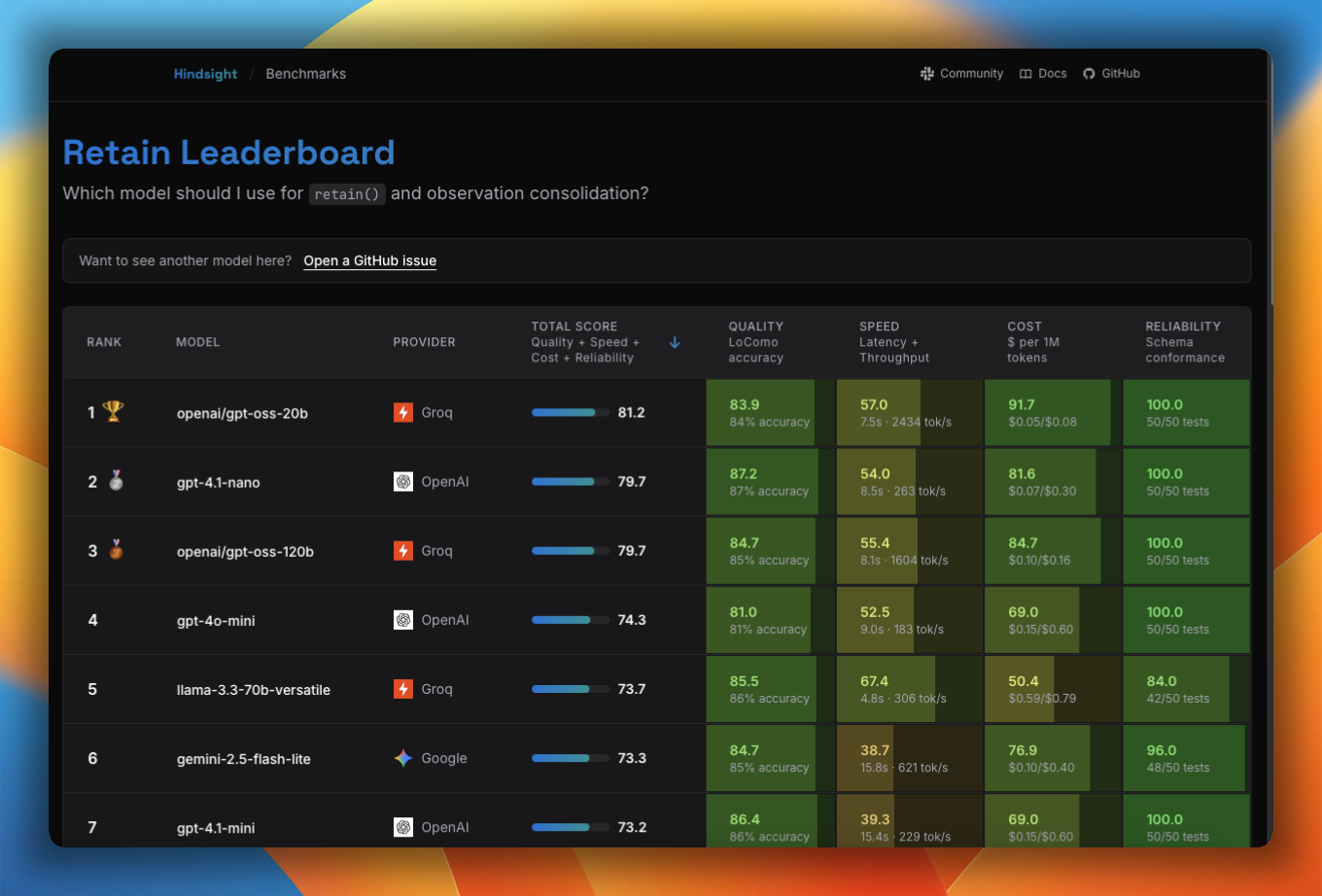
See Models for the full list of supported and tested models, provider defaults, and configuration examples.
Do I need to host my own infrastructure?
No! You have two options:
- Hindsight Cloud - Fully managed service at ui.hindsight.vectorize.io
- Self-hosted - Deploy on your own infrastructure using Docker or direct installation
See Installation for self-hosting instructions.
What are the minimum system requirements for self-hosting?
For running the Hindsight API server locally:
- Python 3.11+
- 4GB RAM minimum (8GB recommended for production)
- LLM API key (OpenAI, Anthropic, etc.) or local LLM setup
See Installation for setup instructions.
What are "zombie" operations and how do I recover them?
A zombie operation is a background task stuck in processing indefinitely because the worker that claimed it is gone — typically after a Docker container restart. The symptom is a pending_consolidation (or similar) counter that never decreases on /banks/{bank_id}/stats, even though the worker logs show plenty of free slots.
The root cause is almost always an unstable HINDSIGHT_API_WORKER_ID. By default the worker uses the container hostname as its identity, and Docker rotates that on every restart — so the new container has a different ID and won't recognize the old worker's claims as its own.
Recover with the admin CLI:
# If you know which worker is dead:
hindsight-admin decommission-worker <old-worker-id>

# Or, fleet-wide release across all workers:
hindsight-admin decommission-workers
Prevent it by setting HINDSIGHT_API_WORKER_ID to a stable value (Docker -e HINDSIGHT_API_WORKER_ID=..., or --worker-id on bare metal). The Helm chart already handles this — its StatefulSet wires the pod name automatically.
See Admin CLI — Recovering stuck operations for the full diagnosis and recovery flow.
How do I isolate user data?
A memory bank is an isolated memory store (like a "brain") that contains its own memories, entities, relationships, and optional disposition traits (skepticism, literalism, empathy). Banks are completely isolated from each other with no data leakage.
There are two approaches for multi-user applications:
1. Per-user memory banks (recommended for most use cases)
- Create one bank per user (e.g.,
bank_id="user-123") - Easiest setup and strongest data isolation
- Perfect for per-user queries and personalization
- Each bank can have unique disposition traits and background context
- Limitation: Cannot perform cross-user analysis (e.g., "What is the most mentioned topic across all users?")
2. Single bank with tags (for applications needing aggregated insights)
- Use one bank for the entire application
- Tag memories with user identifiers during retain (e.g.,
tags={"user_id": "user-123"}) - Filter by tags during recall/reflect for per-user queries
- Advantage: Enables both per-user AND cross-user queries (e.g., analyze specific users or aggregate across all users)
Choose per-user banks for simplicity and privacy, or single bank with tags if you need holistic reasoning across users. See Memory Banks for management details.
What's the difference between retain, recall, and reflect?
Hindsight has three core operations:
- Retain: Store data (facts, entities, relationships)
- Recall: Search and retrieve raw memory data based on a query
- Reflect: Use an AI agent to answer a query using retrieved memories
See Operations for API details.
When should I use recall vs reflect?
Use recall when:
- You want raw facts to feed into your own reasoning or prompt
- You need maximum control over how memories are interpreted
- You're doing simple fact lookup (e.g., "What did Alice say about X?")
- Latency is critical — recall is significantly faster (50-500ms vs 1-10s)
- You want to build your own answer synthesis layer on top of retrieved memories
Use reflect when:
- You want a ready-to-use answer generated from memories (no extra LLM call needed)
- You need disposition-aware responses shaped by the bank's personality traits (skepticism, literalism, empathy)
- The query requires multi-step reasoning across facts, observations, and mental models
- You need structured output (via
response_schema) from memory-grounded reasoning - You want citations — reflect returns which memories, mental models, and directives informed the answer
Key difference: Recall returns data; reflect returns an answer. Recall gives you raw materials, reflect does the reasoning for you using the bank's disposition and an autonomous search loop.
recall("What food does Alice like?")
→ ["Alice loves sushi", "Alice prefers vegetarian options"]   # raw facts

reflect("What should I order for Alice?")
→ "I'd recommend a vegetarian sushi platter — Alice loves sushi and prefers vegetarian options."  # grounded answer
See Recall and Reflect for full API details.
When should I use mental models?
Mental models are standing answers to questions you define — synthesized from the bank's knowledge and rewritten in the background as it changes. Use them when you need:
- Higher-level understanding beyond raw facts (e.g., "User prefers functional programming patterns")
- Long-term behavioral patterns (e.g., "Customer is price-sensitive but values quality")
- An answer available instantly, with no reasoning on the request path
- Context for AI agent reasoning during reflect operations
You create a mental model with the question that defines it; Hindsight builds the content and keeps it current. Reflect checks mental models first, so a fresh one can answer without descending into observations and raw facts. See Mental Models.
What's the difference between a mental model and a knowledge page?
A knowledge page is a mental model — the same engine, the same refresh behaviour — with two additions: a place in a folder tree, and a set of defaults tuned for documents rather than answers (built from observations only, refreshed incrementally after each consolidation, never influenced by other pages, and a larger content budget).
| Mental model | Knowledge page | |
|---|---|---|
| Shape | A standing answer to a question | A markdown document with frontmatter |
| Organization | Flat list, scoped by tags | Nested folders and pages |
| Sources | All fact types by default | Observations only by default |
| Refresh | Off by default | Delta refresh after each consolidation |
| Typical consumer | Your application or an agent, by lookup | A person or agent browsing and reading |
Use a plain mental model when something in your system looks up the answer. Use a knowledge page when the result is meant to be browsed and read directly, like a wiki. Anything you can configure on a mental model can be configured on a page.
See Mental Models and the Knowledge Pages section of the developer docs.
What's the typical latency for recall operations?
Typical latencies:
- Without reranking: 50-100ms
- With reranking: 200-500ms (depends on reranker model and installation)
See Performance for tuning options.
Does Hindsight support metadata filtering?
Yes — through Tags. Tags are string labels attached to memories at retain time and used as a visibility filter at recall/reflect time. Only memories tagged with a matching value are returned.
# Tag memories at retain time
client.retain(bank_id="my-bank", items=[{
    "content": "...",
    "tags": ["user:alice"],
}])

# Filter by tag at recall time
client.recall(bank_id="my-bank", query="...", tags=["user:alice"])
See Tags for full details including document-level tagging.
What about filtering by entities?
Entities (people, places, concepts) extracted from memories are stored in the knowledge graph and drive graph-based retrieval — so querying "tell me about Alice" will naturally surface Alice-related memories without any manual filtering.
If you need explicit tag-based filtering on entity-like values, use entity labels with tag: true. Entity labels let you define a controlled vocabulary of key:value classifiers (e.g. user:alice, topic:algebra) extracted at retain time. Setting tag: true on a label group automatically writes each extracted label as a tag on the memory unit, making them available for standard tags/tags_match filtering:
# Bank config: entity label group with tag: true
{
    "entity_labels": [{
        "key": "user",
        "type": "text",
        "tag": True,
        "description": "The user this memory belongs to"
    }]
}

# The label "user:alice" is extracted and also written as a tag
# Filter at recall time using the standard tags parameter
client.recall(bank_id="my-bank", query="...", tags=["user:alice"])
See Entity Labels for configuration details.
What about document metadata?
Document metadata (the metadata key-value pairs on a retain item) serves a different purpose. It is:
- Included in the fact extraction prompt, so the LLM can use it as additional context when extracting facts — for example, knowing the document title or source can improve accuracy.
- Returned with every recalled memory as-is, so your application can link memories back to source systems (e.g. a URL, thread ID, or ticket number) without extra lookups.
Metadata is not a filter — use tags when you need recall to be scoped to a subset of documents.
How do I control which types of memories are recalled?
If your bank mixes different shapes of memory (e.g., concise rules and detailed procedures) and recall surfaces the wrong shape for a given query, use entity labels with tag: true to classify facts during retain and hard-filter them during recall.
- Define a label group on the bank with
tag: trueand a controlled vocabulary (e.g.,rulevsprocedure) - Retain normally — the LLM classifies each extracted fact automatically
- Pass
tags=["memory_type:rule"]andtags_match="any_strict"at recall time to deterministically include only matching memories
This is a SQL-level filter applied before ranking, not a scoring signal — the excluded memories never enter the retrieval pipeline. This is more reliable than adjusting ranking weights, which only nudge continuous scores and cannot guarantee ordering.
See Best Practices — Filtering by Memory Shape for a full walkthrough, or Entity Labels for the configuration reference.
What is the recommended format for retaining conversations?
Pass the entire conversation as a single document and upsert it as the conversation grows — Hindsight chunks it automatically, so you don't need to split it yourself.
Preferred format: JSON array
[
  {"role": "user",      "content": "I moved to Berlin last month."},
  {"role": "assistant", "content": "How are you finding it?"},
  {"role": "user",      "content": "Love it, especially the food scene."}
]
Hindsight has internal chunking optimizations for the JSON array format, since it's the most common conversation shape.
Alternative: prefixed plain text
[2025-06-01T10:32:00Z] user: I moved to Berlin last month.
[2025-06-01T10:32:05Z] assistant: How are you finding it?
[2025-06-01T10:32:20Z] user: Love it, especially the food scene.
Adding a username and timestamp prefix to each message improves extraction quality — the LLM uses those signals to attribute facts correctly and reason about timing.
Use a stable document ID to upsert:
await client.retain(
    bank_id="my-bank",
    documents=[{
        "id": "chat-session-abc123",  # stable ID enables upsert
        "content": conversation,       # full conversation so far
    }]
)
Re-retaining with the same id replaces the old document and its facts, so you won't accumulate duplicates as the conversation grows.
Don't pre-summarize or pre-extract facts. Hindsight does this automatically and needs the full conversation for context — a message like "yes, exactly" or "I'll go with option 2" is meaningless without the surrounding exchange.
How is Hindsight's graph different from a traditional knowledge graph?
Hindsight uses an event-centric graph that organizes data around moments (conversations, observations, memories) rather than static, isolated facts. Memories are the anchor: entities attach to the memories they appear in, and memories themselves can also be linked directly to each other (more on that below). The closest analogy is a map versus a scrapbook.
A traditional graph (like Neo4j) is a map. It shows how places connect directly to each other via roads, mapping rigid structural facts about the world:
[Toronto] ──IS_IN──> [Canada]
A Hindsight graph is a scrapbook. Each page is a single memory. On that page, you slap stickers of all the people, concepts, and labels present in that specific moment. The stickers don't touch each other — they just live on the same page together:
Scrapbook page: "Math Class"
  [Alice]   [Acme]   [pedagogy:scaffolding]
How do the two handle change over time?
This is where traditional graphs run into major limitations when used for AI memory.
Traditional graphs struggle with change. If Alice leaves Acme Corp to work at Stark Industries, you have to manually delete or rewrite the old [WORKS_AT] arrow. If you don't, the graph contradicts reality by stating she works at both places simultaneously. Traditional graphs are built for the absolute present; they lose history when data changes.
Hindsight handles change effortlessly because history is preserved. If Alice changes jobs, you don't rewrite the past. You simply create a new scrapbook page — Memory: Tuesday's Call with a sticker for [Stark Industries]. The old page from last year still accurately links her to [Acme Corp]. The graph naturally tracks how the world evolves without complex database maintenance.
Where do the stickers come from? How do I control them?
The creation of stickers happens through a mix of AI automation and developer control:
- Open-world automation (default): Hindsight's LLM pipeline automatically detects and extracts standard entities — people, places, dates — from raw text and turns them into stickers.
- Developer control via
entity_labels: You can define a custom schema using entity labels. This forces the LLM to categorize memories using a strict, predefined vocabulary. Instead of letting the AI invent random descriptors, you choose the exact names and parameters for the stickers — for example, forcing apedagogykey to only choose fromscaffolding,direct_instruction, orsocratic_questioning. To lock the bank to only your configured labels and turn off the open-world automation above, also setentities_allow_free_form: falseon the bank config — the LLM then skips free-form named entities entirely and emits only entries that match your schema.
Can I build direct entity-to-entity pipelines?
No. In Hindsight, entities (people, places, concepts, or classification labels) do not have direct arrows connecting them to one another. Instead, they interact by anchoring to the same parent memory unit — the same scrapbook page.
How does Hindsight find connections if entities aren't directly linked?
Recall starts with semantic search — finding the memories most relevant to your query as seed pages — and then expands from those seeds through three parallel signals:
- Shared entities. If Memory A and Memory B both anchor to the same entity node — like
[pedagogy:scaffolding]— Hindsight traversesMemory A → [pedagogy:scaffolding] → Memory B. This is the scrapbook-pages-with-the-same-stickers case. - Semantic links between memories. When a new memory is retained, Hindsight precomputes links to its nearest neighbors in embedding space, so semantically related pages connect directly without needing a shared sticker.
- Causal links between memories. Hindsight also extracts explicit causal relationships (
causes,caused_by,enables,prevents) between memories, so cause-and-effect chains are first-class edges rather than something the model has to infer.
The semantic layer picks the starting points; the graph fills in the connections through whichever of those three signals is strongest for each candidate.
Does this graph structure help reduce hallucinations in my agent?
Yes — by giving the consuming LLM better-grounded context to reason from. Three properties of the scrapbook model contribute directly:
- History is preserved, not collapsed. The model sees time-bounded facts (Alice worked at Acme last year, Stark Industries now) rather than a contradictory present-tense edge that forces it to reconcile or guess.
- Connections come from recorded links, not inference. When recall surfaces two related memories, it's because they share an entity, a precomputed semantic neighbor, or an explicit causal edge — the link appears in the retrieved context, so the model doesn't have to invent one.
- Convergent evidence accumulates. Multiple memories anchoring to the same entity reinforce each other instead of competing, giving the model corroborated claims rather than singular unsupported ones.
Still have questions?
Join our Slack community or report issues on GitHub.