Hindsight Is Now a One-Click Memory Provider in the Hermes Desktop App


Hermes Agent by Nous Research has had Hindsight as a native memory provider for a while. Until now, configuring it meant editing a config.json or dropping keys into a .env. That's fine if you live in a terminal. It's a wall if you don't.
That wall is gone. The Hermes desktop app now lets you select Hindsight as your memory provider and configure the whole thing in-app — pick a mode, paste an API key, save. No files, no environment variables, no restart dance.
TL;DR
- The Hermes desktop app's Settings → Memory & Context section now lists Hindsight as a memory provider.
- Selecting it opens a real configuration panel: Mode, API key, API URL, Bank ID, and Recall budget — all editable in the app.
- The API key is stored as a secret (write-only), the rest as profile config. No more hand-editing files.
- Hindsight is the only memory provider in Hermes that gets a full in-app settings panel — the others render nothing.
- Cloud mode is the fast path: sign up free, paste the key, and Hermes remembers across every session.
What Changed
Hermes supports pluggable memory backends, and the desktop app already let you switch between them with a dropdown. But switching was only half the job — most providers still needed you to go find a config file and fill in the credentials by hand.
Now, when you choose Hindsight in the desktop app, Hermes renders a dedicated settings form right there. You fill it in, hit save, and the agent has long-term memory. The values land in the right places automatically: your API key goes to the secret store (and is never read back into the form), and everything else is written to your profile config.
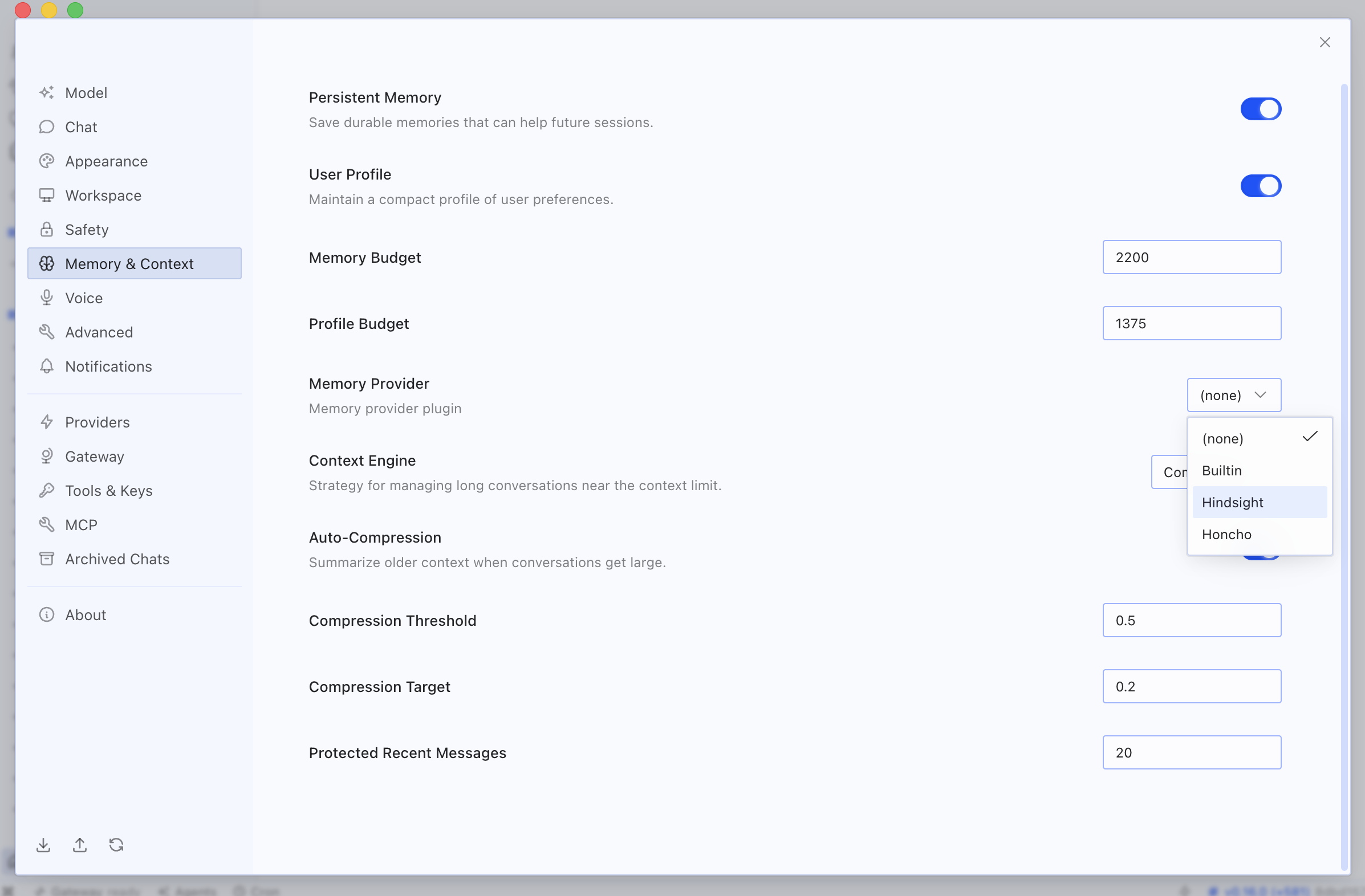
It's the difference between "Hindsight is supported" and "Hindsight is two clicks away."
What You Configure
The in-app panel exposes exactly the settings that matter:
| Setting | What it does | Default |
|---|---|---|
| Mode | Cloud (just needs an API key) or Local External (connect to an existing Hindsight instance) | Cloud |
| API key | Authenticates with the Hindsight API — stored as a write-only secret | — |
| API URL | The Hindsight endpoint | https://api.hindsight.vectorize.io |
| Bank ID | Which memory bank this Hermes profile reads and writes | hermes |
| Recall budget | How hard recall works each turn: low / mid / high | mid |
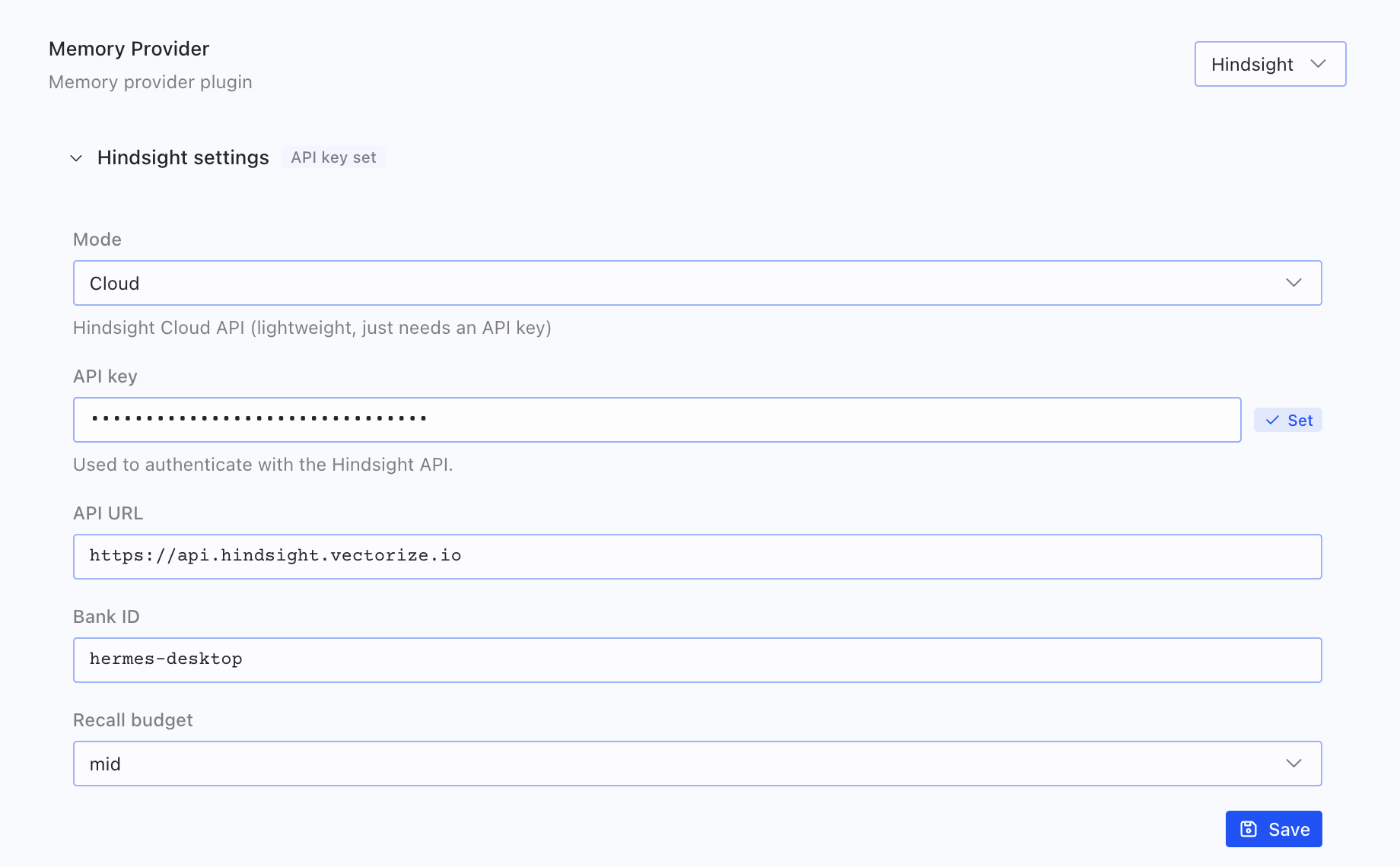
Pick Cloud, paste a key from ui.hindsight.vectorize.io, and you're done. Prefer to run your own backend? Switch the mode to Local External and point the API URL at your instance.
The Part Worth Noticing
Hermes ships with a whole shelf of memory plugins. In the desktop app's provider dropdown you'll see a handful of options — but Hindsight is the only one with an actual configuration panel. Select any of the others and the settings area stays empty; select Hindsight and you get the full form above.
That's not an accident of rendering. The desktop UI is generic: it asks the backend "what does this provider need configured?" and draws whatever comes back. Hindsight is the provider Hermes chose to fully describe — modes, secrets, defaults, and all — so it's the one you can set up without ever leaving the app.
Why It Matters
Memory is the single biggest upgrade you can give an agent, and the friction has always been setup. Making Hindsight a point-and-click choice inside a shipping desktop app removes the last excuse. A Hermes user who has never opened a terminal can now give their agent persistent, cross-session memory in under a minute:
- Open Settings → Memory & Context
- Set the memory provider to Hindsight
- Choose Cloud, paste an API key, save
From that point on, Hermes remembers — preferences, decisions, project context — across every session, on every machine the profile follows.
Get Started
- Integration docs: Configure Hindsight in the Hermes Desktop app
- Hermes Agent: github.com/NousResearch/hermes-agent
- Hindsight Cloud (free): ui.hindsight.vectorize.io
- The native-provider story: Hindsight Is Now a Native Memory Provider in Hermes Agent