How oh-my-pi Built Persistent Codebase Memory on Hindsight
oh-my-pi — a 10k-star terminal coding agent — uses Hindsight as its long-term memory backend. Here's a walkthrough of the integration: bank scoping, mental-model seeding, and the auto-retain pipeline, with code straight from the repo.

 By Ben Bartholomew, Can Bölük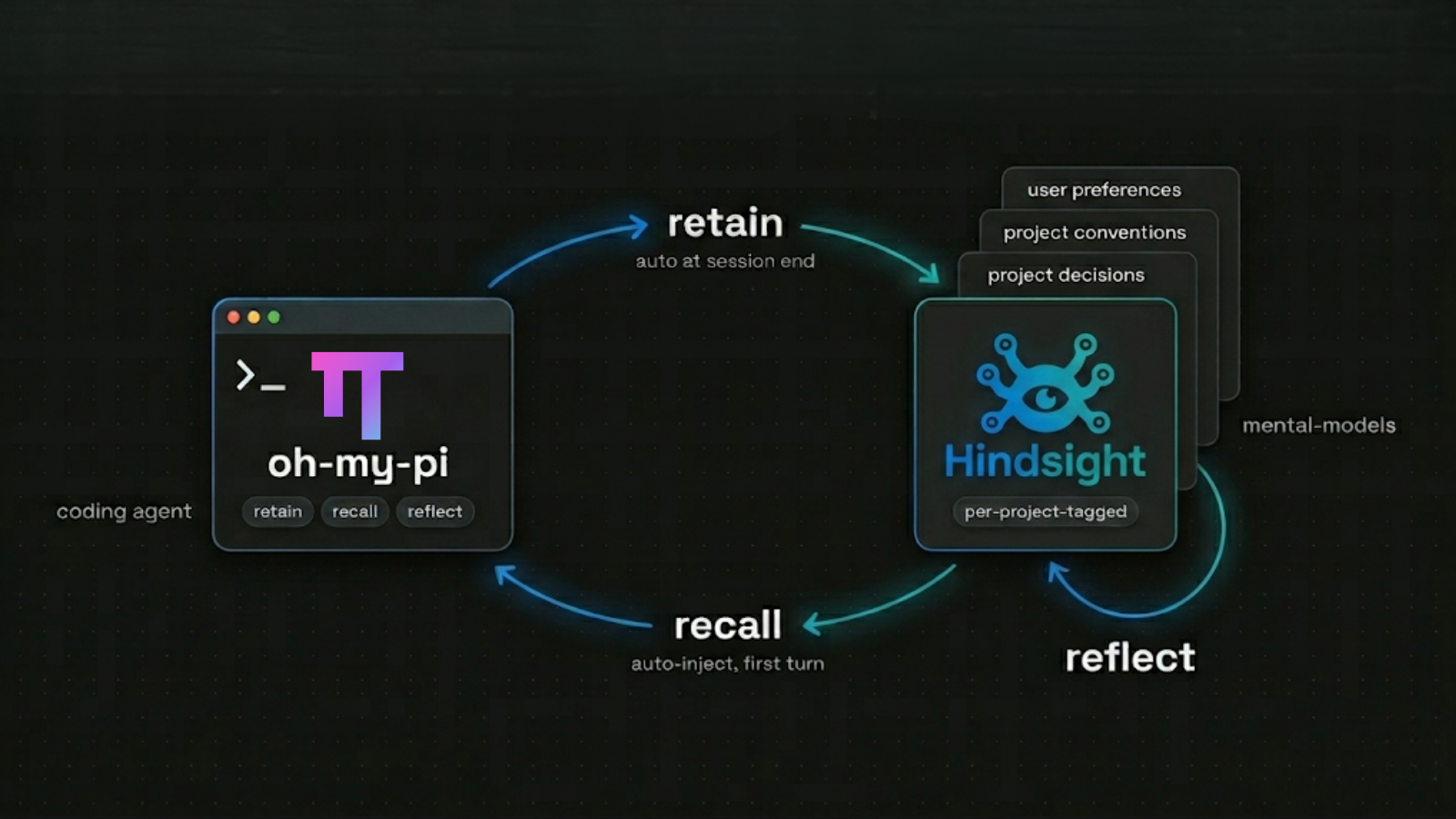
oh-my-pi (or omp) is a TypeScript + Rust coding agent for the terminal — with 10,600+ stars, 40+ providers, 32 tools — it aims to have the IDE wired in, with each tool meticulously crafted for the agent's performance. When it comes to memory, they trusted Hindsight due to it's exceptional long-term recall performance and the multi-faceted retrieval technique used underneath.
It's not a thin integration either: it features a complete memory subsystem built on top of Hindsight's API — bank scoping, mental-model seeding, debounced retain queues, auto-recall on the first turn. This post is a tour of how they built it, with code pulled straight from the public repo. If you're considering Hindsight for a coding agent of your own, this is a useful reference for the shape of a deep integration.
TL;DR
- oh-my-pi exposes
retain/recall/reflectas model-facing tools backed by Hindsight, plus an auto-retain / auto-recall lifecycle the model doesn't have to think about. - Memory is project-scoped by default via one of three modes (
global,per-project,per-project-tagged), with the default mode beingper-project-tagged. - A mental-models layer seeds three curated reflect-backed summaries (
user-preferences,project-conventions,project-decisions) on first session boot and splices their cached output into every prompt rebuild. - They originally used
@vectorize-io/hindsight-clientbut in-housed a minimal fetch client once they settled on the API endpoints they actually needed — without changing the underlying contract.
The Bank-Scoping Model
The first decision a coding agent has to make is what counts as one user's memory. oh-my-pi exposes three answers via hindsight.scoping. From bank.ts:
Three scoping modes (
HindsightConfig.scoping):
global— single shared bank, no per-project filter.per-project— one bank per cwd basename, hard isolation.per-project-tagged— single shared bank, retains carry aproject:<name>tag and recall filters on it but still surfaces untagged ("global") memories alongside.
The default — per-project-tagged — is the interesting choice. It uses one bank for the whole user but tags each retain with the project it came from. Recalls then filter with tagsMatch: "any", so the agent sees project-scoped memories and anything the user has retained globally (user preferences, cross-project conventions). That's stronger isolation than a global bank, less rigid than separate banks per repo, and exactly the trade-off you'd want for a coding agent that hops between projects.
The derivation is one small function:
export function computeBankScope(config: HindsightConfig, directory: string) {
  const base = baseBankId(config); // "omp" unless overridden
  switch (config.scoping) {
    case "global":
      return { bankId: base };
    case "per-project":
      return { bankId: `${base}-${projectLabel(directory)}` };
    case "per-project-tagged": {
      const tag = `${PROJECT_TAG_PREFIX}${projectLabel(directory)}`;
      return { bankId: base, retainTags: [tag], recallTags: [tag], recallTagsMatch: "any" };
    }
  }
}
projectLabel is just the directory's basename, so working in ~/code/superproject tags everything project:superproject. Hindsight's tags / tags_match does the rest server-side — no schema work, no per-repo bank to keep alive. Want hard walls instead? per-project hands every directory its own bank.
The Mental-Models Layer
The clever part of the integration is the mental-models layer. A Hindsight mental model is a named, persisted summary that the server keeps fresh on its own — and omp leans on it as a low-latency cache of what the agent already knows about you and your project, spliced into the developer instructions on every prompt rebuild instead of paying for a recall round-trip each turn.
The seed file (seeds.json) is the entire policy:
{
  "seeds": [
    {
      "id": "user-preferences",
      "name": "User Preferences",
      "source_query": "What does the user prefer in coding style, tooling, communication, and review? Capture only durable preferences expressed across sessions, not one-off requests.",
      "scopes": ["global", "per-project", "per-project-tagged"],
      "projectTagged": false,
      "max_tokens": 600,
      "trigger": { "mode": "delta", "refresh_after_consolidation": true }
    },
    {
      "id": "project-conventions",
      "name": "Project Conventions",
      "source_query": "What are this project's conventions for code style, build, testing, release, and pull-request review? Only include conventions that are explicit in the project (settings, scripts, contributor docs, repeatedly enforced in review).",
      "scopes": ["per-project", "per-project-tagged"],
      "projectTagged": true,
      "max_tokens": 800,
      "trigger": { "mode": "delta", "refresh_after_consolidation": true }
    },
    {
      "id": "project-decisions",
      "name": "Project Decisions",
      "source_query": "What durable architectural or product decisions have been made for this project, and what rationale or trade-offs were recorded? Include only decisions that are stable across sessions; exclude transient plans, unresolved ideas, and active task state.",
      "scopes": ["per-project", "per-project-tagged"],
      "projectTagged": true,
      "max_tokens": 800,
      "trigger": { "mode": "delta", "refresh_after_consolidation": true }
    }
  ]
}
Three things worth noting in that file:
-
trigger.mode = "delta"+refresh_after_consolidation = true. This is the right pattern for a coding agent — the mental model doesn't re-generate on every consolidation pass, only when the consolidator surfaces new content that materially changes the model. Cheap to keep, fresh when it needs to be. -
source_queryis a prompt, not a keyword filter. Hindsight runs this against the bank as a reflect, so the LLM picks out the relevant memories instead of doing an exact-match search. The prompt is doing the work of saying "only durable preferences," "only conventions explicit in the project," "only decisions stable across sessions." -
Tag discipline. A comment in
mental-models.tswarns:The Hindsight refresh path filters source memories with
all_stricttag matching against the model's tags. A seed tagged with something we never write at retain time will refresh empty. Therefore seed tags MUST be a subset of the tags actually attached byretainSession/enqueueRetainfor the active scoping mode.That's a thoughtful integration detail. Seeds for
projectTagged: trueentries get the active scope'sproject:<cwd>tag baked in. Untagged seeds (likeuser-preferences) read every memory in the bank because reflect applies no tag filter whentagsis empty.
When the cached mental-model block is loaded, it's rendered with "anti-feedback" wrappers so the LLM treats it as background knowledge instead of executable instructions — the same pattern Hindsight's own integrations use for recall snippets.
The Retain Pipeline
oh-my-pi's retain code separates tool-initiated retains (the model calls retain mid-turn) from auto-retain (full session flushed at session end). The model-facing tool uses a debounced batch queue:
const RETAIN_FLUSH_BATCH_SIZE = 16;
const RETAIN_FLUSH_INTERVAL_MS = 5_000;
When the model calls retain with one or more items, they're queued. The queue flushes immediately when it hits 16 items, or 5 seconds after the first turn. Each flush is a single retainBatch(...) POST against /v1/default/banks/{bank_id}/memories with async: true so the agent isn't waiting on server-side fact extraction. The model's tool result is the immediate "<count> memory queued." — the actual write is fire-and-forget, with flush failures surfacing as a session warning notice rather than an exception.
Auto-retain takes a different path. It builds a transcript of the session (configurable as full-session or last-turn via hindsight.retainMode) and sends it as one large retain call. The default — full-session — lets Hindsight's fact extractor decide what's worth keeping rather than asking oh-my-pi to pre-summarize on the client.
The lifecycle config defaults are visible in config.ts:
scoping: "per-project-tagged",
autoRecall: true,
autoRetain: true,
retainMode: "full-session",
retainContext: "omp",
recallBudget: "mid",
Out of the box, on a fresh install pointed at Hindsight Cloud, you get tagged per-project memory, auto-recall on every first turn, and auto-retain at session end. The user doesn't configure anything to get the compounding effect.
The Recall Pipeline
Recall is exposed two ways: as a model-facing tool (the model calls recall mid-turn with a query string) and as an auto-injection step (HindsightSessionState.beforeAgentStartPrompt runs a composed query before the first LLM call). The first is simple — POST /v1/default/banks/{bank_id}/memories/recall with the model's query, the configured budget, types, and the bank-scope tag filter.
The auto-injection path is where the work is. From content.ts, oh-my-pi composes a recall query out of the last few user turns (recallContextTurns), caps it at a configured character budget (recallMaxQueryChars), and prepends the recall response with this preamble:
Relevant memories from past conversations (prioritize recent when conflicting).
Only use memories that are directly useful to continue this conversation;
ignore the rest:
That preamble is intentional. Hindsight's recall surfaces what's relevant to a query, not what's useful right now. The preamble tells the LLM to filter further — and to prefer fresh memories when they contradict older ones. (If you've seen recall results land in agent prompts before, you'll recognize this pattern; the Hindsight docs use it too.)
The reflect tool gets its own POST to /v1/default/banks/{bank_id}/reflect, with a best-effort PUT of the bank's reflect_mission / retain_mission on first use per process. Same logic as the SDK, just rewritten in a fetch wrapper they control end-to-end.
Why They Rewrote the Client
The integration started on @vectorize-io/hindsight-client. They eventually swapped it for a hand-rolled fetch client. From the header comment in client.ts:
Replaces the
@vectorize-io/hindsight-clientSDK with hand-rolled fetch calls so we depend on nothing more than the API endpoints we actually use:retain,retainBatch,recall,reflect, bank + document management, and bulk listing. Centralising construction here keeps a single seam for tests to spy on.
This is normal for any sufficiently invested integration — a real shipping product wants to minimize its dependency surface and have full control over retries, timeouts, and test seams. The important detail is that they didn't change the API contract; they just talked to the same endpoints directly. That's a quiet vote of confidence in the API design: it was clean enough to in-house against.
What This Means for Coding Agents on Hindsight
Take a step back. The shape of oh-my-pi's integration looks remarkably similar to other Hindsight-backed coding agents we've covered (Hermes, Claude Code, OpenClaw):
- Three retain/recall/reflect tools exposed to the model
- Auto-recall on the first turn, auto-retain on session end
- Per-project bank scoping (with varying flavors)
- Mental-model-style summary caching for low-latency first-turn context
- A debounced retain queue so the model's
retaincalls don't block
That's not a coincidence. It's the shape that works for code assistants — and Hindsight's API was designed around exactly that lifecycle. oh-my-pi's implementation is the most detailed public reference for the pattern; the docs above link straight to their source files if you want to lift any of it.
Try It
oh-my-pi installs in one command:
# macOS / Linux
curl -fsSL https://omp.sh/install | sh

# Bun (recommended)
bun install -g @oh-my-pi/pi-coding-agent

# Windows
irm https://omp.sh/install.ps1 | iex
Once installed, point it at Hindsight Cloud:
export HINDSIGHT_API_URL="https://api.hindsight.vectorize.io"
export HINDSIGHT_API_TOKEN="hsk_your_token"
Or use the in-app settings — hindsight.apiUrl, hindsight.apiToken, hindsight.scoping. The default per-project-tagged scoping kicks in automatically; mental-model seeding fires on the first session in each bank.
You can grab a Hindsight Cloud key for free, or self-host Hindsight and point oh-my-pi at http://localhost:8888. Same API surface either way.
Further reading:
- oh-my-pi on GitHub — the full source, including the
packages/coding-agent/src/hindsight/directory referenced throughout this post - oh-my-pi README §11 — Hindsight — the official feature description
- What Is Agent Memory? — foundational concepts
- Building a Hermes Coding Assistant That Remembers Your Codebase — the same pattern in a different agent
- Best AI Agent Memory Systems in 2026 — full landscape comparison