


Models
Hindsight uses four kinds of model. Only the LLM needs setting up: the embedding model and the reranker run locally by default, and the decision model is optional.
| Model | What it does | Default |
|---|---|---|
| LLM | Extracts facts on retain, consolidates observations, writes reflect answers and pages | openai provider, gpt-5-nano |
| Embedding model | Turns text into vectors for semantic search | BAAI/bge-small-en-v1.5, local |
| Reranker | Orders recall candidates by relevance | hindsight-ai/hs-rerank-1, local |
| Decision model | Answers quick typed judgments so recall, consolidation, reflect and pages skip LLM calls | Off. See Decision Models |
Local models download from Hugging Face on first run. Every setting is listed in Configuration; this page covers what each provider needs.
LLM
Used for fact extraction, entity resolution, observation consolidation and answer synthesis. Pick a provider: its card shows the default model, so setting the model is optional.
gpt-5-nanoBatch APIOpenAI Responsesgpt-5.6Anthropicclaude-haiku-5-5Google Geminigemini-3.8-flashBatch APIPrompt cachingVertex AIgoogle/gemini-3.1-flash-litePrompt cachingGroq
openai/gpt-oss-120bBatch APIOllamagemma3:12bOllama Cloudgemma3:12bLM Studio

local-modelllama.cppgemma-4-e2b-itMiniMax
MiniMax-M3DeepSeek
deepseek-v4-flashz.ai
glm-5.3-flashopencode-go
deepseek-v4-flashAtlas Cloud

deepseek-ai/deepseek-v4-proMeta Model APImuse-spark-1.3Volcano Engine
doubao-pro-32kOpenRouter
qwen/qwen3.5-9bRequestyopenai/gpt-5-nanoOpenAI Codexgpt-5.6-lunaChatGPT
gpt-6-lunaClaude Codeclaude-sonnet-5-5CursorautoAntigravity
gemini-3.8-flash-lowGitHub Copilot
gpt-5.6-terraAWS Bedrock
us.amazon.nova-2-lite-v1:0Fireworks AI
accounts/fireworks/models/deepseek-v4-flashBatch APINous Portal
deepseek/deepseek-v4-flashSuperGrok (OAuth)
grok-4.5OpenAI CompatibleLiteLLM (100+)
gpt-5-nanoAzure OpenAI
Every provider is set the same way, with HINDSIGHT_API_LLM_PROVIDER and, for most, HINDSIGHT_API_LLM_API_KEY. The same applies per operation: HINDSIGHT_API_RETAIN_LLM_PROVIDER=anthropic gives retain its own provider at that provider's default model. See Per-Operation LLM Configuration.
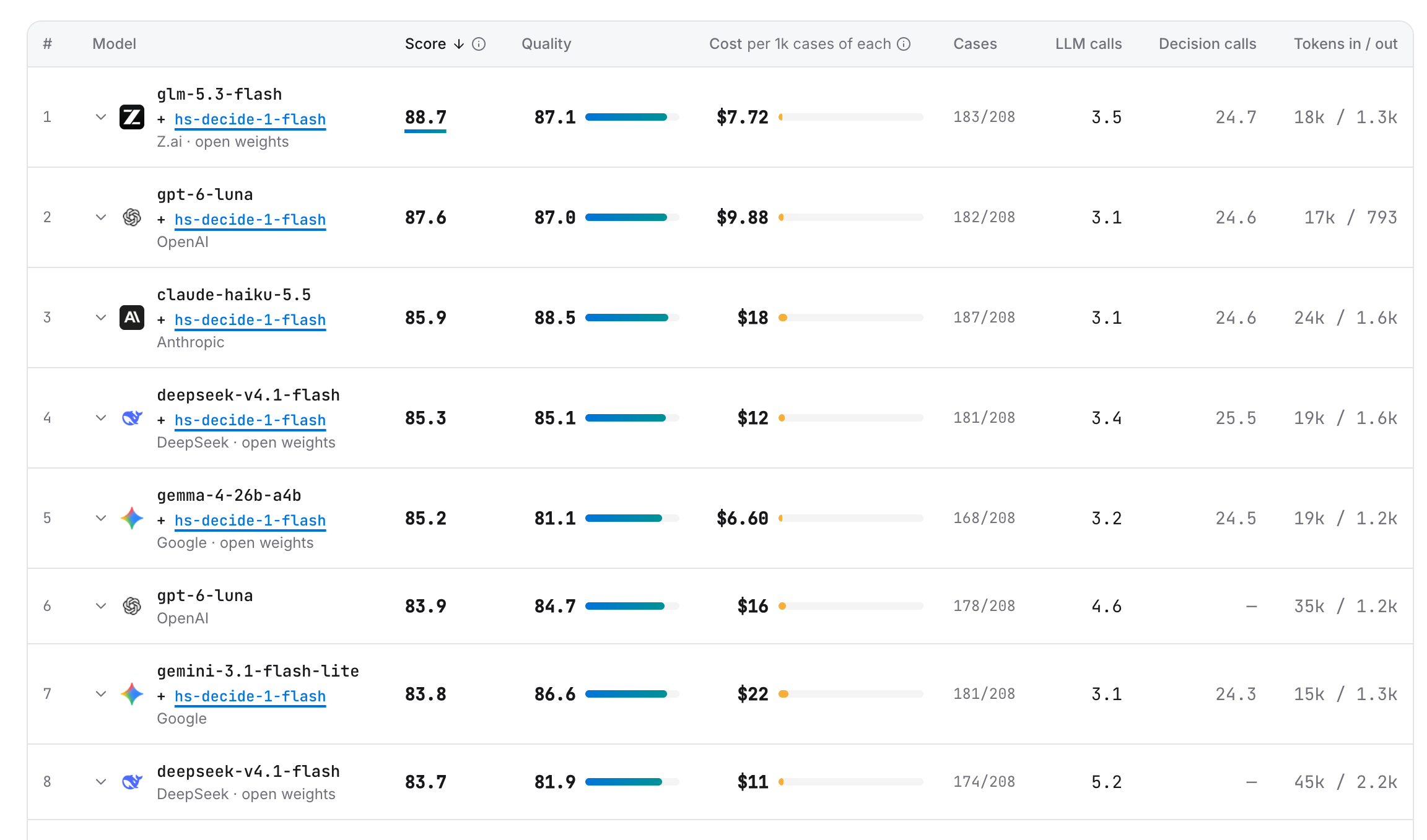
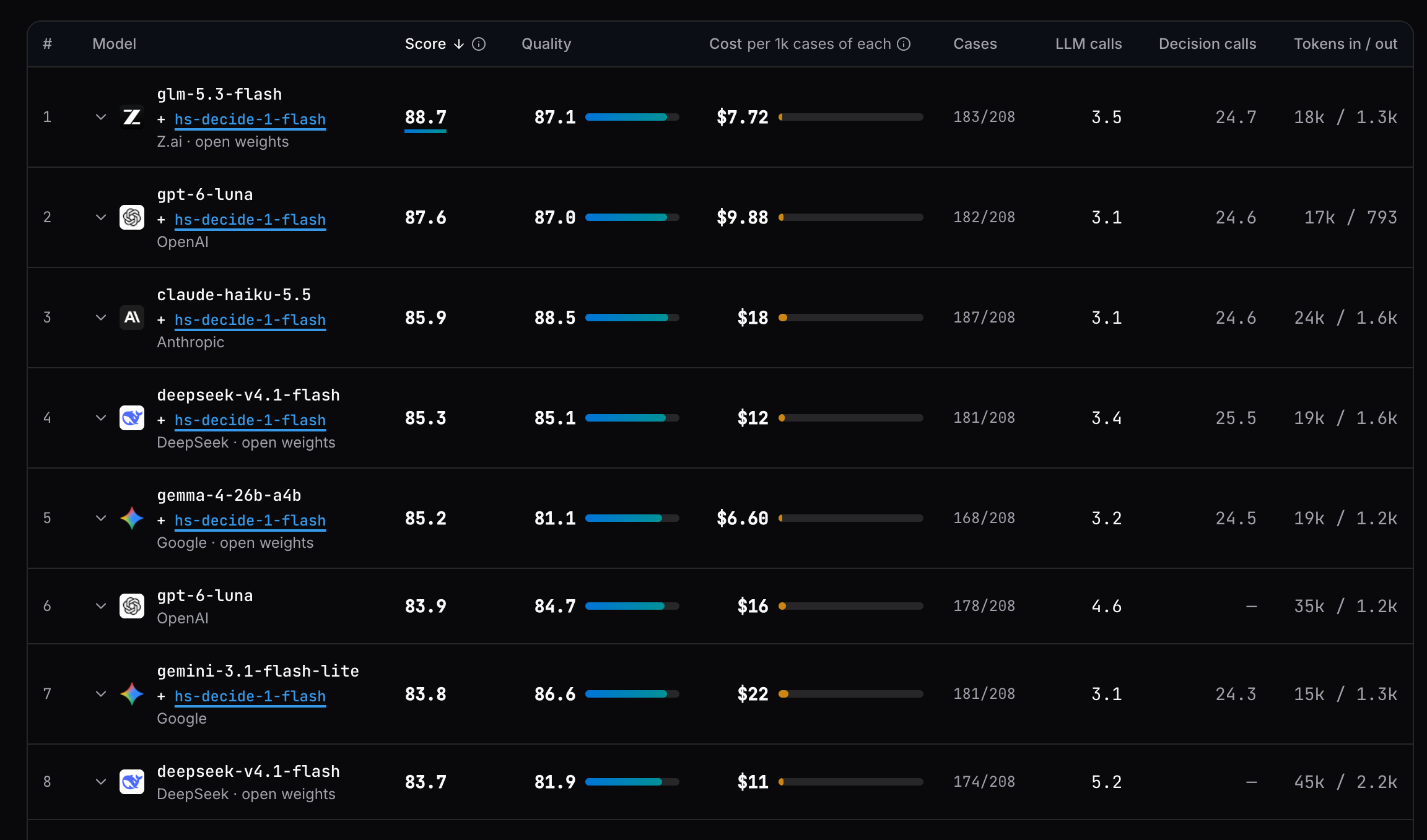
The Model Leaderboard → runs every LLM through Hindsight's own evals, alone and with the decision model, and ranks them on quality and cost.
Provider Capabilities
Some providers support features that lower cost or latency. Hindsight uses each one automatically when the configured provider supports it; the provider's card in the grid above shows which:
- Batch API: submits bulk retain extraction through the provider's asynchronous batch endpoint, typically at about 50% lower cost. When it isn't available, calls run synchronously.
- Prompt caching: reuses the large fixed system prefix that retain and consolidation send on every call, billed at the provider's cached-input rate. On Gemini and Vertex AI this uses the
CachedContentAPI. On by default; turn it off withHINDSIGHT_API_LLM_PROMPT_CACHE_ENABLED=false. The cached prefix is the same for every bank, so one cache serves them all, and a failed cache creation falls back to an uncached call.
A card without "Prompt caching" does not mean a provider has no caching. OpenAI caches a stable prompt prefix automatically on its side, with no configuration. The badge tracks only Hindsight’s explicit caching hook, which Gemini and Vertex AI implement today.
Model requirements
- Follows a JSON schema. Every call, reflect's tool calls included, is a reply to a response schema (structured output); native tool calling is not used, so the model needs no tool support.
- At least 65,000 output tokens. Retain asks for long structured output. For a model with a smaller output limit, lower
HINDSIGHT_API_RETAIN_MAX_COMPLETION_TOKENS(for example to32000or16000). It must stay aboveHINDSIGHT_API_RETAIN_CHUNK_SIZE(default3000); the server checks this on startup. - Thinking models share the output budget with their reasoning. On Gemini 2.5+/3.x, GPT-5 and o-series, Grok reasoning and Claude extended thinking, the provider's output cap covers reasoning plus the visible answer, so a small cap can be used up by reasoning and leave the answer cut off. Reflect's synthesis call is uncapped by default for that reason;
HINDSIGHT_API_REFLECT_MAX_COMPLETION_TOKENSsets a hard ceiling, so leave room for reasoning above your page length. A Gemini call that hits its cap logs atruncated at max_output_tokenswarning instead of returning half an answer.
The LLM is the main bottleneck for retain. See Performance for ways to speed it up.
Cheap Memory Model with Failover
Hindsight calls its own LLM, with its own credentials, only to process memory: extracting facts on retain, consolidating observations, refreshing mental models, and answering reflect. Your agent keeps calling whatever model it already uses. So the memory model can be a cheap, high-throughput one, picked for volume rather than for the agent's reasoning.
A typical production setup puts the cheap model first and stronger, pricier models behind it, used only when the cheap one fails. The building blocks are documented in Multi-LLM Strategies and Per-Operation LLM Configuration:
# Member 0 (primary): cheap workhorse, serves almost every call
export HINDSIGHT_API_LLM_PROVIDER=groq
export HINDSIGHT_API_LLM_API_KEY=<groq-key>
export HINDSIGHT_API_LLM_MODEL=<cheap-model>

# Member 1: mid-tier fallback
export HINDSIGHT_API_LLM_1_PROVIDER=openai
export HINDSIGHT_API_LLM_1_API_KEY=<openai-key>
export HINDSIGHT_API_LLM_1_MODEL=<mid-model>

# Member 2: top-tier last resort, with its own retry budget
export HINDSIGHT_API_LLM_2_PROVIDER=anthropic
export HINDSIGHT_API_LLM_2_API_KEY=<anthropic-key>
export HINDSIGHT_API_LLM_2_MODEL=<top-model>
export HINDSIGHT_API_LLM_2_MAX_RETRIES=3

export HINDSIGHT_API_LLM_MAX_RETRIES=0   # fail over at once instead of retrying the same member
export HINDSIGHT_API_LLM_STRATEGY='{"mode": "failover"}'
# Or spread load instead: '{"mode": "round-robin", "weights": [4, 1, 1]}'
To give one operation a stronger model, override only that operation's primary. Its chain still falls back to the global members above:
# Consolidation starts on the mid-tier model; retain and reflect stay on the cheap one
export HINDSIGHT_API_CONSOLIDATION_LLM_PROVIDER=openai
export HINDSIGHT_API_CONSOLIDATION_LLM_API_KEY=<openai-key>
export HINDSIGHT_API_CONSOLIDATION_LLM_MODEL=<mid-model>
Give an operation a fully separate chain with its own indexed members and strategy (HINDSIGHT_API_RETAIN_LLM_1_PROVIDER, HINDSIGHT_API_RETAIN_LLM_STRATEGY, ...).
Things to know:
- Number members from 1 with no gaps. Hindsight stops reading at the first missing
HINDSIGHT_API_LLM_<n>_PROVIDER: with_1_and_3_set, member 3 is ignored. - An operation with no members or no strategy of its own uses the global ones. Mental-model refresh uses the reflect chain first, then the global one.
- Batch retain does not fail over. With
HINDSIGHT_API_RETAIN_BATCH_ENABLED=true, the whole batch runs on the first member whose provider has a batch API. Put a reliable provider there. - Startup sends a test call to each configured model. A model that is down only logs a warning; the server still starts. Set
HINDSIGHT_API_SKIP_LLM_VERIFICATION=trueto skip these checks, for example when fallbacks are paid per call or slow to answer.
OpenAI and compatible endpoints
OpenAI's Chat Completions API, and any API that speaks it: Together AI, vLLM, a gateway.
Setup
export HINDSIGHT_API_LLM_PROVIDER=openai
export HINDSIGHT_API_LLM_API_KEY=sk-xxxxxxxxxxxx
export HINDSIGHT_API_LLM_MODEL=gpt-5.6-luna   # default: gpt-5-nano
The openai provider calls the Chat Completions API (/v1/chat/completions), so it works with any OpenAI-compatible API (Together AI, vLLM, a gateway, ...): set HINDSIGHT_API_LLM_BASE_URL to the URL that serves /chat/completions. For most providers that is the URL ending in /v1, not the account or resource root. Azure OpenAI doesn't serve the API at the resource root, so https://<resource>.openai.azure.com alone returns 404 Resource not found; see Azure OpenAI Setup for the URL shapes that work.
OpenAI Responses API
Set HINDSIGHT_API_LLM_PROVIDER=openai-responses to call OpenAI's Responses API (/v1/responses) instead of Chat Completions. Both work for every operation; the Responses API keeps a reasoning model's chain-of-thought as a first-class item.
Setup
export HINDSIGHT_API_LLM_PROVIDER=openai-responses
export HINDSIGHT_API_LLM_API_KEY=sk-xxxxxxxxxxxx
export HINDSIGHT_API_LLM_MODEL=gpt-5.6           # reasoning model; e.g. gpt-5.6-terra
export HINDSIGHT_API_LLM_REASONING_EFFORT=high
# export HINDSIGHT_API_LLM_BASE_URL=https://your-gateway.example.com/v1   # any endpoint exposing /v1/responses
Anthropic
Claude models through the Anthropic API.
Setup
export HINDSIGHT_API_LLM_PROVIDER=anthropic
export HINDSIGHT_API_LLM_API_KEY=your-api-key
# export HINDSIGHT_API_LLM_MODEL=claude-haiku-5-5   # the default
Google Gemini
Gemini models through the Gemini API, with Batch API and prompt caching. On Google Cloud, use Vertex AI instead.
Setup
export HINDSIGHT_API_LLM_PROVIDER=gemini
export HINDSIGHT_API_LLM_API_KEY=your-api-key
# export HINDSIGHT_API_LLM_MODEL=gemini-3.8-flash   # the default
Groq
Open models on Groq. Use a paid tier: the free tier allows 8,000 tokens per minute, and one retain call needs about 64k.
Setup
export HINDSIGHT_API_LLM_PROVIDER=groq
export HINDSIGHT_API_LLM_API_KEY=your-api-key
# export HINDSIGHT_API_LLM_MODEL=openai/gpt-oss-120b   # the default
DeepSeek
DeepSeek's API. Besides the default, deepseek-v4-pro, deepseek-chat and deepseek-reasoner work too.
Setup
export HINDSIGHT_API_LLM_PROVIDER=deepseek
export HINDSIGHT_API_LLM_API_KEY=your-api-key
# export HINDSIGHT_API_LLM_MODEL=deepseek-v4-flash   # the default
MiniMax
MiniMax models, with a 1M-token context. MiniMax-M3.1-* always thinks at maximum effort; lower it with HINDSIGHT_API_LLM_REASONING_EFFORT=low.
Setup
export HINDSIGHT_API_LLM_PROVIDER=minimax
export HINDSIGHT_API_LLM_API_KEY=your-api-key
# export HINDSIGHT_API_LLM_MODEL=MiniMax-M3   # the default
z.ai (GLM)
GLM models on z.ai. The default is glm-5.3-flash; glm-4.5-flash is the free tier.
Setup
export HINDSIGHT_API_LLM_PROVIDER=zai
export HINDSIGHT_API_LLM_API_KEY=your-api-key
# export HINDSIGHT_API_LLM_MODEL=glm-5.3-flash   # the default
opencode-go
Models served through opencode-go.
Setup
export HINDSIGHT_API_LLM_PROVIDER=opencode-go
export HINDSIGHT_API_LLM_API_KEY=your-api-key
# export HINDSIGHT_API_LLM_MODEL=deepseek-v4-flash   # the default
Atlas Cloud
Atlas Cloud, which also hosts Qwen, GLM, Kimi and MiniMax models.
Setup
export HINDSIGHT_API_LLM_PROVIDER=atlas
export HINDSIGHT_API_LLM_API_KEY=your-api-key
# export HINDSIGHT_API_LLM_MODEL=deepseek-ai/deepseek-v4-pro   # the default
Volcano Engine
ByteDance's Volcano Engine, serving the Doubao models.
Setup
export HINDSIGHT_API_LLM_PROVIDER=volcano
export HINDSIGHT_API_LLM_API_KEY=your-api-key
# export HINDSIGHT_API_LLM_MODEL=doubao-pro-32k   # the default
OpenRouter
Any model slug OpenRouter serves.
Setup
export HINDSIGHT_API_LLM_PROVIDER=openrouter
export HINDSIGHT_API_LLM_API_KEY=your-api-key
# export HINDSIGHT_API_LLM_MODEL=qwen/qwen3.5-9b   # the default
OpenRouter can serve one model from several hosts. A model slug like z-ai/glm-5.3-flash names who made the model, not the host your request lands on. On every call that asks for JSON back (fact extraction, consolidation, reflect's tool calls), Hindsight sets provider.require_parameters=true, so OpenRouter only picks hosts that support every parameter sent.
To pick the hosts yourself, set OpenRouter's provider routing keys. Your provider keys are kept and win over Hindsight's:
export HINDSIGHT_API_LLM_EXTRA_BODY='{"provider":{"only":["deepinfra","novita"],"allow_fallbacks":false}}'
If a model fails with "No endpoints found that can handle the requested parameters", no host supports every parameter sent. Models that reject temperature are the usual cause. Set HINDSIGHT_API_LLM_TEMPERATURE=none to stop sending it.
Requesty
Requesty's router, with provider-prefixed model names such as openai/gpt-5-nano.
Setup
export HINDSIGHT_API_LLM_PROVIDER=requesty
export HINDSIGHT_API_LLM_API_KEY=your-api-key
# export HINDSIGHT_API_LLM_MODEL=openai/gpt-5-nano   # the default
Fireworks AI
Models on Fireworks AI, named by their full path, for example accounts/fireworks/models/....
Setup
export HINDSIGHT_API_LLM_PROVIDER=fireworks
export HINDSIGHT_API_LLM_API_KEY=your-api-key
# export HINDSIGHT_API_LLM_MODEL=accounts/fireworks/models/deepseek-v4-flash   # the default
Ollama
Local models through Ollama, with no key.
Setup
export HINDSIGHT_API_LLM_PROVIDER=ollama
export HINDSIGHT_API_LLM_BASE_URL=http://localhost:11434/v1
# export HINDSIGHT_API_LLM_MODEL=gemma3:12b   # the default
Ollama Cloud
Hosted Ollama. Ollama Cloud does not enforce a response schema (Ollama docs), so the reply is held only by the prompt and checked afterwards: pick a model that follows a JSON schema reliably.
Setup
export HINDSIGHT_API_LLM_PROVIDER=ollama-cloud
export HINDSIGHT_API_LLM_API_KEY=your-api-key
# export HINDSIGHT_API_LLM_MODEL=gemma3:12b   # the default
LM Studio
Local models through LM Studio, with no key. Set the model to the one LM Studio has loaded.
Setup
export HINDSIGHT_API_LLM_PROVIDER=lmstudio
export HINDSIGHT_API_LLM_BASE_URL=http://localhost:1234/v1
# export HINDSIGHT_API_LLM_MODEL=local-model   # the default
AWS Bedrock
Models on AWS Bedrock, with AWS credentials or an IAM role instead of an API key.
Setup
export HINDSIGHT_API_LLM_PROVIDER=bedrock
export HINDSIGHT_API_LLM_MODEL=us.amazon.nova-2-lite-v1:0   # a Bedrock model ID
No API key: authentication uses AWS credentials (AWS_ACCESS_KEY_ID, AWS_SECRET_ACCESS_KEY, AWS_REGION_NAME) or an IAM role. For about 50% lower cost on throughput, set HINDSIGHT_API_LLM_BEDROCK_SERVICE_TIER=flex. See Configuration.
Built-in llama.cpp
Set HINDSIGHT_API_LLM_PROVIDER=llamacpp to run a llama.cpp server inside Hindsight: fully local, no API key, no other service. A Gemma 4 E2B GGUF model (about 3.5 GB) downloads on first run. It needs the local-llm extra: pip install 'hindsight-api-slim[local-llm]'.
Setup
The published Docker image doesn't include llama-cpp-python, to stay small. For a Docker setup that adds it, see docker/docker-compose/local-llm/. All options: Configuration.
LiteLLM and LiteLLM Router
Any model LiteLLM supports, or LiteLLM's Router for fallback, load balancing and rate limits.
Setup
litellmreaches any model LiteLLM supports, with its provider prefix in the model name (for exampleazure/gpt-4oortogether_ai/...). See Configuration.litellmrouterruns the LLM through LiteLLM's Router: ordered fallback across deployments, load balancing, weighted picks, per-deploymentrpm/tpmlimits and cooldowns. Hindsight passes the JSONRouterconfig through as is. See Configuration.
GitHub Copilot Setup
Use a GitHub Copilot subscription for Hindsight's extraction, consolidation, and reflection calls through the official GitHub Copilot SDK.
Setup
Prerequisites:
- An active GitHub Copilot entitlement
- Copilot CLI signed in under the same operating-system user that runs Hindsight
Configure Hindsight:
export HINDSIGHT_API_LLM_PROVIDER=github-copilot
export HINDSIGHT_API_LLM_MODEL=gpt-5.6-terra
# No HINDSIGHT_API_LLM_API_KEY is needed.
The provider starts one shared Copilot runtime for all Hindsight LLM lanes. That runtime uses a hook-free temporary COPILOT_HOME containing only the signed-in account selection; the credential itself is resolved by the runtime from the system keychain or an existing gh CLI login. Each call then uses an isolated transient session with repository instructions, skills, Copilot memory, built-in tools, and the cross-session store disabled. This prevents the memory integration from recursively retaining its own extraction calls.
For automation, the Copilot SDK also accepts COPILOT_GITHUB_TOKEN, GH_TOKEN, or GITHUB_TOKEN. With one of those set, Copilot CLI never has to have been run on the host, so containers and CI images work with no ~/.copilot at all. GitHub Actions and server-to-server deployments must have the appropriate Copilot organization policy and token permissions.
Important notes:
- Usage counts against the authenticated account or organization's Copilot allowance and AI Credits.
HINDSIGHT_API_LLM_BASE_URLoptionally points to an existing headless Copilot runtime, such ashttp://127.0.0.1:4321; it is not an LLM-provider endpoint for this provider.- GitHub-hosted Copilot sessions do not expose temperature or maximum-output-token controls through the SDK, so those Hindsight settings are not applied.
- Embeddings and reranking continue to use Hindsight's separately configured providers; their local defaults require no API key.
ChatGPT Setup (Sign in with ChatGPT)
The chatgpt provider runs Hindsight's LLM calls on your ChatGPT plan through
OpenAI's documented Sign in with ChatGPT flow for open-source apps.
Hindsight registers itself as its own OAuth client on first sign-in, and every call goes to the public
https://api.openai.com/v1/responses endpoint with your OAuth access token. It does not use an API key.
Setup
How it differs from openai-codex: that provider reuses the Codex CLI's sign-in and calls ChatGPT's private
chatgpt.com/backend-api/codex endpoint. chatgpt uses the supported route and keeps its own
credentials, so it never shares or rotates the Codex CLI's tokens.
Prerequisites:
- A ChatGPT plan that allows plan usage in third-party apps
- A browser on the machine where you run the login
Setup on a machine with a browser (for example a laptop):
-
Sign in:
hindsight-admin chatgpt loginThis opens your browser and waits for the callback on
http://127.0.0.1:1455/auth/callback(--portchanges the port;--no-browserprints the URL instead). Approve the request, including use of your ChatGPT plan. The command validates the ID token and the granted scopes, then writes~/.hindsight/chatgpt/credentials.json(mode0600) next to this host'shost_id. If you declined plan usage, runlogin --enable-plan-usageto be asked again. -
Configure Hindsight:
export HINDSIGHT_API_LLM_PROVIDER=chatgpt
# export HINDSIGHT_API_LLM_MODEL=gpt-6-luna       # the default
# export HINDSIGHT_API_LLM_REASONING_EFFORT=medium # sent as reasoning.effort -
Check the stored session (prints account, client id, scopes and expiry, never token values):
hindsight-admin chatgpt status
Self-hosted server or VM (no browser): the 127.0.0.1 callback reaches the machine running the
browser, so sign in on your laptop and move the credential file to the server.
- On the laptop: run
loginas above. - Copy the file over SSH and install it on the server with
login --from-file, as the user that runs Hindsight (add--home <dir>beforeloginif the server setsHINDSIGHT_API_LLM_CHATGPT_HOME).--from-filekeeps the server's ownhost_id(creating one on first use) instead of the laptop's:scp ~/.hindsight/chatgpt/credentials.json server:/tmp/chatgpt.json
ssh server 'hindsight-admin chatgpt login --from-file /tmp/chatgpt.json && rm /tmp/chatgpt.json' - On the laptop, stop using that copy without revoking it:
Refresh tokens rotate, so after the copy only the server may use and refresh this session. A plain
hindsight-admin chatgpt logout --local-onlylogoutwould revoke it and end the server's session too.--local-onlyclears the laptop's tokens but keeps its client registration for a laterlogin.--from-filerefuses to replace a different account's registration on the server unless you pass--force.
The server then owns refreshes. Sign in again on the laptop later if you also want Hindsight there.
Important notes:
- Access tokens last one hour and are refreshed automatically (five minutes before expiry, and once on an HTTP 401). Refresh tokens rotate; refreshes take a file lock and re-read the file first, so several Hindsight processes can share one credential directory.
- When the refresh token is no longer valid, calls fail with the
logincommand to run. - On ChatGPT Plus, the five-hour usage limit is shared with every other app that uses your plan, including Codex. When the limit is reached, Hindsight defers retain and consolidation work and retries it 30 minutes later instead of failing it. Review usage and per-app limits at ChatGPT Settings → Usage.
- The route is a preview: Hindsight sends
store: falseandstream: true, omits fields it rejects (temperature,max_output_tokens,user, and others), and sends system prompts as developer messages. logoutrevokes the session and clears local tokens but keeps the client registration and host id for the nextlogin.logout --local-onlyclears the tokens without revoking.HINDSIGHT_API_LLM_CHATGPT_HOMErelocates the credential directory. Use one directory per ChatGPT account. The directory must be writable, because each refresh writes the rotated token back; in a container, mount a writable volume there. If a write fails, the process keeps the new tokens in memory, but other processes and restarts will not see them.
OpenAI Codex Setup (ChatGPT Plus/Pro)
Use your ChatGPT Plus or Pro subscription for Hindsight without separate OpenAI Platform API costs.
Setup
Prerequisites:
- Active ChatGPT Plus or Pro subscription
- Node.js/npm installed (for Codex CLI)
Setup Steps:
-
Install Codex CLI:
npm install -g @openai/codex -
Login with ChatGPT credentials:
codex auth loginThis opens a browser window to authenticate with your ChatGPT account and saves OAuth tokens to
~/.codex/auth.json. -
Verify authentication:
ls ~/.codex/auth.json # Should show the auth file exists -
Configure Hindsight:
export HINDSIGHT_API_LLM_PROVIDER=openai-codex
# export HINDSIGHT_API_LLM_MODEL=gpt-5.6-luna  # the default
# No API key needed - reads from ~/.codex/auth.json automatically -
Start Hindsight:
hindsight-api
You can use any model supported by OpenAI Codex CLI
Important Notes:
- OAuth tokens are stored in
~/.codex/auth.json - Tokens refresh automatically when needed
- Usage is billed to your ChatGPT subscription (not separate API costs)
- For personal development use only (see ChatGPT Terms of Service)
Isolating Codex auth for long-running services
By default Hindsight reads Codex credentials from ~/.codex/auth.json — the
same file the @openai/codex CLI, editor plugins, and other agent runtimes use.
This is convenient for local development but can cause a subtle failure mode when
Hindsight runs as a long-lived service (systemd unit, container, background
daemon) alongside another Codex process:
- Codex refresh tokens are single-use and rotate on refresh.
- If another process refreshes the shared token, Hindsight's long-running process is left holding a stale refresh token.
- Recall and
/healthkeep working (the database and API are fine), but/reflectfails with an error such as:Codex refresh_token is permanently invalid (error.code=refresh_token_reused).
Run 'codex auth login' to re-authenticate.
To avoid this, give the Hindsight service its own dedicated Codex auth home
via the CODEX_HOME environment variable. Hindsight honors CODEX_HOME exactly
like the @openai/codex CLI: when set, it reads $CODEX_HOME/auth.json instead
of ~/.codex/auth.json.
# Dedicated credentials directory for the Hindsight service
export CODEX_HOME=/var/lib/hindsight/codex

# One-time login into that isolated home (opens a browser / device-code flow)
codex auth login   # writes $CODEX_HOME/auth.json

export HINDSIGHT_API_LLM_PROVIDER=openai-codex
hindsight-api
For a systemd unit, set it in the service definition so it never shares auth with an interactive Codex session:
[Service]
Environment=CODEX_HOME=/var/lib/hindsight/codex
After a fresh login into the dedicated home and restarting only the Hindsight
service, /reflect uses its own token that other Codex processes will not
rotate out from under it.
CODEX_HOME is also honored by the openai-codex embeddings provider.
Two Codex profiles in one process
CODEX_HOME is process-wide, so every Codex provider a Hindsight process builds
resolves the same auth.json. To run more than one independently authorized
ChatGPT account — for example, to fail over when the preferred account hits its
usage limit — give each one its own credentials directory with
HINDSIGHT_API_LLM_CODEX_HOME (primary) and HINDSIGHT_API_LLM_<n>_CODEX_HOME
(indexed multi-LLM chain
members). Each falls back to CODEX_HOME, then ~/.codex, when unset.
# Two profiles, logged in separately
CODEX_HOME=/var/lib/hindsight/codex-a codex auth login
CODEX_HOME=/var/lib/hindsight/codex-b codex auth login

export HINDSIGHT_API_LLM_PROVIDER=openai-codex
export HINDSIGHT_API_LLM_CODEX_HOME=/var/lib/hindsight/codex-a
export HINDSIGHT_API_LLM_1_PROVIDER=openai-codex
export HINDSIGHT_API_LLM_1_CODEX_HOME=/var/lib/hindsight/codex-b
export HINDSIGHT_API_LLM_STRATEGY='{"mode": "failover"}'
Token refresh is coordinated per auth-file path, so the two profiles refresh independently and never overwrite each other's tokens. Failover is the generic multi-LLM behaviour: a member is tried after the previous one has exhausted its own retries and raised — there is no separate quota classifier or cooldown, so a rate-limited primary is re-tried (and fails) at the head of each request before the fallback serves it.
Meta Model API Setup
Meta Model API serves the Muse Spark models over an OpenAI-compatible endpoint.
Setup
Get a key from the Model API dashboard, then:
export HINDSIGHT_API_LLM_PROVIDER=meta
export HINDSIGHT_API_LLM_API_KEY=your-meta-model-api-key
export HINDSIGHT_API_LLM_MODEL=muse-spark-1.3
The base URL defaults to https://api.meta.ai/v1. Available models are
muse-spark-1.3 (recommended), muse-spark-1.2, muse-spark-1.1, and the
discounted -contributor variants of 1.3 and 1.2, which permit training on your
prompts and completions. All share a 1,048,576-token context window.
Required knobs
Muse Spark always reasons before it replies. That single property drives every setting below, so treat these as required rather than optional tuning:
| Variable | Set it to | Why |
|---|---|---|
HINDSIGHT_API_REFLECT_LLM_TIMEOUT | 300 | Reflect's default is 30s. Muse Spark's final synthesis exceeds that, and the call fails after its retries rather than degrading — reflect returns nothing. |
HINDSIGHT_API_LLM_TIMEOUT | 300 | The global deadline (default 120s) covers retain and consolidation, which are slower here than on a non-reasoning model. |
HINDSIGHT_API_LLM_REASONING_EFFORT | unset, or minimal/low/medium/high/xhigh | none is rejected with HTTP 400. Leave it unset to let the model choose its own depth. |
HINDSIGHT_API_RETAIN_MAX_COMPLETION_TOKENS | leave at the 64000 default | Reasoning tokens are billed against the output budget. Lower this too far and a reply comes back with no content at all. |
Good to know
- Prompt caching is automatic. There is no key, flag, or breakpoint to set — Meta reuses a matching prompt prefix on its own, so the capability table below lists no explicit prompt-caching support even though the benefit applies.
- No batch API and no embeddings endpoint. Embeddings continue to come from
whichever
HINDSIGHT_API_EMBEDDINGS_PROVIDERyou configure. - Recursive JSON schemas are rejected with
HTTP 400. No Hindsight code path sends one, so this only matters if you add a self-referencing response model. - Expect slower calls. A trivial prompt can spend more tokens reasoning than it returns as output.
Nous Portal Setup (Hermes)
Use your Nous Portal subscription for Hindsight via the Hermes CLI login — no static API key required.
Setup
Prerequisites:
- A Nous Portal account
- The Hermes CLI installed
Setup Steps:
-
Log in to Nous Portal:
hermes portalThis opens a browser to authenticate with Nous Portal and saves OAuth credentials to
~/.hermes/auth.json. -
Verify authentication:
hermes portal status # should show "Auth: ✓ logged in" -
Configure Hindsight:
export HINDSIGHT_API_LLM_PROVIDER=nous
# export HINDSIGHT_API_LLM_MODEL=deepseek/deepseek-v4-flash  # defaults to deepseek/deepseek-v4-flash
# No API key needed — reads from ~/.hermes/auth.json automatically -
Start Hindsight:
hindsight-api
You can use any model hosted on the Nous Portal inference API.
Important Notes:
- Credentials are read from
~/.hermes/auth.json(the same store the Hermes agent uses) — no static API key in Hindsight's config. - The short-lived inference JWT is refreshed automatically, before expiry and reactively on a 401.
- Refreshes coordinate with a running Hermes agent through the shared auth store, so the two never disrupt each other's session.
- Default base URL:
https://inference-api.nousresearch.com/v1(override withHINDSIGHT_API_LLM_BASE_URL).
Claude Code Setup (Claude Pro/Max)
Use your Claude Pro or Max subscription for Hindsight without separate Anthropic API costs.
Setup
This integration uses the Claude Agent SDK with your personal Claude Pro/Max subscription credentials. You must be logged into Claude Code on your own machine before using this provider.
Please be aware:
- Anthropic's Agent SDK documentation
states that third-party developers should not offer claude.ai login or rate limits for
their products. Hindsight does not perform any login on your behalf — it uses
credentials you've already authenticated via
claude auth login. - In January 2026, Anthropic enforced restrictions against third-party tools using Claude subscription OAuth tokens. Those restrictions targeted tools that spoofed the Claude Code client identity — Hindsight uses the official Claude Agent SDK instead.
- This provider is intended for local, personal development use only. Do not use it in production deployments or shared environments.
- Anthropic's terms may change. If you want guaranteed compliance, use the
anthropicprovider with an API key instead. - Usage counts against your Claude Pro/Max subscription limits.
For production or team use, we recommend using HINDSIGHT_API_LLM_PROVIDER=anthropic with
an API key from the Anthropic Console.
Prerequisites:
- Active Claude Pro or Max subscription
- Claude Code CLI installed
Setup Steps:
-
Install Claude Code CLI:
npm install -g @anthropics/claude-code
# Or via Homebrew
brew install anthropics/claude-code/claude-code -
Login with Claude credentials:
claude auth loginThis opens a browser window to authenticate with your Claude account. Authentication is automatically managed by the Claude Agent SDK.
-
Verify authentication:
claude --version
# Should show version without errors -
Configure Hindsight:
export HINDSIGHT_API_LLM_PROVIDER=claude-code
# No API key needed - uses claude auth login credentials
Server-held token (optional, for a personal machine without a browser login): instead of relying on the host's
claude auth loginsession, you can generate a long-lived token once and give it to Hindsight. This is still subscription access, so the Terms of Service notice above applies in full: it does not make the provider suitable for servers, Docker deployments or shared hosts. For those, use theanthropicprovider with an API key.claude setup-token # prints sk-ant-oat01-...
export HINDSIGHT_API_LLM_API_KEY=sk-ant-oat01-...Hindsight passes it to every spawned CLI as
CLAUDE_CODE_OAUTH_TOKEN, so the auth session lives in the server's config (and can be set per operation or per bank like any other LLM key). With no key set, the CLI's own login is used. -
Start Hindsight:
hindsight-api
You can use any model supported by Claude Code CLI.
Important Notes:
- Authentication handled by Claude Agent SDK (uses bundled CLI)
- Credentials managed securely by Claude Code
- Usage billed to your Claude subscription (not separate API costs)
- For personal development use only (see Claude Terms of Service)
Cursor Setup (Cursor subscription)
Serve Hindsight's extraction, consolidation and reflection calls from a Cursor
subscription, by driving the cursor-agent CLI in its headless print mode. No API key
and no second per-token billing relationship.
Setup
This is the opposite direction from the Cursor integration, which makes Cursor a client of Hindsight. Here Cursor is the model backend Hindsight calls.
Prerequisites:
- An active Cursor subscription (a free plan works, but only with
auto— see below) cursor-agentinstalled and signed in under the same OS user that runs Hindsight
Setup Steps:
-
Install the CLI:
curl https://cursor.com/install -fsS | bash -
Log in:
cursor-agent login -
Verify:
cursor-agent --version
cursor-agent --list-models -
Configure Hindsight:
export HINDSIGHT_API_LLM_PROVIDER=cursor
export HINDSIGHT_API_LLM_MODEL=auto
# An agent CLI turn takes 15-30s, well past the 30s reflect default.
export HINDSIGHT_API_LLM_TIMEOUT=300
export HINDSIGHT_API_REFLECT_LLM_TIMEOUT=180
# No API key needed. To authenticate with a key instead:
# export HINDSIGHT_API_LLM_API_KEY=...   # or CURSOR_API_KEY
Important notes:
- Raise the timeouts. Each call spawns a
cursor-agentturn, which takes 15-30s againstauto— slower than a chat-completions request and past the 30sHINDSIGHT_API_REFLECT_LLM_TIMEOUTdefault. Left at the default, reflect spends its first iteration on timeout retries before recovering. - Structured output is a prompt-level emulation. The CLI exposes no
response_format, JSON-schema or temperature flag — only--output-format text|json|stream-json, which describes the envelope. Hindsight puts the schema in the prompt and parses the model's JSON back out, retrying on a parse failure. That is less reliable than a native schema, so prefer a strong named model overautofor reflect, the operation that leans hardest on it. - Free plans are limited to
auto. A named--modelreturnsNamed models unavailable Free plans can only use Auto. Paid plans can use any id fromcursor-agent --list-models. - The agent's own tools are turned off.
cursor-agentis an agent, not a completions endpoint: it ships Shell, Read, Write, Delete, web fetch and more, and--mode askis not a tool switch — a headless run in ask mode will still read files out of its working directory. Hindsight therefore runs the CLI in an empty scratch workspace, with its ownCURSOR_CONFIG_DIR(so it never sees your~/.cursorconfig, hooks or session history), and writes acli-config.jsonthere that denies every tool by name. That is the equivalent of thetools=[]theclaude-codeprovider passes its SDK, and it matters because retain prompts are built from whatever text you store in Hindsight. - Usage counts against your Cursor subscription.
- Reasoning effort is not supported — the CLI has no such flag, and Hindsight warns once
at startup if
HINDSIGHT_API_LLM_REASONING_EFFORTis set. - Embeddings and reranking continue to use Hindsight's separately configured providers.
SuperGrok Subscription Setup (device-code OAuth)
Serve LLM calls from a SuperGrok subscription (device-code OAuth) — no API
key. For API-key access to api.x.ai, use provider: openai with
HINDSIGHT_API_LLM_BASE_URL=https://api.x.ai/v1; this provider is the
subscription lane, the same category as openai-codex (ChatGPT subscription)
and claude-code (Claude subscription). Both routes reach the same published
endpoint, so the credential is the whole difference: a flat-rate consumer
subscription authorized once in a browser, instead of a per-token metered key.
Setup
Authentication is xAI's own OIDC issuer at https://auth.x.ai using the RFC
8628 device-code flow, with the public OAuth client id published in xAI's
Apache-2.0 Grok CLI sources. Hindsight keeps its own credential file and never
reads or writes the Grok CLI's ~/.grok/auth.json.
xAI may restrict api.x.ai access by SuperGrok subscription tier: an OAuth
grant can be valid and still be refused with HTTP 403. Hindsight reports that
as a distinct entitlement error naming the cause rather than as a credential
failure, and it neither re-tries nor discards the token. If you hit it, verify
the account tier or use an API-key provider instead.
Usage counts against your SuperGrok subscription limits. When the account's spending limit stops a call, Hindsight raises a distinct quota error and leaves the credential alone.
Prerequisites:
- An active SuperGrok subscription
- A browser on the machine you run the login from (the device-code flow needs an interactive approval; the running service never performs one)
Setup steps:
-
Log in once, on the host that will own the credential:
python -m hindsight_api.engine.providers.xai_oauth_auth loginThe command prints a verification URL and a user code, waits for approval, then writes
~/.hindsight/xai_oauth.jsonwith owner-only permissions. -
Configure Hindsight:
export HINDSIGHT_API_LLM_PROVIDER=xai-oauth
# export HINDSIGHT_API_LLM_MODEL=grok-4.5   # defaults to grok-4.5
# No API key needed -
Start Hindsight:
hindsight-api
Important notes:
- The access token is refreshed automatically: proactively 60 seconds before expiry (or before the configured request timeout, whichever is longer), and once reactively on an HTTP 401. Several configured lanes share one credential file safely — the refresh takes an advisory lock and re-reads the file under it, so siblings do not each refresh.
- A running service never starts the device-code flow. When only a login can restore service, calls fail with the exact command to run.
- Unlike reaching
api.x.aithroughprovider: openai, this provider sends the member's configuredreasoning_effort, so that setting takes effect here. The one value not forwarded isnone: xAI rejects it outright (HTTP 400), so this lane expresses it the way the API expects — by omitting the field. - Only non-streaming calls are implemented. Streaming responses omit
prompt_tokens_details, so cached-token accounting would read low.
Optional environment overrides:
| Variable | Purpose | Default |
|---|---|---|
HINDSIGHT_API_XAI_OAUTH_BASE_URL | Point at a different upstream. Takes precedence over HINDSIGHT_API_LLM_BASE_URL. | https://api.x.ai/v1 |
HINDSIGHT_API_XAI_OAUTH_TOKEN_PATH | Relocate the credential store. Both the read and the write follow it. | ~/.hindsight/xai_oauth.json |
HINDSIGHT_API_XAI_OAUTH_CLIENT_ID | Override the OAuth client id used for login and refresh. | xAI's published public client id |
HINDSIGHT_API_XAI_OAUTH_SCOPE | Override the scope string requested at login. | openid profile email offline_access grok-cli:access api:access |
HINDSIGHT_API_XAI_OAUTH_REFRESH_SKEW_SECONDS | Refresh this many seconds before expiry. Widen it for deployments that touch the provider rarely. | 60 |
HINDSIGHT_API_XAI_OAUTH_REFRESH_TIMEOUT_SECONDS | Per-request timeout for discovery, login and refresh calls. | 20 |
Deployment note
The credential is a host-local file, and only the interactive login can create
it. A containerized engine therefore needs the store mounted from a host where
the login was run (or the login run inside the container once, interactively)
and HINDSIGHT_API_XAI_OAUTH_TOKEN_PATH pointed at it. The mount must be
writable: unlike the Grok CLI's own file, this store is where Hindsight
persists each rotated token, so a read-only mount degrades to failing once the
current token expires.
xAI issues a new refresh token on every refresh and retires the one it replaces. Replicas must therefore share the one credential file rather than each starting from its own copy of a single login's output: a copy stops working as soon as another replica refreshes, and the login has to be repeated. A single shared writable volume is the supported shape; if you cannot provide one, run one replica on this provider and give the others an API-key lane.
Azure OpenAI Setup
Azure OpenAI is reached through the openai provider — there is no azure
provider, and setting one fails at startup with
Invalid LLM provider: azure.
Setup
The one thing that trips people up is the base URL. Azure does not serve the OpenAI API at the resource root, so the endpoint shown in the Azure portal is not usable on its own:
HINDSIGHT_API_LLM_BASE_URL | Result |
|---|---|
https://<resource>.openai.azure.com | 404 Resource not found |
https://<resource>.openai.azure.com/openai/deployments/<deployment> | 404 Resource not found (no api-version) |
https://<resource>.openai.azure.com/openai/v1 | works |
https://<resource>.openai.azure.com/openai/deployments/<deployment>?api-version=<version> | works |
Recommended — the v1 surface:
export HINDSIGHT_API_LLM_PROVIDER=openai
export HINDSIGHT_API_LLM_API_KEY=<azure-openai-resource-key>
export HINDSIGHT_API_LLM_MODEL=<deployment-name>
export HINDSIGHT_API_LLM_BASE_URL=https://<resource>.openai.azure.com/openai/v1
Or the deployment-scoped form. Keep the api-version query string — Hindsight
parses it out of the base URL and passes it to the SDK:
export HINDSIGHT_API_LLM_BASE_URL=https://<resource>.openai.azure.com/openai/deployments/<deployment>?api-version=2025-01-01-preview
Important notes:
HINDSIGHT_API_LLM_MODELis your deployment name, not the model name. Agpt-4odeployed asmy-gpt4ois configured asmy-gpt4o.- The key is the Azure OpenAI resource key (
az cognitiveservices account keys list -n <resource> -g <group>). An API Management subscription key is a different credential: with APIM in front, the base URL must be the APIM route and APIM has to forward theapi-keyheader. Test against the Azure endpoint directly first to isolate which layer is failing. - Gateways and proxies must preserve the same path shape (
/openai/v1or/openai/deployments/...?api-version=). - Azure OpenAI accepts
prompt_cache_keyon GPT deployments (it improves cache routing on GPT-5.6 and later), but the same*.openai.azure.comendpoint also serves non-OpenAI Foundry models (DeepSeek, Llama, Mistral) that reject it withunrecognized_request_argument. The host alone can't tell the two apart, soHINDSIGHT_API_LLM_CACHE_AFFINITYresolvesautotononefor Azure hosts. If your deployment serves an OpenAI model, set it explicitly toopenai_prompt_cache_key.
Vertex AI Setup (Google Cloud)
Google Cloud's Vertex AI provides access to Gemini models via the native Google GenAI SDK.
Setup
Prerequisites:
- GCP project with Vertex AI API enabled
- IAM role
roles/aiplatform.userfor your credentials
Environment Variables:
| Variable | Description | Required |
|---|---|---|
HINDSIGHT_API_LLM_VERTEXAI_PROJECT_ID | Your GCP project ID | Yes |
HINDSIGHT_API_LLM_VERTEXAI_REGION | GCP region (e.g., us-central1) | No (default: us-central1) |
HINDSIGHT_API_LLM_VERTEXAI_SERVICE_ACCOUNT_KEY | Path to service account JSON key file | No (uses ADC if not set) |
Authentication Methods:
-
Application Default Credentials (ADC) - Recommended for development
# Setup ADC
gcloud auth application-default login

# Configure Hindsight
export HINDSIGHT_API_LLM_PROVIDER=vertexai
export HINDSIGHT_API_LLM_MODEL=gemini-3.1-flash-lite
export HINDSIGHT_API_LLM_VERTEXAI_PROJECT_ID=your-project-id -
Service Account Key - Recommended for production
# Create service account and download key
gcloud iam service-accounts create hindsight-api
gcloud projects add-iam-policy-binding your-project-id \
  --member="serviceAccount:hindsight-api@your-project-id.iam.gserviceaccount.com" \
  --role="roles/aiplatform.user"
gcloud iam service-accounts keys create key.json \
  --iam-account=hindsight-api@your-project-id.iam.gserviceaccount.com

# Configure Hindsight
export HINDSIGHT_API_LLM_PROVIDER=vertexai
export HINDSIGHT_API_LLM_MODEL=gemini-3.1-flash-lite
export HINDSIGHT_API_LLM_VERTEXAI_PROJECT_ID=your-project-id
export HINDSIGHT_API_LLM_VERTEXAI_SERVICE_ACCOUNT_KEY=/path/to/key.json
Notes:
- Model names can optionally include the
google/prefix (e.g.,google/gemini-3.1-flash-lite) — it will be stripped automatically - The native SDK handles token refresh automatically
- Uses service account credentials if provided, otherwise falls back to ADC
Embedding Model
Turns text into vectors for semantic search. The default, BAAI/bge-small-en-v1.5 (384 dimensions, about 130 MB), runs in the API process with no setup. Pick a provider with HINDSIGHT_API_EMBEDDINGS_PROVIDER; every option is in Configuration › Embeddings.

hs-embed-1Local (SentenceTransformers)
BAAI/bge-small-en-v1.5ONNX Runtimeintfloat/multilingual-e5-smallOpenAItext-embedding-3-smallOpenAI Codextext-embedding-3-smallOpenRouterperplexity/pplx-embed-v1-0.6bRequestyopenai/text-embedding-3-smallCohere
embed-english-v3.0Google (Gemini, Vertex AI)gemini-embedding-001ZeroEntropy
zembed-1NVIDIA NIMnvidia/llama-nemotron-embed-vl-1b-v2Text Embeddings InferenceLiteLLMtext-embedding-3-smallAWS BedrockHindsight reads the embedding dimension at startup and sizes the database for it. Once memories are stored, a server will not start on a model with other dimensions. To switch models, re-embed everything in place with hindsight-admin reembed; do it for a switch with the same dimensions too, or old and new vectors end up mixed.
Hindsight Inference
Hindsight Inference serves hs-embed-1, an embedding model built for agent memory, at $0.005 per million input tokens: eight languages, 384-dimensional vectors.
Setup
Sign in once with hindsight-admin cloud login, then:
export HINDSIGHT_API_EMBEDDINGS_PROVIDER=hindsight
On a server where you can't sign in, set the key instead: HINDSIGHT_API_EMBEDDINGS_HINDSIGHT_API_KEY. It wins over the saved sign-in.
The weights are open: hindsight-ai/hs-embed-1 (112M, MIT) also runs on your own machine: see Local.
Local
SentenceTransformers in the API process: no key, no network once the model is downloaded. The default. We recommend hindsight-ai/hs-embed-1, our open embedding model built for agent memory.
Setup
export HINDSIGHT_API_EMBEDDINGS_PROVIDER=local
export HINDSIGHT_API_EMBEDDINGS_LOCAL_MODEL=hindsight-ai/hs-embed-1
hs-embed-1 has 112M parameters (MIT), returns 384 dimensions, works in eight languages, reads inputs up to 8,192 tokens and needs no query or document prefix. It downloads from Hugging Face on first start. Vectors from two models don't mix, so memories already stored need re-embedding after you switch: see hindsight-admin reembed.
Any other Sentence Transformers model works the same way:
| Model | Dimensions | Use |
|---|---|---|
hindsight-ai/hs-embed-1 | 384 | Recommended. Built for agent memory, 8 languages |
BAAI/bge-small-en-v1.5 | 384 | Default. Fast, English |
sentence-transformers/paraphrase-multilingual-MiniLM-L12-v2 | 384 | 50+ languages |
A model that needs trust_remote_code also needs HINDSIGHT_API_EMBEDDINGS_LOCAL_TRUST_REMOTE_CODE=true. Only set it for models you trust. To serve the model on its own machine or a GPU, see Text Embeddings Inference.
ONNX Runtime
Runs an ONNX embedding model in the API process, on CPU, without PyTorch or a sidecar.
Setup
pip install 'hindsight-api-slim[local-onnx]'
export HINDSIGHT_API_EMBEDDINGS_PROVIDER=onnx
export HINDSIGHT_API_EMBEDDINGS_ONNX_MODEL_ID=intfloat/multilingual-e5-small
export HINDSIGHT_API_EMBEDDINGS_ONNX_DIMENSIONS=384
The query and passage prefixes default to E5's (query: , passage: ); clear them for models that don't use them. Pre-downloaded models, CUDA and a Docker recipe: Configuration › Local ONNX embeddings.
OpenAI
OpenAI embeddings, and Azure OpenAI or any compatible API with a base URL.
Setup
export HINDSIGHT_API_EMBEDDINGS_PROVIDER=openai
export HINDSIGHT_API_EMBEDDINGS_OPENAI_API_KEY=sk-xxxxxxxxxxxx
# export HINDSIGHT_API_EMBEDDINGS_OPENAI_MODEL=text-embedding-3-small   # the default
# export HINDSIGHT_API_EMBEDDINGS_OPENAI_BASE_URL=https://your-endpoint/v1
HINDSIGHT_API_EMBEDDINGS_OPENAI_DIMENSIONS shortens text-embedding-3 vectors.
OpenAI Codex
OpenAI embeddings on a ChatGPT Plus or Pro login, with no API key.
Setup
export HINDSIGHT_API_EMBEDDINGS_PROVIDER=openai-codex
It uses the same login as the LLM: see OpenAI Codex Setup. The default model is text-embedding-3-small.
OpenRouter
Embedding models served by OpenRouter.
Setup
export HINDSIGHT_API_EMBEDDINGS_PROVIDER=openrouter
export HINDSIGHT_API_EMBEDDINGS_OPENROUTER_API_KEY=your-api-key   # else HINDSIGHT_API_LLM_API_KEY
# default model: perplexity/pplx-embed-v1-0.6b
Requesty
Embedding models through Requesty's router.
Setup
export HINDSIGHT_API_EMBEDDINGS_PROVIDER=requesty
export HINDSIGHT_API_EMBEDDINGS_REQUESTY_API_KEY=your-api-key   # else HINDSIGHT_API_LLM_API_KEY
# default model: openai/text-embedding-3-small
Cohere
Cohere embeddings. embed-multilingual-v3.0 covers 100+ languages (1024 dimensions).
Setup
export HINDSIGHT_API_EMBEDDINGS_PROVIDER=cohere
export HINDSIGHT_API_COHERE_API_KEY=your-api-key
# default model: embed-english-v3.0
Google
Gemini embeddings, through the Gemini API with a key, or through Vertex AI when a project is set.
Setup
# Gemini API
export HINDSIGHT_API_EMBEDDINGS_PROVIDER=google
export HINDSIGHT_API_EMBEDDINGS_GEMINI_API_KEY=xxxxxxxxxxxx

# Vertex AI: picked automatically when the project ID is set
export HINDSIGHT_API_EMBEDDINGS_PROVIDER=google
export HINDSIGHT_API_EMBEDDINGS_VERTEXAI_PROJECT_ID=your-gcp-project-id
gemini-embedding-001 returns 768 dimensions by default; Google recommends 768, 1536 or 3072, set with HINDSIGHT_API_EMBEDDINGS_GEMINI_OUTPUT_DIMENSIONALITY. The gemini-embedding-2 family (including gemini-embedding-2-preview) works on both the Gemini API and Vertex AI. Those models merge multi-input requests into one vector, so Hindsight sends one input per call to keep one vector per fact.
ZeroEntropy
zembed-1, which embeds queries and documents differently.
Setup
export HINDSIGHT_API_EMBEDDINGS_PROVIDER=zeroentropy
export HINDSIGHT_API_EMBEDDINGS_ZEROENTROPY_API_KEY=your-api-key
export HINDSIGHT_API_EMBEDDINGS_ZEROENTROPY_DIMENSIONS=1280
Hindsight sends retained memories as document inputs and recall text as query inputs. The API defaults to 2560 dimensions; Hindsight asks for 1280 so pgvector's HNSW index works without changing the vector extension. Also 640, 320, 160, 80 or 40.
NVIDIA NIM
NVIDIA's embedding API. Hindsight sends input_type as query or passage.
Setup
export HINDSIGHT_API_EMBEDDINGS_PROVIDER=nvidia
export HINDSIGHT_API_EMBEDDINGS_NVIDIA_API_KEY=your-api-key
# default model: nvidia/llama-nemotron-embed-vl-1b-v2
Text Embeddings Inference
A self-hosted Text Embeddings Inference server, on its own machine or a GPU.
Setup
docker run -p 8080:80 ghcr.io/huggingface/text-embeddings-inference:cpu-1.9.3 \
  --model-id hindsight-ai/hs-embed-1 --auto-truncate

export HINDSIGHT_API_EMBEDDINGS_PROVIDER=tei
export HINDSIGHT_API_EMBEDDINGS_TEI_URL=http://localhost:8080
The model is whatever the server serves. A Docker Compose setup: docker/docker-compose/tei/.
LiteLLM and AWS Bedrock
Any embedding model LiteLLM supports, through a LiteLLM proxy or the LiteLLM SDK, including AWS Bedrock.
Setup
# LiteLLM proxy
export HINDSIGHT_API_EMBEDDINGS_PROVIDER=litellm
export HINDSIGHT_API_LITELLM_API_BASE=http://localhost:4000
export HINDSIGHT_API_EMBEDDINGS_LITELLM_MODEL=text-embedding-3-small

# LiteLLM SDK, no proxy
export HINDSIGHT_API_EMBEDDINGS_PROVIDER=litellm-sdk
export HINDSIGHT_API_EMBEDDINGS_LITELLM_SDK_API_KEY=sk-xxxxxxxxxxxx
export HINDSIGHT_API_EMBEDDINGS_LITELLM_SDK_MODEL=openai/text-embedding-3-small

# AWS Bedrock, through the LiteLLM SDK (credentials from the environment or an IAM role)
export HINDSIGHT_API_EMBEDDINGS_PROVIDER=litellm-sdk
export HINDSIGHT_API_EMBEDDINGS_LITELLM_SDK_MODEL=bedrock/amazon.titan-embed-text-v2:0
If your org's Service Control Policy denies bedrock:InvokeModel on the bare model id once an application inference profile exists, keep ..._MODEL as is and add the profile ARN separately:
export HINDSIGHT_API_EMBEDDINGS_PROVIDER=litellm-sdk
# Stays a recognizable model id: this is what picks the request format
export HINDSIGHT_API_EMBEDDINGS_LITELLM_SDK_MODEL=bedrock/amazon.titan-embed-text-v2:0
# The profile actually invoked
export HINDSIGHT_API_EMBEDDINGS_LITELLM_SDK_MODEL_ID=arn:aws:bedrock:eu-west-1:123456789012:application-inference-profile/abc123
The two are separate because Bedrock's embedding request and response formats differ per model family (Titan, Cohere, TwelveLabs, Nova), and the family is read off the model id. A profile ARN is opaque and account-scoped, so it can't be used for that.
Chat models don't need this: set HINDSIGHT_API_LLM_MODEL=bedrock/converse/<arn>, since the Converse API takes one format for every model.
Cross-Encoder (Reranker)
Orders recall's candidates by relevance to the query. The default, hindsight-ai/hs-rerank-1 (multilingual, 114M parameters), runs in the API process with no setup. Pick a provider with HINDSIGHT_API_RERANKER_PROVIDER; every option is in Configuration › Reranker. With a decision model set up for recall, the decision model ranks instead.
hs-rerank-1Local (SentenceTransformers)cross-encoder/ms-marco-MiniLM-L-6-v2Cohere and compatible endpointsrerank-english-v3.0OpenRoutercohere/rerank-v3.5ZeroEntropyzerank-2SiliconFlow
BAAI/bge-reranker-v2-m3NVIDIA NIMnvidia/llama-nemotron-rerank-vl-1b-v2Alibaba Cloud (DashScope)qwen3-rerankGoogle Discovery Enginesemantic-ranker-default-004Text Embeddings InferenceFlashRankms-marco-MiniLM-L-12-v2ONNX Runtimecross-encoder/ms-marco-MiniLM-L-6-v2Jina (Apple Silicon MLX)
jinaai/jina-reranker-v3-mlxLiteLLMcohere/rerank-english-v3.0RRF only (no model)TypeSafe (deprecated)
jev-latestHindsight Inference
Hindsight Inference serves hs-rerank-1, a cross-encoder built for agent memory: eight languages, queries and documents up to 8,192 tokens.
Setup
Sign in once with hindsight-admin cloud login, then:
export HINDSIGHT_API_RERANKER_PROVIDER=hindsight
On a server where you can't sign in, set the key instead: HINDSIGHT_API_RERANKER_HINDSIGHT_API_KEY. It wins over the saved sign-in.
The weights are open: hindsight-ai/hs-rerank-1 (114M, MIT) also runs on your own machine: see Local.
Local
SentenceTransformers CrossEncoder in the API process: no key, no network once the model is downloaded. The default model is hindsight-ai/hs-rerank-1, our open reranker built for agent memory.
Setup
hs-rerank-1 has 114M parameters (MIT), works in eight languages and reads inputs up to 8,192 tokens. Most of its weights are the vocabulary table, so each pass runs a 15M-parameter transformer, and it's fast on CPU.
export HINDSIGHT_API_RERANKER_PROVIDER=local
export HINDSIGHT_API_RERANKER_LOCAL_MODEL=hindsight-ai/hs-rerank-1
It downloads from Hugging Face on first start. Any other cross-encoder works the same way:
| Model | Use |
|---|---|
hindsight-ai/hs-rerank-1 | Default. Built for agent memory, 8 languages, 8,192-token inputs |
cross-encoder/ms-marco-MiniLM-L-6-v2 | Fast, English (the default before hs-rerank-1) |
cross-encoder/ms-marco-MiniLM-L-12-v2 | More accurate, English |
cross-encoder/mmarco-mMiniLMv2-L12-H384-v1 | Multilingual |
To serve it on its own machine or a GPU instead, run it on Text Embeddings Inference (the CPU image uses the model's int8 ONNX export) and point the tei provider at it:
docker run -p 8080:80 ghcr.io/huggingface/text-embeddings-inference:cpu-1.9.3 \
  --model-id hindsight-ai/hs-rerank-1 --auto-truncate

export HINDSIGHT_API_RERANKER_PROVIDER=tei
export HINDSIGHT_API_RERANKER_TEI_URL=http://localhost:8080
For a GPU, use the GPU image: 89-1.9.3 for L4 and other Ada GPUs, 1.9.3 for A100 and H100, with --gpus all.
Cohere and compatible endpoints
Cohere's rerank API, or any endpoint that speaks it: Azure AI Foundry, Jina, Voyage, a self-hosted BGE.
Setup
# Cohere
export HINDSIGHT_API_RERANKER_PROVIDER=cohere
export HINDSIGHT_API_COHERE_API_KEY=your-api-key
export HINDSIGHT_API_RERANKER_COHERE_MODEL=rerank-english-v3.0   # or rerank-multilingual-v3.0

# A Cohere-compatible endpoint (Azure AI Foundry, Jina, Voyage, self-hosted BGE, ...)
export HINDSIGHT_API_RERANKER_PROVIDER=cohere
export HINDSIGHT_API_RERANKER_COHERE_API_KEY=your-api-key
export HINDSIGHT_API_RERANKER_COHERE_MODEL=rerank-v3.5   # whatever the endpoint serves
export HINDSIGHT_API_RERANKER_COHERE_BASE_URL=https://your-endpoint.example/rerank
With a base URL, Hindsight leaves the Cohere SDK for a plain HTTP client that speaks the standard rerank format: POST {base_url} with Authorization: Bearer <key> and {"model", "query", "documents", "return_documents": false}, answered with {"results": [{"index", "relevance_score"}, ...]}.
OpenRouter
Rerank models served by OpenRouter.
Setup
export HINDSIGHT_API_RERANKER_PROVIDER=openrouter
export HINDSIGHT_API_RERANKER_OPENROUTER_API_KEY=your-api-key   # else HINDSIGHT_API_LLM_API_KEY
# default model: cohere/rerank-v3.5
ZeroEntropy
ZeroEntropy's zerank-2; zerank-2-small is faster.
Setup
export HINDSIGHT_API_RERANKER_PROVIDER=zeroentropy
export HINDSIGHT_API_RERANKER_ZEROENTROPY_API_KEY=your-api-key
# default model: zerank-2
SiliconFlow
Rerank models on SiliconFlow, including Qwen/Qwen3-Reranker-8B.
Setup
export HINDSIGHT_API_RERANKER_PROVIDER=siliconflow
export HINDSIGHT_API_RERANKER_SILICONFLOW_API_KEY=your-api-key
# default model: BAAI/bge-reranker-v2-m3
NVIDIA NIM
NVIDIA's own reranking API, which isn't Cohere-compatible.
Setup
export HINDSIGHT_API_RERANKER_PROVIDER=nvidia
export HINDSIGHT_API_RERANKER_NVIDIA_API_KEY=your-api-key
# default model: nvidia/llama-nemotron-rerank-vl-1b-v2
Alibaba Cloud (DashScope)
Alibaba Cloud's DashScope rerank API, in 100+ languages.
Setup
export HINDSIGHT_API_RERANKER_PROVIDER=alibaba
export HINDSIGHT_API_RERANKER_ALIBABA_API_KEY=your-api-key
# default model: qwen3-rerank
Google
Google Cloud's Discovery Engine ranking API, with Google Cloud credentials.
Setup
export HINDSIGHT_API_RERANKER_PROVIDER=google
export HINDSIGHT_API_RERANKER_GOOGLE_PROJECT_ID=your-gcp-project-id   # falls back to HINDSIGHT_API_LLM_VERTEXAI_PROJECT_ID
# export HINDSIGHT_API_RERANKER_GOOGLE_SERVICE_ACCOUNT_KEY=/path/to/key.json   # else Application Default Credentials
Text Embeddings Inference
A self-hosted Text Embeddings Inference server, on its own machine or a GPU.
Setup
docker run -p 8080:80 ghcr.io/huggingface/text-embeddings-inference:cpu-1.9.3 \
  --model-id hindsight-ai/hs-rerank-1 --auto-truncate

export HINDSIGHT_API_RERANKER_PROVIDER=tei
export HINDSIGHT_API_RERANKER_TEI_URL=http://localhost:8080
The model is whatever the server serves; the CPU image uses the model's int8 ONNX export. For a GPU, use the GPU image: 89-1.9.3 for L4 and other Ada GPUs, 1.9.3 for A100 and H100, with --gpus all.
FlashRank
A small, fast cross-encoder on CPU, in process.
Setup
export HINDSIGHT_API_RERANKER_PROVIDER=flashrank
# default model: ms-marco-MiniLM-L-12-v2
ONNX Runtime
Any cross-encoder exported to ONNX, in the API process, without PyTorch.
Setup
export HINDSIGHT_API_RERANKER_PROVIDER=onnx
export HINDSIGHT_API_RERANKER_ONNX_MODEL_ID=hindsight-ai/hs-rerank-1   # the default
On Apple Silicon the local provider is usually faster. Every option: Configuration › Reranker.
Jina (Apple Silicon MLX)
jinaai/jina-reranker-v3-mlx, run locally through MLX on M1 or later.
Setup
export HINDSIGHT_API_RERANKER_PROVIDER=jina-mlx
The model (about 1.2 GB) downloads from Hugging Face on first start.
LiteLLM
Rerank models LiteLLM supports, through a LiteLLM proxy or the LiteLLM SDK: Cohere, Together AI, Voyage, Jina, Bedrock.
Setup
# LiteLLM proxy
export HINDSIGHT_API_RERANKER_PROVIDER=litellm
export HINDSIGHT_API_RERANKER_LITELLM_API_BASE=http://localhost:4000
export HINDSIGHT_API_RERANKER_LITELLM_MODEL=cohere/rerank-english-v3.0

# LiteLLM SDK, no proxy
export HINDSIGHT_API_RERANKER_PROVIDER=litellm-sdk
export HINDSIGHT_API_RERANKER_LITELLM_SDK_API_KEY=your-api-key
export HINDSIGHT_API_RERANKER_LITELLM_SDK_MODEL=cohere/rerank-english-v3.0
RRF only (no model)
No model: recall keeps the merged search order.
Setup
export HINDSIGHT_API_RERANKER_PROVIDER=rrf
TypeSafe (deprecated)
Deprecated: set up the decision model with the typesafe provider instead. Recall uses it in place of the reranker, and consolidation, reflect and pages get it too.
Setup
TypeSafe isn't a /rerank endpoint: it answers typed questions about a state. Hindsight makes the candidates the options of one choice question, and the probabilities it returns are the ranking. A pool that fits the 250-option limit and the token budget is ranked in one call; a larger one is split into groups whose top candidates go on to a final round. HINDSIGHT_API_RERANKER_TYPESAFE_PRUNE_CANDIDATES=true adds a second question that cuts the list where relevance ends (see Configuration). Its scores are rank positions, not relevance, so recall publishes no scores.reranker and rejects min_scores.reranker with HTTP 400.
Decision Model
Answers short typed questions (yes or no, pick one of these, how likely is this) in well under a second, so Hindsight can skip an LLM call for a judgment that needs no writing. Optional: with none set up (HINDSIGHT_API_DECISION_MODEL_PROVIDER=none, the default), every operation keeps its LLM-only path. See Decision Models for what each operation does with it, and Configuration for every option, including per-operation overrides.
Reflect and page refresh support only hindsight and typesafe for now. With another provider they keep their LLM-only path and log a warning, while recall and consolidation still use it. To pair another provider with hindsight or typesafe for reflect, override the reflect provider (see OpenAI Decisions).
When the endpoint serves another model than the provider's default, also set HINDSIGHT_API_DECISION_MODEL_MODEL and HINDSIGHT_API_DECISION_MODEL_TOKENIZER, and set HINDSIGHT_API_DECISION_MODEL_MAX_REQUEST_TOKENS to that model's context window less a margin. On Hindsight Inference it is not needed: it fits each request to the window of the model that serves it.
Hindsight Inference
hs-decide-1-flash on the Hindsight Inference Decisions API. Used by consolidation, reflect and pages, and by recall when you turn it on.
Setup
Sign in once, or set HINDSIGHT_API_DECISION_MODEL_API_KEY:
hindsight-admin cloud login
export HINDSIGHT_API_DECISION_MODEL_PROVIDER=hindsight
hs-decide-1-flash is also open weights: hindsight-ai/hs-decide-1-flash (0.8B, Apache 2.0). To serve it yourself on vLLM, see Decision Models › Run It Yourself.
TypeSafe (Jev)
jev-latest on TypeSafe's System One API. Used by recall, consolidation, reflect and pages.
Setup
export HINDSIGHT_API_DECISION_MODEL_PROVIDER=typesafe
export HINDSIGHT_API_DECISION_MODEL_API_KEY=your-typesafe-key
Cloudflare Clef
Clef on Workers AI, clef or clef-flash. Used by recall and consolidation.
Setup
The base URL is required:
export HINDSIGHT_API_DECISION_MODEL_PROVIDER=cloudflare
export HINDSIGHT_API_DECISION_MODEL_API_KEY=your-cloudflare-api-token
export HINDSIGHT_API_DECISION_MODEL_BASE_URL=https://api.cloudflare.com/client/v4/accounts/<account_id>/ai/run
OpenAI Decisions
The OpenAI Decisions API (public beta), gpt-6-luna by default. Used by recall and consolidation.
Setup
Here with reflect on TypeSafe, since reflect doesn't support OpenAI yet:
export HINDSIGHT_API_DECISION_MODEL_PROVIDER=openai
export HINDSIGHT_API_DECISION_MODEL_API_KEY=your-openai-key
export HINDSIGHT_API_REFLECT_DECISION_MODEL_PROVIDER=typesafe
export HINDSIGHT_API_REFLECT_DECISION_MODEL_API_KEY=your-typesafe-key