What's New in Hindsight Cloud: June–August Updates
Three months of Hindsight Cloud: a client-managed knowledge base, scheduled mental model refreshes, a rebuilt console, plus enterprise SSO, MFA enforcement, audit logging, and Memory Defense.
 By Ben Bartholomew
It's been three months since the last Cloud roundup, and rather more than three months' worth of work has landed. The last update went out when 0.6.2 was current, so this one covers thirteen releases: v0.7.0 through v0.9.2.
The headline is a client-managed knowledge base you can browse and edit in the console. Alongside it: mental models that refresh on a schedule you set, a Constellation view you can take fullscreen, background document export, and a rebuilt visual design across the whole console.
There's also a substantial run of Enterprise work in this window: single sign-on with your own identity provider, organization-wide MFA enforcement, per-bank audit logging, and a much deeper Memory Defense tier.
- A knowledge base you can edit — folder tree, page editor, page-level search, and MCP access.
- Mental models on a schedule — cron triggers, dry runs, and honest staleness.
- A new look — the Hindsight palette, and cards you can actually see in light mode.
- Constellation, animated and fullscreen — zoom, pan, and inline memory detail.
- Documents and entities — tag filters, entity timelines, in-flight badges.
- Exporting a bank's documents — take your extracted facts with you.
- Single sign-on and MFA — bring your own IdP, and enforce MFA across an org.
- Audit logging — a queryable trail, opt-in per bank.
- Memory Defense Enterprise — prompt injection, size anomaly, and deeper secret detection.
A knowledge base you can edit
The biggest addition is the knowledge base: a set of client-managed pages that live alongside your memories and are organized in a folder hierarchy you control.
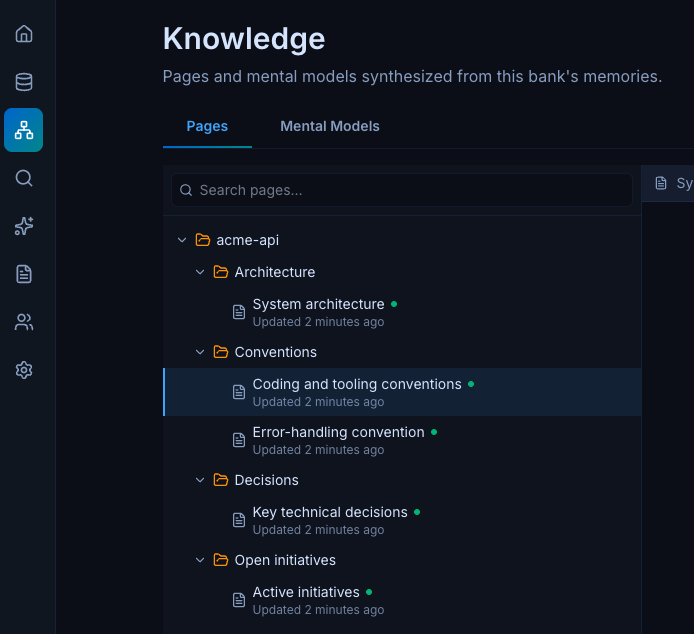
The mental shift is worth stating up front. A knowledge page is a mental model, with a simplified, document-shaped configuration wrapped around it. So a page isn't a static file you maintain by hand. It's a standing answer, rebuilt in the background from the memories underneath it, that your application reads instead of paying for synthesis on the request path.
What you get in the console:
- A folder tree for organizing pages, rather than a flat list.
- A page editor with the rendered result alongside it.
- Page-level search across the knowledge base.
- Refresh triggers visible on the tree, so you can see how each page stays current without opening it.
- Per-scope staleness — a page reports whether its own scope has new material, instead of inheriting a single bank-wide watermark that marked everything stale at once.
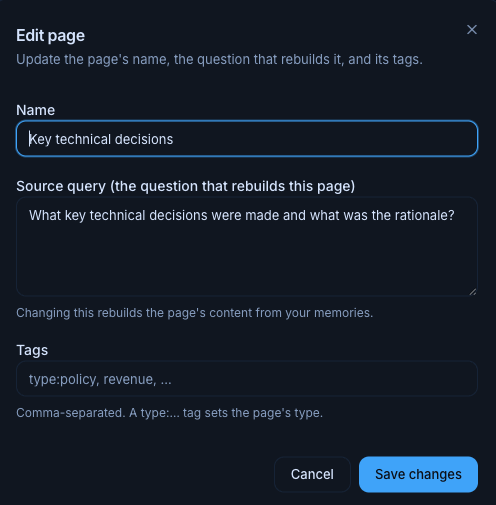
Two things extend it beyond the console. hindsight fs projects the knowledge base onto your filesystem, so pages can be mirrored locally and managed from the CLI. And knowledge-base CRUD is now exposed as native MCP tools, which means an agent connected to Cloud can create, read, update, and search its own knowledge base rather than only reading from it.
We went deeper on both elsewhere: knowledge pages for coding agents and managing a knowledge base over MCP.
Mental models on a schedule
Mental models gained a third way to refresh. Alongside the existing manual and refresh-on-new-memories paths, a model can now refresh on a cron schedule.
The console presents this as a single Refresh trigger choice with three options: Manual, On new memories, or On a schedule. The cron field appears only when you pick the third. Schedules are standard 5-field UTC cron expressions, validated as you type, and the two automatic modes are mutually exclusive by design.
The scheduling UI does the thing schedule UIs usually skip:
- A live preview of what the expression means in plain language, with the next several runs listed in both UTC and your local time.
- "Next refresh" displayed next to "last refreshed" in the model list, the dashboard, and the detail dialog.
Alongside scheduling:
- Dry-run refresh builds a model without persisting it, with an optional trace, so you can see what a refresh would produce before committing to it. This one is API-side rather than a button in the console.
- A minimum interval between automatic refreshes stops a busy bank from re-synthesizing the same model continuously.
- Consistent staleness reporting — per-model staleness is now computed and described the same way everywhere it appears, which it previously wasn't.
A new look
The console got a design system overhaul, and it's more than a repaint.
The stock component-library greys were replaced with the Hindsight palette, applied through tokens rather than per-component edits, so every view inherits the new look at once. The most visible fix: in light mode the card color was previously identical to the page background, which meant cards were effectively invisible. Pages now sit at #F3F5F9 with cards at white, and dark mode uses a blue-shifted set with the page at #080C17 and cards at #0F1724.
Two smaller details worth calling out, because they're the kind of thing that quietly makes an interface feel better without anyone identifying why:
- Letter tracking went from
0.025emto0. Inter reads wrong with positive tracking at body sizes. - Body copy now clears WCAG AA in both modes. The muted foreground was retuned to
#525866, measuring 5.3:1 against the page and 7.1:1 against a card.
Constellation, animated and fullscreen
The Constellation view, introduced in the last update, picked up two upgrades.
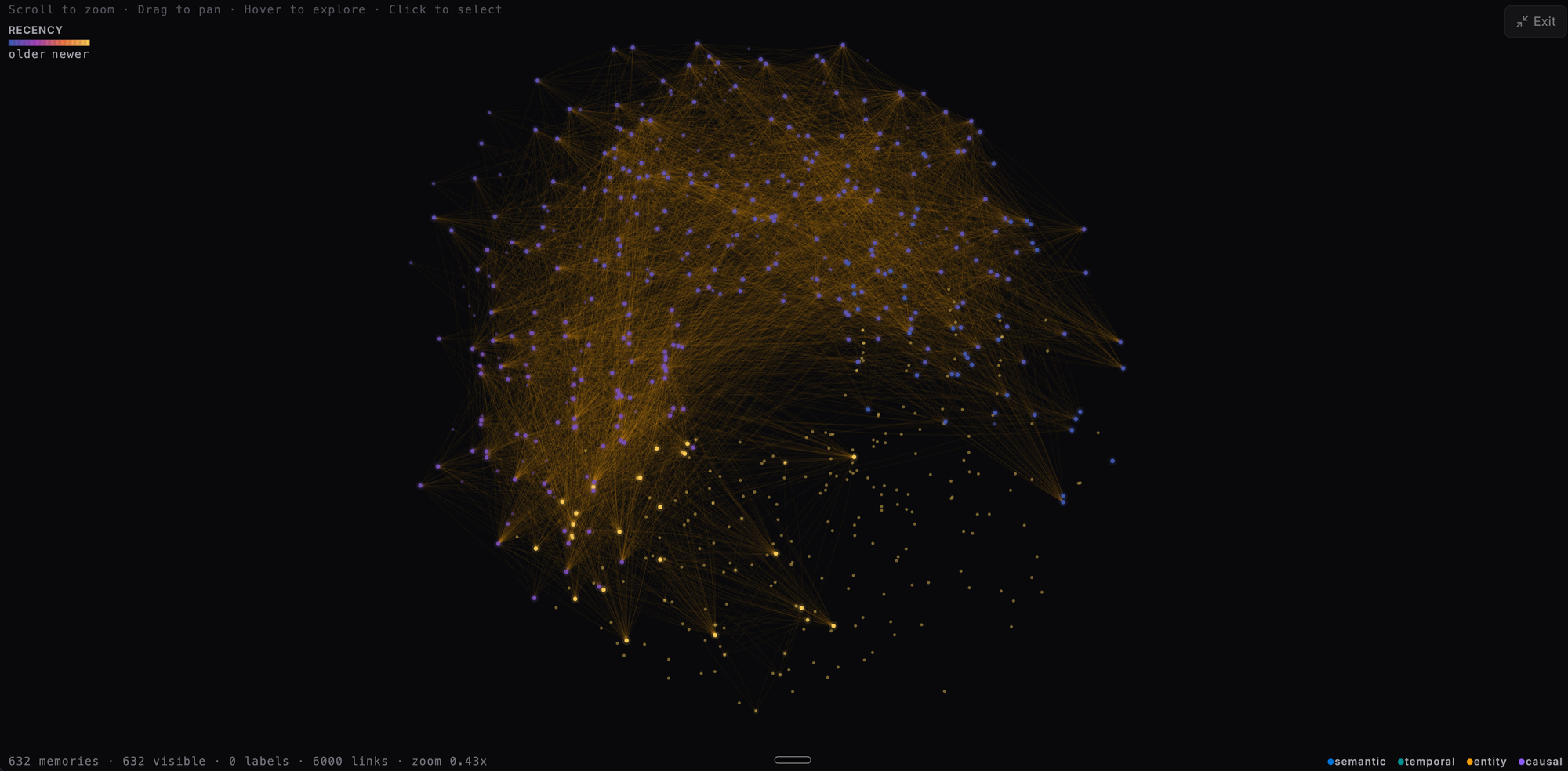
- Animation and inline detail — the graph animates, and clicking a memory opens its details instead of navigating away.
- Fullscreen — the graph takes over the viewport, with scroll to zoom, drag to pan, and hover to explore entity connections.
Documents and entities
A cluster of navigation improvements across the data views:
- Document tag filtering, with facet chips unified across views so filtering works the same way everywhere.
- Filter memories by linked entity, plus an entity timeline for seeing what a bank knows about one entity over time.
- In-flight retain badges on documents currently being updated by a running retain operation.
Exporting a bank's documents
You can export a bank's documents from the console, and the export carries the work that was done on them: extracted facts, entity names, causal links, and chunks all travel with the documents.
- It runs in the background. An export is submitted as a tracked operation rather than a single long request, so a large bank doesn't hold a connection open while it packages up.
- Observations are optional. A checkbox controls whether consolidated observations are included alongside the raw facts.
Note that this is export only today. Cloud doesn't offer a matching document import.
Single sign-on and MFA
Two identity features landed for teams that need to control how people get in.
Single sign-on lets an organization bring its own identity provider. You configure it once from the Single sign-on tab in settings:
- OIDC or SAML, so Okta, Entra, Google Workspace, and anything else standards-compliant will work.
- Claim your email domains and verify them by DNS. Once a domain is verified and the configuration is active, anyone signing in with an address at that domain is routed to your IdP automatically. Nobody has to remember to click a different button.
- Members are provisioned on first sign-in and appear in the team list marked as SSO-provisioned, so you aren't pre-creating accounts.
- Client secrets are encrypted at rest and never returned by the API.
Once SSO is active for a domain, password sign-in and password reset are refused for addresses at that domain. There's no side door around your IdP.
Multi-factor authentication can be enforced across an organization. An owner switches on Require MFA for all members, and from then on every member is gated until they've enrolled a factor and the current session was authenticated with it. Supported factors are authenticator apps (TOTP), security keys and passkeys (WebAuthn), SMS, and emailed codes.
Individuals can also enroll voluntarily from their account security page even when the organization doesn't require it. The setup dialog shows a QR code, with a manual key for anything that can't scan.
For organizations with session-management obligations such as HIPAA, there's also a 30-minute idle timeout that signs a user out after inactivity.
Both of these arrived just after the last roundup went out, and both are Enterprise features enabled per organization.
Audit logging
Audit logging records a queryable trail of what happened in a bank: retain, recall, reflect, and other audited actions. The viewer filters by action and severity, and charts request volume over time.
It's opt-in per bank rather than all-or-nothing, which is the right default at scale. Audit logging generates a lot of data and most banks don't need it, so you switch it on for the ones that do, from that bank's audit logging section.
This is a Cloud Enterprise feature.
Memory Defense Enterprise
Memory Defense inspects content during retain and decides what to do with secrets, prompt injections, and oversized payloads.
Every bank gets the baseline: a master switch, a default action, and secret masking, which replaces detected API keys and tokens with markers like [REDACTED:github_token] before anything is written.
Enterprise adds detectors you can enable and tune independently:
| Capability | What it catches |
|---|---|
| Prompt injection guard | Attempts to inject instructions into memory, like "ignore previous" or a system override |
| Size anomaly | Oversized payloads, which waste tokens, starve ranking, and stage exfiltration. Default threshold is 64 KB |
| Protected document tags | Re-submissions to a document that would strip or replace a protected tag |
| Broad pattern catalog | Adds 220+ secret-detection patterns on top of the basic set |
| Base64 decoding | Decodes base64 blobs and re-scans them for secrets hidden inside |
| LLM screening | Natural-language disclosures no pattern will catch, like "the password is ..." |
Each carries its own action and minimum-severity threshold, so you can block on high-confidence secrets while merely flagging borderline ones. Entitlement is enforced on the server as well as in the console, so the policy can't be set around it through the API.
Also shipped
Smaller changes worth knowing about:
- Operations report progress as they run. A long consolidation used to look identical whether it was healthy or stuck. Operations now record a coarse stage/processed/total snapshot mid-run, so a slow job is distinguishable from a frozen one.
- Dry-run fact extraction is a read-only API endpoint that previews what a retain would extract from a piece of text without writing anything to the bank: candidate facts and token usage, no entity resolution, embeddings, or persistence.
- Observation scopes can be enumerated, filtered, and visualized, and there's a
sharedscope keyword for observations that span scopes. - Audit log and observations are overridable per bank, rather than being a single deployment-wide setting.
Try it
Hindsight Cloud is the fastest way to run Hindsight without operating it yourself: managed Postgres, OAuth for MCP clients, billing, multi-org, and now a knowledge base your agents can manage themselves.
Sign up at ui.hindsight.vectorize.io — the free tier is enough to try retain and recall against a real bank without entering a card.