Give Every Agent You Run in Omnigent a Persistent Memory
Omnigent wraps any AI agent: Claude Code, Codex, Cursor, Hermes, and more. Add Hindsight once and every harness it orchestrates gets recall, retain, and reflect from a single setup.
 By Ben Bartholomew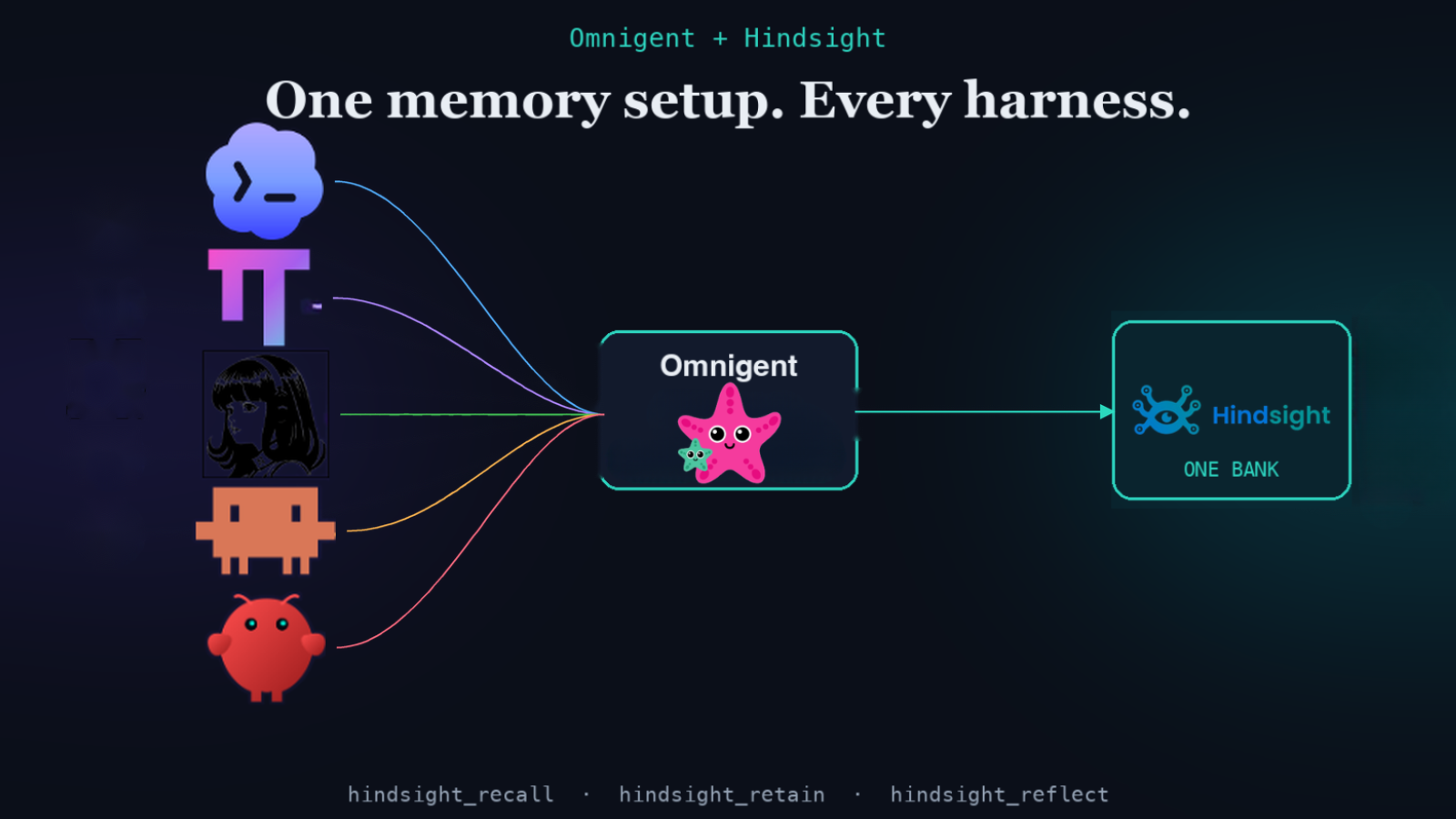
Most agent memory integrations solve one problem for one tool. Add Hindsight to Cursor, and Cursor remembers. Add it to Aider, and Aider remembers. Each is its own setup, its own configuration, its own ceiling.
Omnigent breaks that pattern. It is a meta-harness: a single orchestration layer that wraps and coordinates multiple AI agents at once, including Claude Code, Codex, Cursor, OpenCode, Hermes, and Pi. When you add Hindsight to Omnigent, you add persistent memory to all of them through one place, with a single setup instead of wiring up each tool's integration separately. And for any harness that has no native Hindsight integration, including custom ones, Omnigent is the memory layer. The bridge lives in Omnigent, so the agents inside it do not have to carry it themselves.
TL;DR
- Omnigent ships three built-in memory tools:
hindsight_recall,hindsight_retain, andhindsight_reflect. - Omnigent intercepts and executes these tools locally, so every harness it wraps gets the same memory from one setup, including custom harnesses with no native Hindsight integration.
- Install is one optional extra:
pip install "omnigent[memory]". - Wire up the tools in your agent's YAML spec, set
HINDSIGHT_API_KEY, and the agent decides when to recall and retain. - Memory persists across sessions and is scoped to a bank per agent (or per conversation, as a fallback).
What makes this different from other integrations
Every Hindsight integration we have covered so far lives inside a single tool: Cursor hooks into VS Code's MCP layer, Aider wraps the CLI, Zed uses its global agent rules. Each works well for that tool and only for that tool.
Omnigent is different because it sits above the tools. It does not care which harness the agent calls underneath. When an agent running in Omnigent calls hindsight_recall, Omnigent intercepts it at the runner level, executes it locally using hindsight-client, and sends back the result. The wrapped harness, whether that is Claude Code, Codex, or a custom agent, never has to know how memory works.
Several of those harnesses also have their own native Hindsight integrations, and they are excellent when you run that tool on its own. The point of the Omnigent path is that you configure memory once, centrally, and it applies to every harness you orchestrate, plus the ones that have no native option at all. One Hindsight setup, any harness. That is the universal memory bridge.
Install
The memory tools are an optional extra, so you only pull in what you need:
pip install "omnigent[memory]"
This adds hindsight-client>=0.4.0 as the only dependency. You also need an API key from your Hindsight Cloud dashboard (or point at a self-hosted server):
export HINDSIGHT_API_KEY=hsk_...
Wire up the tools in your agent spec
Omnigent agents are defined in YAML. Add the three tools under tools.builtins:
name: my-agent
# ...rest of your agent spec

tools:
  builtins:
    - name: hindsight_recall
      api_key: ${HINDSIGHT_API_KEY}
      bank_id: my-agent-memory      # optional; defaults to agent_id
      budget: mid                   # low / mid / high
      max_tokens: 4096

    - name: hindsight_retain
      api_key: ${HINDSIGHT_API_KEY}
      bank_id: my-agent-memory

    - name: hindsight_reflect
      api_key: ${HINDSIGHT_API_KEY}
      bank_id: my-agent-memory
That is the entire setup. On next run, the three tools are available in the agent's tool list.
How the tools work
Once wired up, the agent calls the tools explicitly. This is deliberate: Omnigent gives the agent the capability, and the agent decides when to use it. The standard pattern is to include this in your agent's system instructions:
- At the start of each task, call hindsight_recall with the user's request
  to load relevant decisions, preferences, and project context before answering.
- When the user gives you a durable fact (a convention, a decision, a preference),
  call hindsight_retain to store it.
- Call hindsight_reflect to synthesize what you know about a topic across sessions.
hindsight_recall runs a semantic search against your bank and returns the most relevant memories for the current message. The budget and max_tokens settings control how many tokens of memory are returned.
hindsight_retain stores a piece of information to the bank. The agent decides what is worth keeping; you can steer that with tags in the config if you want finer-grained filtering later.
hindsight_reflect synthesizes an answer from the accumulated observations in the bank. Useful for "what do we know about X?" queries that span many past sessions.
How bank scoping works
Memory is isolated per bank. Omnigent resolves which bank to use in this order:
- The explicit
bank_idin your YAML config (most predictable, recommended for production). - The agent's
agent_id: one bank per agent, shared across all conversations that agent has. - The
conversation_id: one bank per conversation. A new conversation resolves to a new bank, so memory does not carry across conversations (the earlier bank still exists, it is just no longer referenced).
If you run multiple agents in Omnigent and want them to share a memory (a shared project bank, for example), point them all at the same bank_id.
A working example: the Remy agent
Omnigent ships a complete working example at examples/remy/config.yaml. Remy is a conversational assistant with all three memory tools wired up and instructions on when to call each one. Running it against Hindsight Cloud is one command:
HINDSIGHT_API_KEY=hsk_... omnigent run examples/remy
After a few conversations, try asking Remy something it learned in a previous session. It calls hindsight_recall against your question, finds the relevant memory, and answers from context it would have lost if memory were not there.
Cloud or self-hosted
For Hindsight Cloud, the api_key in your spec plus your dashboard bank is all you need. The API URL defaults to https://api.hindsight.vectorize.io.
For a self-hosted server, override the URL in config:
- name: hindsight_recall
  api_url: http://localhost:8888
  bank_id: local-memory
An open local server needs no token.
Which harnesses benefit
Any harness Omnigent wraps gets the memory tools, whether or not the harness has its own Hindsight integration:
| Harness | Native Hindsight integration | Via Omnigent |
|---|---|---|
| Claude Code | Yes (official) | Yes |
| Cursor | Yes (official) | Yes |
| Codex | Yes (official) | Yes |
| OpenCode | Yes (official) | Yes |
| Pi | Yes (community, via epimetheus) | Yes |
| Custom harness | Usually none | Yes |
Most of these harnesses already have a native Hindsight integration, and each is a great choice when you run that tool standalone. What Omnigent adds is a single, central memory setup that applies across every harness you orchestrate at once, plus coverage for custom or in-house harnesses that have no native option. You configure memory in one place instead of once per tool.
Omnigent's tools vs. a native integration
If a harness has both options, which should you use? Pick one path per bank. Do not enable a tool's native Hindsight integration and point Omnigent's memory tools at the same bank, or you will get two recall and retain paths writing the same conversation twice.
The tradeoff:
- A native integration is often automatic. It hooks the tool's own lifecycle so recall and retain happen without the agent thinking about it, but it is scoped to that one tool and configured per tool.
- Omnigent's memory tools are one central setup that works across every harness you orchestrate, but they are agent-driven: the agent calls them explicitly, guided by its system instructions.
A simple rule: reach for a tool's native integration when you run that tool on its own, and use Omnigent's memory tools when you are orchestrating multiple harnesses through Omnigent and want them to share one memory with one setup.
Frequently asked questions
Does Omnigent call recall and retain automatically? No. The agent calls the tools when its system instructions say to. This keeps the behavior transparent: you can read the agent spec and see exactly when memory operations happen.
Can two agents share one bank?
Yes. Set the same bank_id on both agents' tool configs and they read from and write to the same store. A fact one agent retains is available to the other on recall.
Does memory survive switching harnesses? Yes. The bank lives in Hindsight, not in the harness. If you switch an Omnigent agent from Codex to Claude Code, the bank is exactly where it was.
What does hindsight_reflect do that hindsight_recall doesn't?
Recall retrieves memories relevant to a specific query. Reflect synthesizes across accumulated observations to reason about a topic, useful when you want a summary of what the agent has learned over many sessions, not just facts matching one query. Reflect also supports structured output via a response_schema field and can return the underlying facts it used to generate its answer.
Can I filter recall to specific topics or users?
Yes. The recall_tags and recall_tags_match config fields filter which memories are considered. Set tags on hindsight_retain to label what gets stored, and recall_tags on hindsight_recall to pull back only memories matching those labels. This is useful when one bank serves multiple users or projects.
Further reading
- What is agent memory?: the concepts behind recall and retention.
- One memory for every AI tool: point multiple agents at the same bank.
- Inside retain(): what happens under the hood when the agent calls
hindsight_retain. - Claude Code persistent memory: if you run Claude Code inside Omnigent.