Haystack Persistent Memory: Drop-In Tools and Auto-Recall for Any Agent

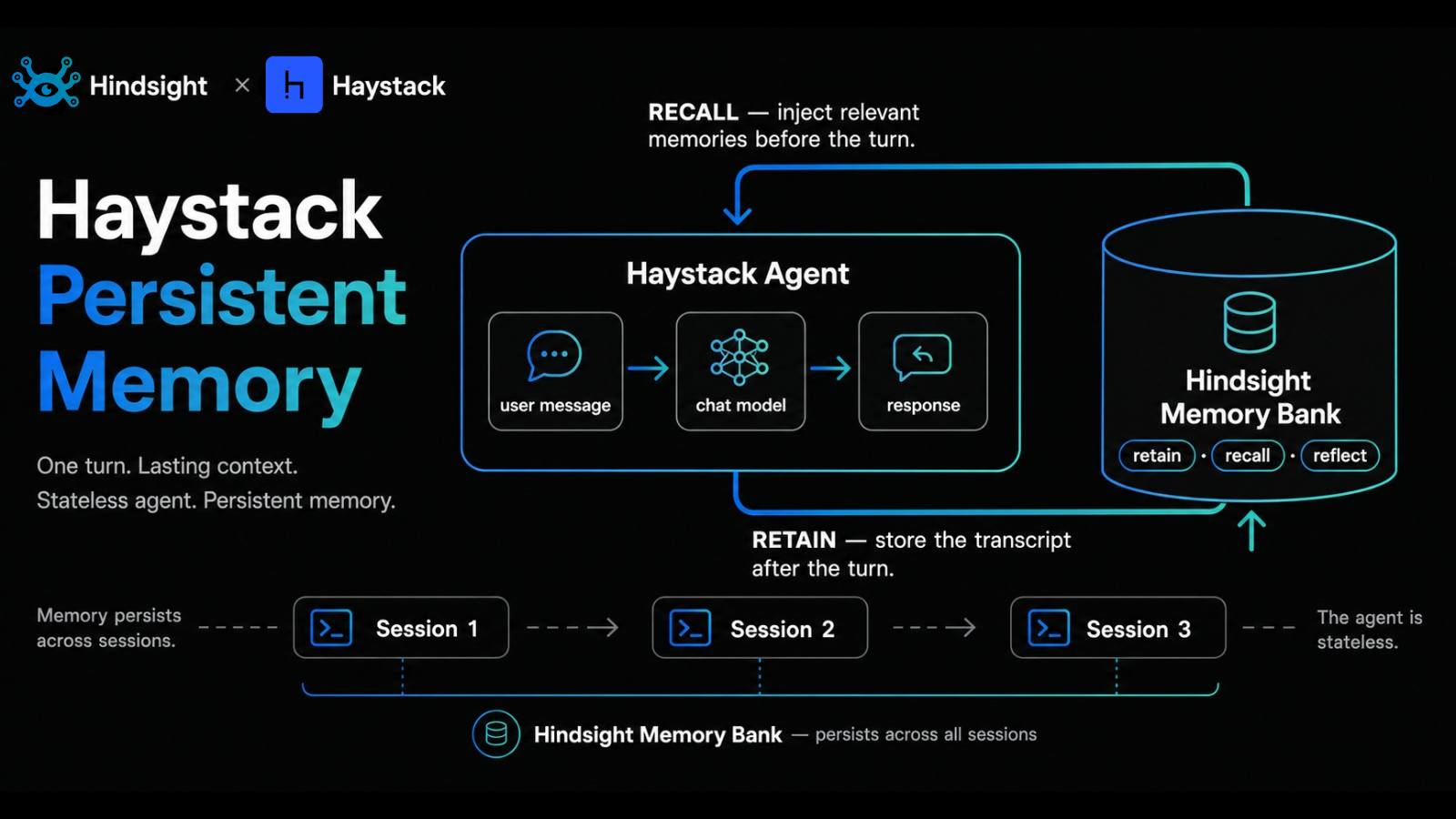
Haystack is deepset's open-source framework for building production LLM applications: pipelines, agents, RAG, the whole stack. The Agent component handles tool use and conversation control well, but it's stateless across runs. The next session starts cold.
This post is a walkthrough of hindsight-haystack, the integration that adds three drop-in Haystack Tool instances (retain, recall, reflect) and an optional HindsightMemoryWrapper toolset that does the memory work automatically without the agent having to decide when to call a tool.
TL;DR
pip install hindsight-haystack. Two entry points cover both styles of integration:create_hindsight_tools()returns alist[Tool]you pass to any HaystackAgent. The agent decides when to call them.HindsightMemoryWrapperis aToolsetsubclass withauto_recallandauto_retainflags. Usetoolset.run(agent, ...)and the memory work runs automatically before and after each turn.
- The same three memory primitives in both: retain stores content, recall searches, reflect synthesizes.
- Drop tools individually with
include_retain/include_recall/include_reflect. - Hindsight Cloud is the recommended path; self-hosted works the same way once you point the client URL at your instance.
Why Persistent Memory Matters for Haystack Agents
Haystack's Agent component is fine for a single conversation: it carries the message history through the run and the chat model has it in context. What it can't do is remember anything once that run ends. The next call starts with whatever you pass in messages, nothing else.
For a one-shot RAG endpoint that's fine. For a customer-facing assistant that should remember preferences across sessions, a support agent that should accumulate fixes to known issues, or a research agent that should build up a project model over weeks, you need a layer that survives the run. That's the gap this integration fills.
Two Integration Modes
The integration ships two entry points, and they cover the two ways teams typically want to wire memory in.
Mode 1: Tools the Agent Decides To Call
create_hindsight_tools() returns a list of Haystack Tool instances. You pass them to Agent(tools=...), and the model decides when to call them based on the tool descriptions and the user's request.
from hindsight_client import Hindsight
from hindsight_haystack import create_hindsight_tools
from haystack.components.agents import Agent
from haystack.components.generators.chat import OpenAIChatGenerator
from haystack.dataclasses import ChatMessage

client = Hindsight(base_url="http://localhost:8888")

tools = create_hindsight_tools(
    client=client,
    bank_id="user-123",
    mission="Track user preferences",
)

agent = Agent(
    chat_generator=OpenAIChatGenerator(model="gpt-4o-mini"),
    tools=tools,
    system_prompt=(
        "You are a helpful assistant with long-term memory. "
        "Use retain_memory to store important facts. "
        "Use recall_memory to search memory before answering."
    ),
)

result = agent.run(messages=[ChatMessage.from_user("Remember that I prefer dark mode")])
print(result["messages"][-1].text)
You get three tools by default: retain_memory, recall_memory, reflect_memory. The system prompt tells the agent when each one should fire. This mode is the right fit when you want explicit control: the agent calls memory on the turns where it makes sense, and skips it on the turns where it doesn't.
The tradeoff is that the model has to remember to use the tools. A weaker model under a busy prompt sometimes won't.
Mode 2: Automatic Memory With HindsightMemoryWrapper
HindsightMemoryWrapper is a Toolset subclass that handles the memory lifecycle so the agent doesn't have to. With auto_recall=True, every turn prepends relevant memories to the system prompt before the chat model runs. With auto_retain=True, the user and assistant messages get stored after each turn.
from hindsight_haystack import HindsightMemoryWrapper

toolset = HindsightMemoryWrapper(
    client=client,
    bank_id="user-123",
    mission="Track user preferences",
    auto_recall=True,    # Inject memories into system prompt before each turn
    auto_retain=True,    # Store user + assistant messages after each turn
)

agent = Agent(
    chat_generator=OpenAIChatGenerator(model="gpt-4o-mini"),
    tools=toolset,
    system_prompt="You are a helpful assistant with long-term memory.",
)

# Use toolset.run() instead of agent.run() to get the auto behavior
result = toolset.run(agent, messages=[ChatMessage.from_user("I prefer dark mode")])
The one detail to watch is that you have to call toolset.run(agent, ...) rather than agent.run(...) for the automatic recall/retain to fire. The toolset wraps the agent's run with the pre- and post-turn memory work; bypassing the wrapper bypasses the automation. The three explicit tools are still attached to the agent, so the model can also call them mid-turn if it wants finer control (e.g. reflect_memory for a synthesizing question).
This mode is the right fit when you want memory to "just work" without depending on the model's tool-routing.
The Three Memory Tools
Whichever mode you pick, the same three tools are available.
retain_memory stores free-text content in the bank. Hindsight extracts structured facts asynchronously after the call returns, so the tool returns quickly and the extraction happens server-side.
recall_memory searches the bank for content relevant to a query. The result is a ranked set of memories. Budget (low / mid / high) controls how deep the search goes.
reflect_memory asks Hindsight to synthesize an answer over the bank using an LLM, rather than returning raw memories. Good for "what do we know about X?" style questions where you want a paragraph back, not five separate snippets.
You can drop any of them at construction time:
# Only retain + recall (no reflect)
tools = create_hindsight_tools(
    client=client,
    bank_id="user-123",
    include_reflect=False,
)
The same flags exist on HindsightMemoryWrapper: include_retain, include_recall, include_reflect. Default for all three is True.
Configuration
For most apps, the same connection settings apply everywhere. configure() sets defaults once so every subsequent create_hindsight_tools() or HindsightMemoryWrapper() call only needs bank_id:
from hindsight_haystack import configure

configure(
    hindsight_api_url="http://localhost:8888",
    api_key="your-api-key",
    budget="mid",
    tags=["source:haystack"],
    context="my-app",
    mission="Track user preferences",
)

# Now the bank_id is the only required argument
tools = create_hindsight_tools(bank_id="user-123")
You can still pass an explicit client= (already-configured Hindsight instance) when you need per-tenant routing or custom HTTP settings.
Setup
You need a Hindsight account and an API key. Hindsight Cloud is the fastest path:
- Sign up at hindsight.vectorize.io. Free tier is enough to try it end to end.
- Create an API key from the dashboard. The format is
hsk_.... - Point the client at Cloud:
Or set the URL and key on
from hindsight_client import Hindsight
client = Hindsight(
    base_url="https://api.hindsight.vectorize.io",
    api_key="hsk_your_key",
)configure()once and skip the explicit client.
Self-hosting works the same way once you point base_url at your local instance (typically http://localhost:8888).
Tradeoffs
Mode pick is meaningful. Tools-only mode keeps the agent in control and saves a Hindsight call on turns where memory wasn't relevant. Auto mode is more reliable (every turn recalls and retains) but costs more Hindsight calls and a slightly longer time-to-first-token on each turn. For high-stakes production assistants, auto mode is usually the right default; for cheap RAG-style flows, tools-only is fine.
Bank routing belongs in your app. bank_id is the routing key for who owns the memory. Most production apps want one bank per user (or per project, or per tenant) consistently. Mixing different users' memories into the same bank works technically but undoes most of the point of persistent memory.
Retain is asynchronous. A retain_memory call returns when the content lands in the bank, not when the extractor finishes. Facts become recallable within seconds. For chat flows this is fine because the next turn happens after extraction completes. For automated scripts that retain-then-recall in the same run, add a short delay or use Reflect (which doesn't depend on extraction having finished).
Recap
Haystack Agent default | With hindsight-haystack | |
|---|---|---|
| Memory across runs | None | Persistent, per bank |
| Memory setup | Manual context-passing | Three tools or auto-wrapper |
| Cross-tool sharing | n/a | Same bank readable from Claude Code, Cline, Flowise, API |
| Automatic recall before turn | n/a | auto_recall=True |
| Automatic retain after turn | n/a | auto_retain=True |
| Selective tool surface | n/a | include_retain/recall/reflect flags |
| Synthesized answers | n/a | reflect_memory returns LLM-synthesized text |
Next Steps
- Hindsight Cloud: ui.hindsight.vectorize.io
- Integration docs: Haystack + Hindsight
- Source:
vectorize-io/hindsight/hindsight-integrations/haystack - Hindsight API reference: API quickstart